Framer icon

Knowledge base plugin for Framer

Knowledge Base for Modern Framer Sites

Modern knowledge base for Framer sites. Component-based docs that match Framer's forward-thinking approach.

Create your Knowledge base


Aaron Dye Timothy M. Ben Marco Chris R.
from 124+ reviews
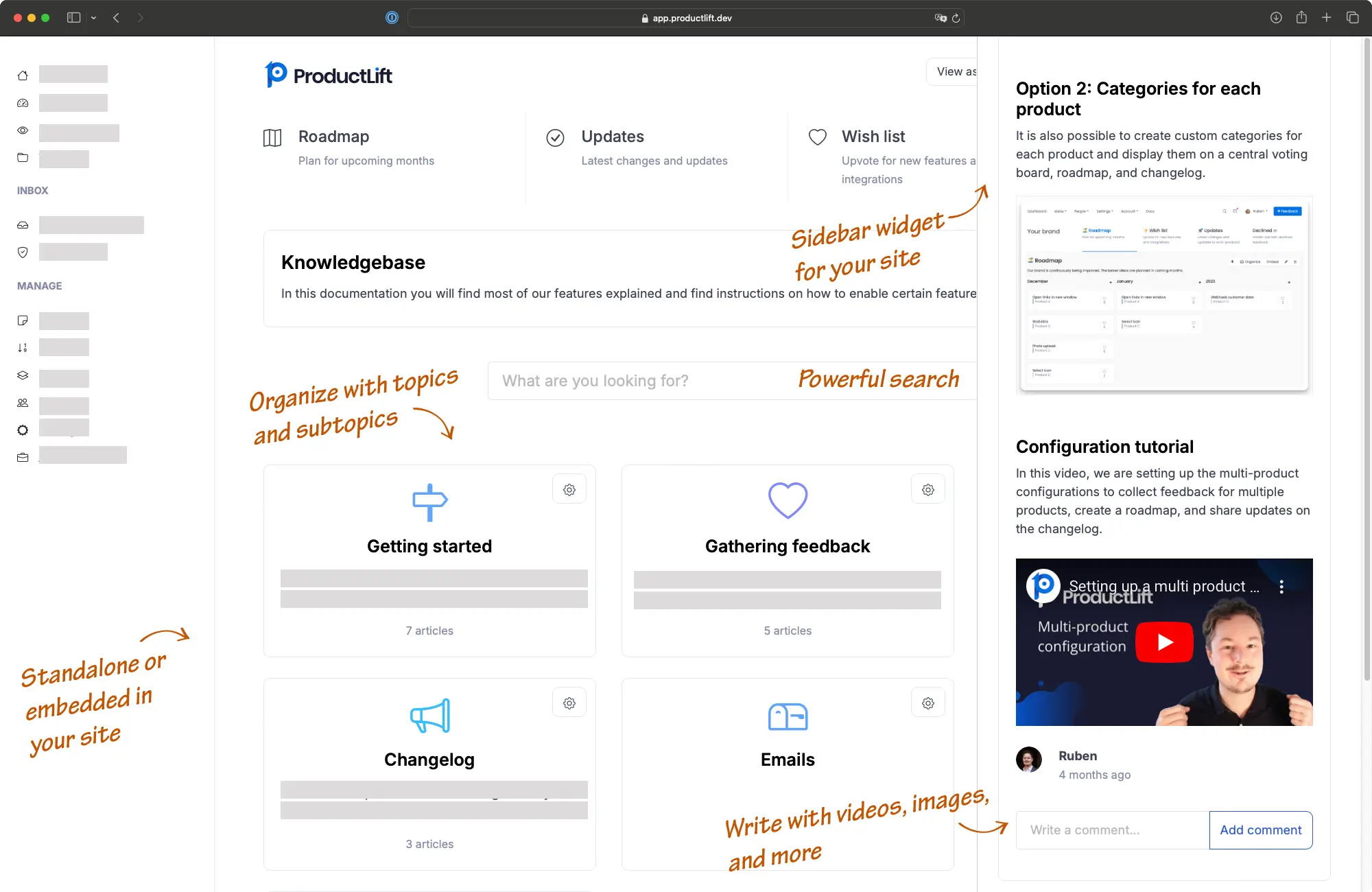
Framer knowledge base interface screenshot

Framer represents the cutting edge of web design tools. ProductLift gives you a knowledge base solution as modern as your workflow. Create product documentation, API references, and help centers that integrate seamlessly with Framer's component architecture. Perfect for startups building on Framer, design teams creating documentation, and anyone who wants a knowledge base as polished as their Framer site.

starstarstarstarstar

"I loved everything about it! The user interface, the way it lays out is so amazing. Down to internal notes, attachments, and just simply works for us and our company."

Timothy
CEO at Indema

Explore other ProductLift features for Framer

Component Architecture

Add as a custom component in Framer. Works seamlessly with Framer's modern component-based workflow.

API Access

Pull knowledge base content via API for custom Framer implementations. Full flexibility for advanced use cases.

Built for Modern Teams

Framer teams ship fast. Document features quickly with markdown sync and AI-assisted content creation.

Design-Forward Interface

Your Framer site is beautiful. Your knowledge base should be too. Modern UI that matches contemporary design standards.

Top 6 Reasons Why Over 3,000 Users Love our Knowledge Base

AI Content Creation

Rewrite and improve articles with AI, enabling team members to create polished articles efficiently without the need for extensive editing.

Markdown Sync with Bulk Upload

Sync your documentation from Git repositories or upload multiple markdown files at once for rapid knowledge base setup and maintenance.

Automatic Image Management

Upload images directly in the editor with automatic optimization and CDN hosting—no manual image management needed.

File Attachments

Attach PDF, Excel, and other document types to your articles for comprehensive resource sharing.

Flexible Widget Options

Display as a sidebar widget, embedded iframe, or standalone help center to fit your Framer site structure perfectly.

Customizable Design

Extensive design options to match your brand, ensuring a cohesive look and feel with your existing platforms.

Perfect for Framer Users

Framer's component-based workflow integrates smoothly with our knowledge base. Embed as an iframe component or pull content dynamically via API. Perfect for design teams building product documentation, API references, or user guides with Framer's modern design tools.

Demo: See It in Action

Experience our knowledge base seamlessly integrated into the web page.

Other demos

Sidebar Demo

See how our knowledge base works as a convenient sidebar widget.

View Sidebar Demo

Standalone Demo

Explore our full-featured, standalone knowledge base in action.

View Standalone Demo

How it works

1

Create an account

2

Create and Organize Content

3

Embed it on Framer

Need more details? Read the full Framer installation guide.

Get started - free

Features

Build a great Framer knowledgebase with these features

(and more)

Widgets for Integration


Embed feedback, roadmap, changelog, and knowledge base widgets into your product.

Single Sign-On (SSO)


Seamlessly authenticate users without requiring new accounts.

Embeddable Iframes


Easily embed feedback boards, roadmaps, or changelogs in your site via iframe.

WYSIWYG Editor


Allows formatting of posts with a full WYSIWYG editor.

Knowledge Base Management


Host structured knowledge bases with unlimited topics and subtopics.

AI Knowledge Base Articles


Generate knowledge base articles based on changelog updates.

Full Customization


Custom branding with SCSS, custom domain, and flexible tab configurations.

API and Webhooks


Integrate seamlessly with external platforms via API and webhooks.


Trusted by the best

3,051 of the best product managers, SaaS companies, and digital businesses are building better with ProductLift

Sebastian F.

Sebastian F.

Entrepreneur

This app will help you connect with your users and gather feedback like never before. The UI is clean and focused. The different pages and forms can be fully customized. Ruben is an amazing developer and entrepreneur with a proven track record. ProductLift is going places and you should get onboard.
Aaron Dye

Aaron Dye

An excellent product with equally excellent support! Everything just works, and when I had questions, the team was incredibly responsive.
Timothy M.

Timothy M.

Product Manager

This tool is literally a needle in a haystack. I was using Frill, and this doesn't even compare. The user interface, the way it lays out — so amazing. Also amazing support team!
Ben

Ben

Product Owner

Helped us quickly move away from our antiquated spreadsheet to a user-interactive system. User feedback is now collected in real-time. Support has been super speedy!
Marco

Marco

Based in Europe, ideal for privacy-conscious customer interaction. Constant improvements by Ruben together with thorough support make ProductLift a solid and future-proof choice.
Chris R.

Chris R.

Founder

By far the most customizable of all the feedback tools and much better than Feedbear. Developer is super responsive and support has been great. Highly recommend!

Framer Knowledge base FAQ

How do I install the Knowledge base Framer plugin?

Add a knowledge base to Framer by adding it as an iframe or a JavaScript code. Create a ProductLift account, go to your knowledge base and click "Embed". Now, copy the provided code and paste it into your Framer site via the Plugin section in your Framer dashboard and activate it.

Can I customize the knowledge base to fit my brand?

Yes, the Plugin Framer knowledge base offers extensive customization options for colors, fonts, and layouts to ensure it aligns with your brand identity.

Is the Plugin knowledge base Framer user-friendly?

Absolutely, it features a great user experience and anyone is able to add or edit content in the knowledge base without needing technical skills.

Does the knowledge base Plugin work well with other Framer plugins?

Yes, it’s designed to integrate seamlessly with a wide range of Framer plugins, enhancing its functionality and your site’s overall utility.

Can the knowledge base be public or private?

You control the visibility of your knowledge base; it can be public for all to see or private, restricted to certain users or roles.

What integrations does the Framer Plugin knowledgebase support?

Yes, the knowledgebase Framer Plugin offers integration capabilities with external tools such as Jira, Google Analytics, Slack, Pabbly Connect, and it also provides an API. This integration helps streamline your workflow and enhance productivity.

Who takes care of updates and maintenance?

All updates and maintenance for the Plugin Framer knowledgebase are managed by us, ensuring that your site always has the latest features with minimal downtime.

What is Framer?

Framer is a powerful design and prototyping tool that allows users to create interactive and animated interfaces for web and mobile applications.

How expensive is Framer?

Framer offers several pricing tiers, including a free version with limited features. They typically have a range of paid plans that include additional functionalities, such as team collaboration, more advanced prototyping features, and extra storage space. These plans can vary in price depending on whether you're an individual, part of a team, or looking for enterprise solutions.

Is Framer a good platform?

Yes, Framer is widely regarded as a top-notch design and prototyping platform. It offers a range of powerful features and capabilities that enable designers and developers to create high-fidelity prototypes and interactive designs.

The faster, easier way to capture user feedback at scale

Join over 3,051 product managers and see how easy it is to build products people love.

Aaron Dye Timothy M. Ben Marco Chris R.
from 124+ reviews

Did you know 80% of software features are rarely or never used? That's a lot of wasted effort.

SaaS software companies spend billions on unused features. In 2025, it was $29.5 billion.

We saw this problem and decided to do something about it. Product teams needed a better way to decide what to build.

That's why we created ProductLift - to put all feedback in one place, helping teams easily see what features matter most.

In the last five years, we've helped over 3,051 product teams (like yours) double feature adoption and halve the costs. I'd love for you to give it a try.

Ruben Buijs, Founder
Ruben Buijs

Founder & Digital Consultant

Works With All Popular Platforms

Wordpress Wix Shopify Squarespace Woocommerce Webflow Prestashop Framer Jimdo Carrd

View all platforms