 Ruben Buijs
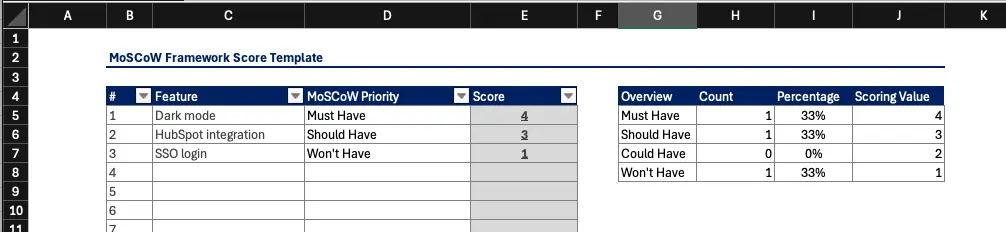
Looking for a MoSCoW prioritization template? We've created a simple MoSCoW spreadsheet in Excel that you can download and use right away:
👉 Download MoSCoW Prioritization Template
🚀 Use MoSCoW in ProductLift. Visual categorization, team alignment, and roadmap generation. Or try the MoSCoW calculator to score features interactively.
What is MoSCoW Prioritization?
MoSCoW is a prioritization framework (also called MoSCoW analysis) that helps product managers and teams classify features or initiatives into four categories: Must Have, Should Have, Could Have, and Won't Have. Unlike numerical scoring systems such as RICE or ICE, MoSCoW is categorical. You place each feature into a bucket rather than assigning it a calculated score. That simplicity is its greatest strength.
For a more detailed explanation of MoSCoW prioritization, check out: Understanding MoSCoW Prioritization
Where MoSCoW Came From
MoSCoW was created by Dai Clegg at Oracle UK in 1994 as part of the Dynamic Systems Development Method (DSDM), one of the earliest agile frameworks predating the Agile Manifesto by seven years. The lowercase "o"s in MoSCoW are not part of the acronym; they were added purely to make the word pronounceable, which is why it looks like the Russian capital. DSDM formalized MoSCoW as a way for fixed budget, fixed timeline projects to negotiate scope with business sponsors, and that origin still shapes how it is used today. If your project has a hard deadline or a fixed budget, MoSCoW was literally designed for you.
The Four MoSCoW Categories: A Deep Dive
Must Have
Must Have features are non-negotiable. Without them the product breaks, the launch fails, or a regulatory requirement goes unmet. If you removed a Must Have from the release, the product would be unusable or unsellable.
Examples:
- User authentication for any SaaS product. Without login, there is no product.
- Payment processing for an e-commerce checkout. Customers literally cannot buy.
- GDPR consent flows for a product serving EU users. Shipping without them means legal exposure.
A useful test: if your CEO walked over and asked "can we cut this?" and the answer is "we'd have to delay the entire launch," it's a Must Have.
Should Have
Should Have features are important and expected by users, but the product can still function without them. Workarounds exist, even if they are manual or inconvenient. These are the features you will build as soon as Must Haves are locked down.
Examples:
- Email notifications when a task is assigned. Users can still check the app manually.
- CSV export for reporting. Users can copy data from the UI in the meantime.
- Team roles and permissions. A small beta can get by with a single admin role initially.
Could Have
Could Have features are genuinely nice to have. They improve the experience but carry low risk if cut. When deadlines get tight, Could Haves are the first to go.
Examples:
- Dark mode. Users want it, but no one will cancel over it.
- Keyboard shortcuts for power users. Helpful, not critical.
- Calendar view alongside an existing list view. A second perspective, not a core workflow.
Won't Have (This Time)
Won't Have is the most underrated category. It does not mean "never." It means "explicitly out of scope for this cycle." Documenting Won't Haves prevents scope creep and gives stakeholders a clear signal that their request was heard and intentionally deferred.
Examples:
- AI powered suggestions for a V1 launch. Valuable, but requires data you don't have yet.
- Native mobile app when you're validating with a responsive web app first.
- Multi-language support when your initial market is English only.
Writing things down in the Won't Have column is a communication tool. It turns an implicit "we forgot" into an explicit "we chose not to, and here's why."
When MoSCoW Works Best
MoSCoW shines in situations where you need fast, collaborative alignment rather than precise numerical ranking.
- Fixed deadlines: When the launch date is immovable, MoSCoW forces the team to decide what ships and what doesn't.
- Resource constraints: Small teams can't build everything. Categorizing features makes trade-offs visible.
- MVP planning: MoSCoW is a natural fit for defining minimum viable products. Must Haves become your MVP scope.
- Sprint scoping: When planning a two-week sprint, quick categorical decisions beat lengthy scoring debates.
MoSCoW vs RICE vs ICE vs WSJF at a Glance
MoSCoW is categorical while RICE, ICE, and WSJF are numerical. Each framework answers a slightly different question, so most product teams end up using two or three of them together (for example: MoSCoW for the release scope conversation, RICE or ICE for ranking the backlog inside each MoSCoW bucket).
| Framework | Type | Best used when | Weakness |
|---|---|---|---|
| MoSCoW | Categorical (4 buckets) | Fixed deadline or fixed budget release scoping, workshop alignment | Every stakeholder wants Must Have. No numerical ranking inside a bucket. |
| RICE | Numerical (Reach × Impact × Confidence / Effort) | Ranking a large backlog with real usage data | Requires reach estimates you may not have for new features |
| ICE | Numerical (Impact × Confidence × Ease) | Fast solo scoring or early stage products with little data | Two people can rate the same feature very differently |
| WSJF | Numerical (Cost of Delay / Job Size) | SAFe programs, coordinating dependent teams | Overkill for small teams; requires cost of delay estimates |
For a full breakdown of when to use each framework, see the product prioritization framework comparison. Not sure which framework fits your team? Read our guide on how to choose a prioritization framework.
Running a MoSCoW Session
Here's a step-by-step process for running a MoSCoW prioritization workshop with your team:
- List all features. Start with a flat list of every feature, request, and initiative under consideration. Pull from your feedback board, backlog, and stakeholder requests.
- Set context. Remind the team of the constraints: timeline, available resources, strategic goals for this cycle. Context shapes every categorization decision.
- Vote on categories. Walk through each feature and have the team propose a category. You can do this with sticky notes, a shared spreadsheet, or a tool like ProductLift's MoSCoW prioritization view.
- Resolve disagreements. The most common debate is "Should vs. Could." When two people disagree, ask: "If we cut this feature, would customers notice within the first week?" If yes, it's probably a Should Have. If not, it's a Could Have.
- Challenge the Must Haves. Go back through every Must Have and pressure-test it. Ask: "Would the product literally fail without this, or would it just be worse?" This prevents category inflation.
- Document rationale. Write a one-sentence justification for each categorization. Future-you will thank present-you when the same debate resurfaces next quarter.
- Share the results. Publish the final MoSCoW breakdown to stakeholders so everyone sees the same priorities.
Handling Edge Cases and Common Debates
"Everything is a Must Have" Syndrome
This is the most common failure mode. When stakeholders insist everything is critical, the framework collapses. Fix this by setting a hard cap: no more than 60% of features can be Must Haves. If your list exceeds that threshold, the team must demote items until it fits. Another tactic: ask each person to rank their Must Haves against each other. The ones that fall to the bottom of that internal ranking are actually Should Haves.
Features That Straddle Categories
Some features genuinely sit on a boundary. A notification system might be a Must Have for enterprise customers but a Could Have for self-serve users. In these cases, break the feature into smaller pieces. Basic email notifications might be a Must Have while advanced notification preferences are a Could Have.
Won't Have as a Communication Tool
Teams often skip the Won't Have column, but it is one of the most valuable outputs of a MoSCoW session. When a stakeholder's pet feature lands in Won't Have with a documented reason, it signals respect for their input while maintaining scope discipline. It transforms "no" into "not now, and here's the plan."
Integrating MoSCoW with Sprint Planning
MoSCoW maps cleanly to agile sprint cycles:
- Must Have = this sprint. These items go into the current sprint backlog without question.
- Should Have = next sprint. Queue them up so the team knows what's coming immediately after.
- Could Have = backlog. They stay visible but don't get scheduled until capacity opens up.
- Won't Have = parked. Documented and revisited at the next quarterly planning session.
This mapping gives product managers a simple rule for backlog grooming. After each MoSCoW session, your sprint is pre-populated with Must Haves, and your next sprint already has a draft scope of Should Haves.
Worked Example: Scoring a Product Backlog with MoSCoW
Imagine you are a product manager at a mid market SaaS company preparing for a fixed launch date in 10 weeks. Your team can realistically ship six to eight features. The stakeholder wish list has 12 items. Here is how MoSCoW resolves that:
| Feature | Category | Reason |
|---|---|---|
| SSO with Okta | Must Have | Blocks three enterprise deals in the pipeline |
| Role based permissions | Must Have | Required by the same enterprise contracts |
| Audit log export | Must Have | Legal reviewed. Contractually required by launch. |
| Slack notifications | Should Have | Users can still use email. Not a blocker. |
| Bulk CSV import | Should Have | Workaround exists (Zapier), but painful at scale |
| Custom dashboard widgets | Could Have | Nice to have. First feedback session did not surface it. |
| Dark mode | Could Have | Requested by three users. No churn risk. |
| Native mobile app | Won't Have (This Time) | Responsive web covers 90% of use cases. Deferred to Q3. |
| AI summarization | Won't Have (This Time) | No training data yet. Reassess after 100 more accounts. |
Notice the pattern: Must Haves are tied to concrete revenue, legal, or contractual outcomes. Should Haves are important but have workarounds. Could Haves would be nice, no one will churn over them. Won't Haves are explicitly parked with a documented reason. That final column is where the discipline comes from.
MoSCoW Templates for Different Scenarios
The workbook contains an instructions tab and one reusable scoring sheet. The scenarios below are different ways to use that scoring sheet, not separate downloadable templates.
MoSCoW Method Template
The MoSCoW method template is the general purpose sheet, one row per feature or story, four category columns, and a rationale field. Use it for release planning, quarterly roadmap workshops, or any generic "what ships and what does not" conversation. Grab it here: Download MoSCoW Prioritization Template.
MoSCoW Analysis Template
The MoSCoW analysis template is the same sheet used with a stricter rubric. Every Must Have needs a written business justification (contract, legal, revenue at risk) and no more than 60% of items can be Must Haves. This is the format to use when a steering committee will review the output, because it forces the team to defend each Must Have in writing. Combine it with the ICE prioritization model if you also need a numerical tiebreaker inside the Must Have bucket.
MoSCoW Requirements Template
The MoSCoW requirements template is the DSDM style version: rows are requirements (not features), and each row has an acceptance criterion in addition to a category. This is the format that most closely matches Dai Clegg's original 1994 usage and it works well for regulated industries (fintech, healthcare) where "done" needs a testable definition. Pair it with the RICE template when you also need to sequence Must Haves against each other by expected reach.
MoSCoW Chart and MoSCoW Matrix
A MoSCoW chart and a MoSCoW matrix are two different visualizations of the same categorized list. A MoSCoW chart is usually a bar or column view showing the count and effort per category, so leadership can see at a glance whether the release is Must Have heavy. A MoSCoW matrix is a 2 by 2 grid (importance on one axis, urgency on the other) that maps the four categories visually and is the format most workshop facilitators sketch on a whiteboard. Both views are generated from the same underlying scoring sheet in the downloadable template.
About the MoSCoW Matrix Excel Template
Our Excel-based MoSCoW prioritization template is designed to be:
- Easy to Use: Simply categorize your features, and the template will help you visualize the prioritization.
- Customizable: Adjust it to fit your specific product development needs.
- Comprehensive: Organize all your prioritization data in one place for easier decision-making.
- Visual: View your MoSCoW table, chart, or diagram at a glance.
How to Use the MoSCoW Prioritization Template
- Open the downloaded MoSCoW sheet in Excel.
- Navigate to the "Scoring Sheet."
- Create a MoSCoW list of your initiatives or features in the designated column.
- Assign each item to one of the MoSCoW categories (Must Have, Should Have, Could Have, or Won't Have).
- The template will automatically categorize and rank your initiatives based on your input.
- Use the results to guide your prioritization and planning decisions.
MoSCoW Prioritization Example
Here's a simple MoSCoW method example for a project management tool:
| Category | Feature |
|---|---|
| Must Have | User login, Task creation, Due dates |
| Should Have | Email notifications, Team assignments |
| Could Have | Calendar view, Dark mode |
| Won't Have | AI suggestions (future release) |
This MoSCoW prioritization example shows how to categorize features based on business requirements.
Learn More About Prioritization
- MoSCoW Prioritization Guide: How MoSCoW works with examples
- MoSCoW Calculator: Score and categorize features interactively
- ICE Prioritization Template: An alternative numerical scoring approach
- RICE Template: Score features by Reach, Impact, Confidence, and Effort
- How to Choose a Framework: Decision guide for your team
- All 10 Prioritization Frameworks: Compare MoSCoW, RICE, ICE and more
- Real-World Examples: See MoSCoW applied at AirFrance/KLM
- Feature Prioritization Tool: Move the workshop result into a live, shared product backlog
Last updated on Oct 9, 2026