15 Best Knowledge Base Software in 2026
 Ruben Buijs
September 2026 17 min read
Ruben Buijs
September 2026 17 min read TL;DR
Our top pick is ProductLift (from $19/mo), which bundles a knowledge base with feedback, roadmap, and changelog tools. Prices across the 15 tools range from free (Notion, BookStack, Nuclino) to $250/mo (Trainual). The biggest trend in knowledge base software for 2026 is AI-powered search and auto-generated articles, with most tools now offering some form of intelligent content suggestions.
Comparison Table
| Tool | Best For | Starting Price | G2 Rating |
|---|---|---|---|
| ProductLift | All-in-one (KB + Feedback + Roadmap) | From $19/mo | 5.0/5 |
| ProProfs Knowledge Base | Help center + internal wiki in one account | Free / $49/author/mo | 4.6/5 |
| Zendesk Guide | Customer support teams | $55/agent/mo | 4.3/5 |
| Notion | Internal team wikis | Free / $10/user/mo | 4.7/5 |
| Confluence | Engineering teams using Jira | Free / $6.05/user/mo | 4.1/5 |
| Guru | AI-powered search across tools | Free / $10/user/mo | 4.7/5 |
| Document360 | Dedicated KB platform | Custom (quote-based) | 4.7/5 |
| Helpjuice | KB analytics and ticket deflection | $120/mo | 4.6/5 |
| Stonly | Interactive decision trees | $99/mo | 4.8/5 |
| Trainual | Employee onboarding and SOPs | $250/mo | 4.7/5 |
| Slite | Clean internal wiki | Free / $8/user/mo | 4.7/5 |
| Nuclino | Lightweight team wiki | Free / $6/user/mo | 4.7/5 |
| BookStack | Open source, self-hosted | Free (self-hosted) | 13K+ GitHub stars |
| GitBook | Developer documentation | Free / $6.70/user/mo | 4.7/5 |
| ReadMe | Interactive API documentation | $99/mo | 4.7/5 |
Tools Covered
- ProductLift – Best all-in-one (KB + Feedback + Roadmap)
- ProProfs Knowledge Base – Best for help center + internal wiki in one account
- Zendesk Guide – Best for customer support teams
- Notion – Best free option for internal teams
- Confluence – Best for engineering teams
- Guru – Best AI-powered search across tools
- Document360 – Best dedicated KB platform
- Helpjuice – Best for KB analytics
- Stonly – Best for interactive decision trees
- Trainual – Best for employee onboarding
- Slite – Best clean internal wiki
- Nuclino – Best lightweight team wiki
- BookStack – Best open source option
- GitBook – Best for developer docs
- ReadMe – Best for interactive API docs
Why This Comparison is Different
Most knowledge base comparisons (also spelled knowledgebase software in one word) are written by people who've never actually implemented one. This guide is different.
What makes this guide useful:
- Real pricing – What you'll actually pay for 100, 500, or 1,000 articles
- Internal vs external – Which tools work for customer-facing docs, which for internal wikis, and which do both
- Search quality matters – We tested actual search on each platform (AI vs keyword vs fuzzy)
- Integration reality – Does it actually sync with your help desk, or just "integrate via Zapier"?
- Migration paths – How easy is it to move your 500 existing articles?
Looking for SaaS-specific picks? See our SaaS knowledge base guide with criteria like API access, changelog integration, and ticket deflection metrics. You may also find our guide to creating a knowledge base and knowledge base best practices helpful.
How We Evaluated These Knowledge Base Tools
Every tool on this list was tested against six criteria that matter when you're actually running a knowledge base, not just skimming a features grid:
- Search quality (25%): We ran the same 10 queries in each tool's search box, phrased the way customers actually type ("how do I cancel" not "cancellation process"). AI/semantic search beats keyword search here.
- Customer-facing vs internal fit (20%): Some tools are wikis pretending to be help centers. We looked at custom domain, SEO controls, branding, and whether a customer would ever want to look at it.
- Pricing predictability (15%): Per-user, per-agent, per-project, and flat pricing all scale differently. We scored predictability, not just the sticker price.
- Article scale (15%): Performance and organisation at 500+ articles. Tools that shine at 20 articles can fall apart at 500.
- Integration reality (15%): Actual native integrations with help desks, product feedback, and analytics, not "connects via Zapier" hand-waves.
- Ticket deflection features (10%): Search-before-ticket, article suggestions inside your help widget, and per-article deflection analytics.
Prices were pulled from each vendor's public pricing page in April 2026 and re-verified against G2. Where vendors hide pricing behind sales calls (Zendesk Suite, Document360 Enterprise) we noted that instead of guessing.
What we did NOT weight: Series-C funding rounds, board-member logos, or Product Hunt medals. A 14-employee tool that nails search + deflection ranks above a 400-employee tool with a mid-2010s editor.
Quick Picks by Use Case
Don't have time to read the full comparison? Here's the TL;DR:
🏆 Best All-in-One (KB + Feedback + Roadmap): ProductLift – Knowledge base included with feedback management from $19/mo.
🤖 Best AI-Powered Search: Guru – AI finds answers across all your tools, not just the KB.
🗂️ Best Help Center + Internal Wiki in One: ProProfs Knowledge Base – One account for customer docs and team docs, AI search and failed-search reports included.
📚 Best for Customer Support: Zendesk Guide – Native help desk integration, multilingual, AI suggestions.
👥 Best for Internal Teams: Confluence – Deep Jira integration, great for engineering teams.
💰 Best Free Option: Notion – Free for small teams, versatile wiki capabilities.
🎓 Best for Training/Onboarding: Trainual – Built for SOPs and employee onboarding.
🎯 Best Interactive KB: Stonly – Guided decision trees instead of static articles.
🆓 Best Open Source: BookStack – Self-hosted, completely free.
Knowledge Base vs Knowledgebase: Is There a Difference?
Short answer: no. Both spellings describe the same category of software.
You will see the product category written three ways: knowledge base software (two words, the most common form in North American style guides), knowledgebase software (one word, a compound preferred by some vendors and by developer-facing docs), and occasionally knowledge-base software (hyphenated, older usage). Google normalizes all three to the same intent, which is why searches for "best knowledgebase software" return the same listicles as "best knowledge base software." All of the 15 tools we compare below serve the same job: a searchable, categorized library of articles that helps customers self-serve or teams share internal documentation.
When each spelling shows up: The two-word form dominates in help-center product pages, G2 categories, and analyst reports. The one-word compound (knowledgebase) is common in URL slugs, developer documentation, and product-team shorthand (many SaaS admin panels use "knowledgebase" as a menu item because it fits on a single line). If you're evaluating vendors, do not weight the spelling. Weight search quality, deflection analytics, and pricing predictability. That is what actually determines whether the tool reduces support tickets six months after launch.
Internal vs External Knowledge Bases: Which Do You Need?
Before comparing tools, understand the fundamental difference:
🏢 Internal Knowledge Bases (Team Wikis)
Purpose: Company documentation, SOPs, engineering docs, HR policies
Users: Your employees
Key features: Collaboration, permissions, integrations with Slack/Jira, version control
Best tools: Confluence, Notion, Slite, Trainual
🌍 External Knowledge Bases (Customer Help Centers)
Purpose: Customer self-service, reducing support tickets
Users: Your customers
Key features: SEO optimization, multilingual, custom branding, analytics on what customers search for
Best tools: Zendesk Guide, Document360, Helpjuice
🔀 Hybrid (Both Internal & External)
Some tools handle both with permission controls:
- ProductLift – Public KB for customers + internal notes on feedback
- Notion – Can publish select pages publicly
- Document360 – Separate projects for internal vs external
Reality check: Most companies eventually need both. Starting with a tool that does both (even if not perfectly) beats juggling two separate systems.
What to Look for in Knowledge Base Software
1. Search Quality (This is Critical)
Bad search is the #1 reason knowledge bases fail. Users give up after one failed search.
Types of search:
- Basic keyword matching (BookStack, basic tools) – Only finds exact terms. Users must know the right keywords.
- Fuzzy search (Notion, Confluence) – Handles typos and partial matches. Better but not great.
- Semantic/AI search (Guru, Stonly, Document360) – Understands intent. "How do I delete my account" finds the article even if it's titled "Account Removal Process."
Test it: Before choosing a tool, import 10 sample articles and search using customer language, not your internal jargon.
2. Organization & Structure
Can you structure content logically?
- Categories & subcategories – Most tools support this
- Tags & custom fields – Better for cross-referencing
- Related articles – Auto-suggest or manual linking
- Article status – Draft, under review, published, archived
3. Collaboration Features
Who can edit? How do changes get approved?
- Real-time co-editing (Notion, Confluence) – Multiple people can edit simultaneously
- Version history – Roll back bad edits
- Comments & suggestions – Review before publishing
- Approval workflows – Route to subject matter experts
4. Branding & Customization
For external KBs, does it look like YOUR brand or theirs?
- Custom domain (help.yourcompany.com vs yourcompany.zendesk.com)
- CSS customization – Match your brand colors and fonts
- Remove "Powered by" badges – Some tools charge extra for this
5. Multilingual Support
If you serve international customers, can you translate articles? Can customers switch languages?
Watch out for: Some tools call themselves "multilingual" but just mean you can create separate KBs per language, with no unified management.
6. Analytics
What do you actually need to measure?
- Search queries with no results – These are your content gaps
- Most/least viewed articles – What's working, what's not
- Article helpfulness ratings – "Was this article helpful?" feedback
- Ticket deflection – Did KB reduce support volume?
1. ProductLift – Best All-in-One (KB + Feedback + Roadmap)
⭐ G2 Rating: 5.0/5 | 💰 Starting Price: From $19/mo (KB included with feedback platform)
Best for: SaaS teams who want KB + feedback + roadmap + changelog in one affordable tool
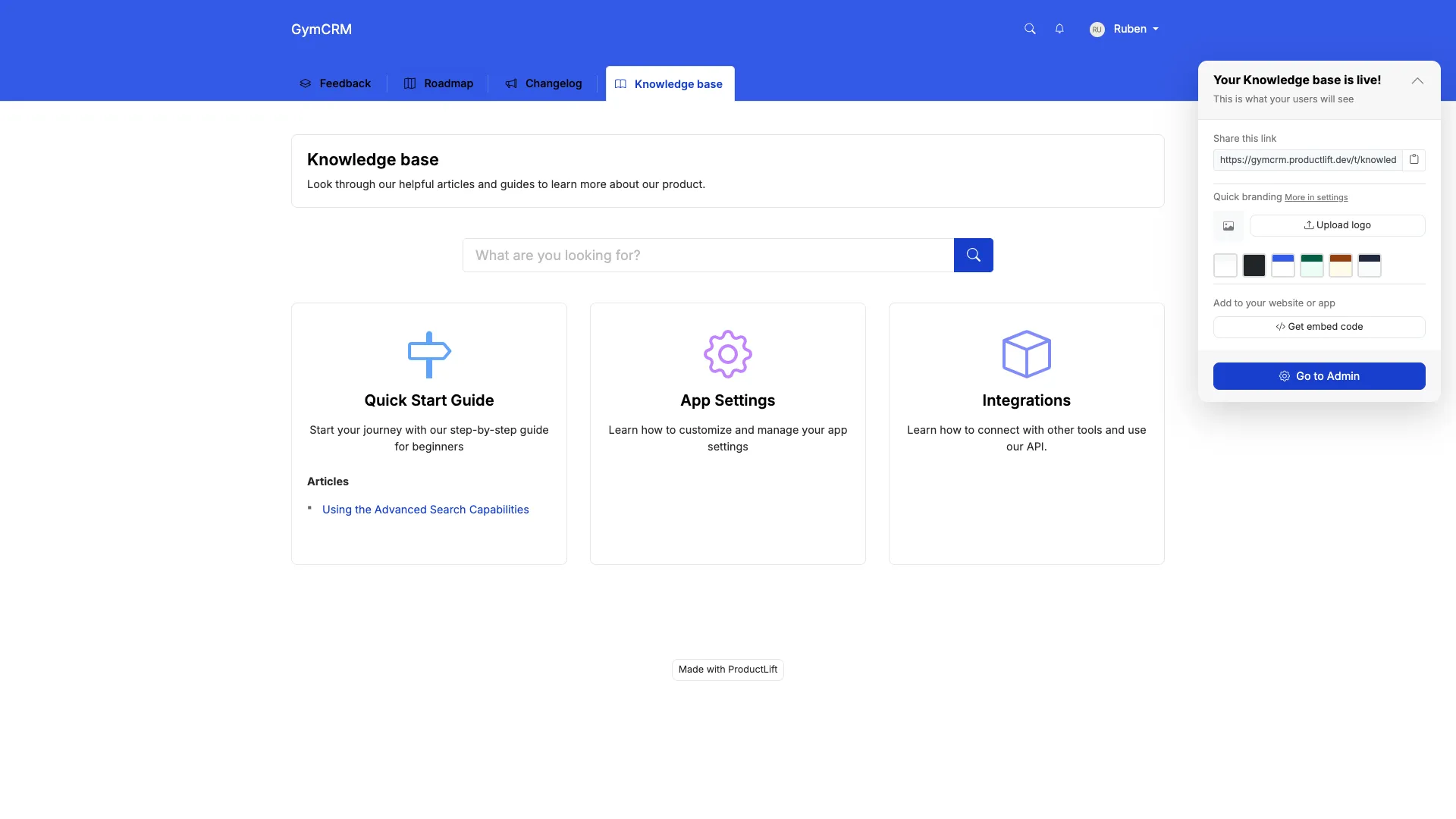
What ProductLift's KB Does Well
- Included in the platform: No separate KB subscription. Feedback, roadmap, changelog, and docs one affordable tool starting at $19/mo.
- AI-powered: Generate article drafts from shipped features. Auto-create docs from changelog entries.
- 28 languages supported: Customers can read articles in their preferred language.
- Unified search: Customers search across KB, feedback, and changelog in one interface.
- White-label ready: Custom domain, CSS, branding, on all plans.
- Categories & tags: Organize articles with nested categories and custom tags.
Where ProductLift Falls Short
- Not as feature-rich as dedicated KB tools: Document360 or Zendesk have more advanced features (workflows, advanced analytics)
- No approval workflows: Articles are either draft or published, no multi-stage review
- Simpler analytics: View counts and search queries, but not as detailed as specialized tools
The Unique Advantage
Most knowledge bases exist in isolation. ProductLift connects your KB to your product development:
- Ship a feature → Generate changelog entry → Auto-create KB article
- Users search KB → Don't find answer → Submit feedback (same interface)
- Replace 4 separate tools (feedback, roadmap, changelog, KB) with one
What Users Say
"We were paying $79/mo for Intercom Articles, $79/mo for Canny, and $49/mo for Beamer. ProductLift replaced all three starting at $19/mo. The KB isn't as fancy as Intercom's, but it's 90% as good for 10% the cost." – Founder, SaaS startup
Pricing
- Starter $19/mo, Pro $49/mo, Business $129/mo – Unlimited articles, unlimited readers
- KB included with feedback/roadmap/changelog. No add-on cost
- 14-day free trial, no credit card required
Who should use ProductLift: SaaS teams who want customer feedback, roadmap, changelog, AND documentation in one affordable platform.
Who should look elsewhere: Enterprises needing advanced KB workflows, or large support teams needing deep help desk integration.
Want to See It in Action?
2. ProProfs Knowledge Base – Best for Help Center + Internal Wiki in One Account
⭐ G2 Rating: 4.6/5 | 💰 Starting Price: Free (1 author, 25 pages), $49/author/mo (Essentials, billed annually)
Best for: Support, IT, and HR teams that want a public help center and an internal wiki from the same account
What ProProfs Knowledge Base Does Well
- Answers stay accurate as content grows: Every new or updated article is read into what the AI already knows, so nobody goes back to manually fix old pages when something changes
- Creates content two ways: Turn a written prompt into a full article with the AI Writer, or record yourself completing a task on screen and get a step-by-step guide with screenshots
- Understands intent, not just keywords: Search reads what a customer meant and returns one direct answer instead of a list of links
- Flags problems automatically: Failed searches, broken links, and content gaps surface on their own, before they turn into support tickets
- Enterprise-grade access control: SSO, IP restrictions, and encryption are built in
- White label: 100+ templates, custom branding, and a custom domain, no developer required
- Translates articles instantly: Convert any article into 90+ languages with one click
Why Teams Choose ProProfs Knowledge Base
Most companies end up running two knowledge bases: a public help center for customers and an internal wiki for the team. ProProfs does both from one account, with the same AI search and the same editor. The failed-search reports work like Zendesk's Content Cues (they tell you which article to write next) without requiring you to run your ticketing on the same platform.
What users say: "The AI ended up being more useful than we expected." One reviewer in IT services described relying on the AI writer for first drafts, and using the failed-search reports to decide what to update next instead of guessing.
Where ProProfs Knowledge Base Falls Short
- No on-premise deployment: Cloud-only, so not an option for teams that must self-host for compliance or security reasons
- No dark mode: Neither the editor nor the public help center supports a dark theme
- Per-author pricing: $49-79 per author per month adds up when many people contribute to docs
Pricing
- Free: $0/month (1 author, up to 25 pages, no credit card)
- Essentials: $49/author/month (billed annually)
- Business: $69/author/month (billed annually)
- Business Complete Elite: $79/author/month (billed annually, unlimited authors)
Who should use ProProfs Knowledge Base: Teams that want one account for both a public help center and an internal wiki, with AI handling drafting and search out of the box.
Who should look elsewhere: Anyone who wants AI that proactively monitors a codebase or support inbox, or teams that need flat per-team pricing instead of per-author costs.
3. Zendesk Guide – Best for Customer Support Teams
⭐ G2 Rating: 4.3/5 | 💰 Starting Price: $55/agent/mo (Suite Team), Guide included
Best for: Support teams already using Zendesk who need a tightly integrated help center
What Zendesk Guide Does Well
- Native help desk integration: Articles link to tickets, auto-suggest during conversations, track deflection
- AI-powered content suggestions: Automatically suggest relevant articles to agents and customers
- Multilingual out of the box: Manage translations with side-by-side editor
- Community forums included: KB + community in one platform
- Content Cues: AI suggests which articles to update based on low ratings or ticket trends
- Strong analytics: Track ticket deflection, article performance, search effectiveness
The Pricing Reality
Zendesk Guide isn't sold separately. It's part of Zendesk Suite:
- Suite Team: $55/agent/mo (includes Guide, Support, Messaging)
- Suite Growth: $89/agent/mo (adds advanced AI)
- Suite Professional: $115/agent/mo (multilingual, CSAT surveys)
For a 5-agent team, that's $275-575/month. You're paying for the full help desk, not just KB.
What Users Say
"Zendesk Guide is excellent if you're already using Zendesk Support. The ticket deflection tracking alone justifies it. But if you don't need a full help desk, you're overpaying." – Support Lead, B2B SaaS
Where Zendesk Falls Short
- Expensive if you just need KB: Can't buy Guide standalone
- Locked into Zendesk ecosystem: Hard to migrate away
- Customization requires dev work: Theming needs HTML/CSS knowledge
Who should use Zendesk Guide: Support teams already using Zendesk Support who want tight integration and can justify the cost.
Who should look elsewhere: Anyone not using Zendesk for ticketing, or small teams on a budget.
4. Notion – Best Free Option for Internal Teams
⭐ G2 Rating: 4.7/5 | 💰 Starting Price: Free (unlimited individuals), $10/user/mo (teams)
Best for: Internal team wikis, project docs, and lightweight external docs
What Notion Does Well
- Incredibly flexible: Blocks, databases, embeds. Build exactly what you need
- Real-time collaboration: Google Docs-style co-editing with comments
- Generous free tier: Free for individuals, unlimited pages
- Beautiful design: Clean, modern interface that teams love
- Templates galore: 1,000+ community templates for wikis, SOPs, project docs
- Can publish pages publicly: Share select pages as external KB (help.yoursite.com)
Why It's Not Perfect for External KB
Notion is amazing for internal wikis, but has limitations for customer-facing knowledge bases:
- No built-in analytics: Can't track what customers search for or which articles help
- Limited SEO control: Published pages have basic SEO but not optimized for help centers
- No multilingual management: You'd create separate pages per language manually
- Search is keyword-based: No AI/semantic search
- Performance with large KBs: Notion can get slow with 500+ pages
What Users Say
"Notion is our internal wiki and we love it. We tried using it as our public KB but customers complained about search. Ended up using Document360 for external, Notion for internal." – Product Manager
Pricing
- Free: For individuals, unlimited pages
- Plus: $10/user/mo (team collaboration, 30-day history)
- Business: $18/user/mo (advanced permissions, analytics)
- Enterprise: Custom pricing (SSO, SCIM, advanced security)
Who should use Notion: Teams wanting a flexible internal wiki, or startups needing a lightweight public KB on a budget.
Who should look elsewhere: Support teams needing analytics, multilingual support, or help desk integration.
5. Confluence – Best for Engineering Teams (Internal)
⭐ G2 Rating: 4.1/5 | 💰 Starting Price: Free (10 users), $6.05/user/mo (Standard)
Best for: Engineering teams using Jira who need technical documentation and runbooks
What Confluence Does Well
- Deep Jira integration: Link docs to issues, auto-update status, embed roadmaps
- Spaces for organization: Separate wikis per team/project with custom permissions
- Templates for everything: Meeting notes, project plans, technical specs, runbooks
- Page hierarchy: Parent/child structure keeps large doc sets organized
- Macros & integrations: Embed charts, tables, diagrams (Gliffy, Lucidchart)
- Version history: Track all changes, compare versions, revert edits
Why Engineers Love It (and Writers Don't)
Confluence is built for technical documentation, not customer support articles:
- Great for: API docs, architecture diagrams, deployment guides, incident runbooks
- Not great for: Customer-facing help centers (clunky editor, dated UI)
The Atlassian Lock-In
Confluence shines if you're already in the Atlassian ecosystem (Jira, Trello, Bitbucket). But if you're not, the learning curve is steep and you're locked into their platform.
What Users Say
"Our engineering team lives in Confluence for technical docs. But we use Document360 for customer-facing KB—Confluence's editor is too clunky for support articles." – CTO, SaaS company
Pricing
- Free: Up to 10 users, 2GB storage
- Standard: $6.05/user/mo (unlimited pages, 250GB storage)
- Premium: $11.55/user/mo (analytics, 24/7 support)
- Enterprise: Custom pricing (SSO, unlimited storage, 99.9% uptime SLA)
Who should use Confluence: Engineering teams deeply invested in Jira who need internal technical documentation.
Who should look elsewhere: Support teams needing customer-facing KB, or non-technical teams wanting simplicity.
6. Guru – Best AI-Powered Search Across All Tools
⭐ G2 Rating: 4.7/5 | 💰 Starting Price: Free (3 users), $10/user/mo (Starter)
Best for: Teams with knowledge scattered across multiple tools who need AI to find it all
What Makes Guru Different
Guru isn't a traditional knowledge base. It's a knowledge management platform that connects to your existing tools:
- Search across everything: One search finds answers in Guru, Slack, Google Drive, Notion, Salesforce, etc.
- AI-powered: Understands context, suggests answers proactively, surfaces stale content
- Browser extension: Get answers without leaving your current tool
- Verification system: Mark content as "verified" with expiration dates, which ensures docs stay fresh
- Cards not articles: Bite-sized knowledge snippets instead of long articles
Where Guru Excels
- Sales & support teams: Quick answers during customer calls
- Distributed knowledge: When your knowledge is in Notion, Google Docs, Confluence, and Slack, Guru finds it all
- Content freshness: Verification system prevents outdated info
What Guru Doesn't Do Well
- Not great for external KB: Guru is internal-only, no customer-facing help center
- Cards vs articles: Better for quick facts than long-form documentation
- Requires adoption: Only works if team actively creates and verifies Cards
Pricing
- Free: 3 users, 50 Cards
- Starter: $10/user/mo (unlimited Cards, basic integrations)
- Builder: $20/user/mo (advanced AI, analytics, automations)
- Expert: Custom pricing (enterprise features, SSO)
Who should use Guru: Teams with knowledge scattered across multiple tools who need AI-powered search and proactive suggestions.
Who should look elsewhere: Anyone needing a customer-facing help center, or teams wanting traditional long-form documentation.
7-11. Specialized Knowledge Base Solutions
Document360 – Best Dedicated KB Platform
💰 Price: Custom, quote-based (see document360.com/pricing) | ⭐ G2: 4.7/5
Good for: Companies wanting a powerful, standalone KB without help desk lock-in.
Key features: Advanced analytics, multilingual, version control, Markdown support, API documentation, private/public projects.
Watch out for: Pricing is quote-based (no self-serve tier), per-project pricing adds up, search is good but not AI-powered.
Helpjuice – Powerful Analytics
💰 Price: $120/mo (Starter, 4 users) | ⭐ G2: 4.6/5
Good for: Support teams obsessed with measuring KB performance and ticket deflection.
Key features: Deep analytics (search queries, no-result searches, article ratings), custom branding, multilingual, integrations with help desks.
Watch out for: Dated UI (feels like 2015), pricing increases with users, setup takes time.
Stonly – Interactive Decision Trees
💰 Price: $99/mo (Starter) | ⭐ G2: 4.8/5
Good for: Teams wanting interactive guides instead of static articles.
Key features: Decision trees ("If X, then Y"), checklists, step-by-step guides, in-app widgets, AI-powered.
Watch out for: Not great for long-form documentation, requires rethinking your content structure.
Trainual – Best for Employee Onboarding
💰 Price: $250/mo (up to 50 users) | ⭐ G2: 4.7/5
Good for: HR teams documenting SOPs, training materials, and onboarding processes.
Key features: Onboarding tracks, quizzes, role-based content, progress tracking, integrates with HR systems.
Watch out for: Built for internal use only, no customer-facing option. Overkill if you just need a simple wiki.
Slite – Clean Internal Wiki
💰 Price: Free (50 docs), $8/user/mo (Standard) | ⭐ G2: 4.7/5
Good for: Small teams wanting a simpler, prettier alternative to Confluence.
Key features: Ask AI questions about your docs, clean editor, fast search, integrations with Slack/Notion.
Watch out for: Internal-only (no public KB), limited at scale (best for <100 employees), no advanced permissions.
12-15. Budget & Open Source Options
Nuclino – Lightweight Team Wiki
💰 Price: Free (unlimited users, 50 items), $6/user/mo (Standard) | ⭐ G2: 4.7/5
Good for: Small teams wanting a minimal, fast wiki without complexity.
Key features: Real-time collaboration, graph view of content connections, embeds, Markdown support, clean design.
Missing: No customer-facing option, basic permissions, no workflows or approvals.
BookStack – Best Open Source
💰 Price: Free (self-hosted) | ⭐ GitHub: 13K+ stars
Good for: Technical teams who can self-host and want complete control.
Key features: Books/chapters/pages hierarchy, Markdown & WYSIWYG editor, LDAP/SAML SSO, API, image management.
Watch out for: Requires server setup & maintenance, no cloud option, basic search (no AI), you're responsible for backups/security.
GitBook – Best for Developer Docs
💰 Price: Free (1 user), $6.70/user/mo (Plus) | ⭐ G2: 4.7/5
Good for: Developer-focused teams documenting APIs, SDKs, and technical products.
Key features: Git sync (docs as code), OpenAPI spec import, code blocks with syntax highlighting, versioning, public/private spaces.
Watch out for: Better for technical docs than support KB, markdown-first (not WYSIWYG), limited integrations.
ReadMe – Interactive API Documentation
💰 Price: $99/mo (Startup) | ⭐ G2: 4.7/5
Good for: API-first companies needing beautiful, interactive developer documentation.
Key features: Auto-generate docs from OpenAPI, live code examples, try-it console, metrics on API usage, changelog.
Watch out for: Specifically for API docs, not a general-purpose KB. $99/mo minimum, pricing increases with API calls.
Feature Comparison Table
Here's how the top tools compare on essential features:
| Feature | ProductLift | ProProfs KB | Zendesk | Notion | Confluence | Document360 |
|---|---|---|---|---|---|---|
| Customer-Facing KB | ✅ | ✅ | ✅ | ⚠️ Limited | ❌ | ✅ |
| Internal Wiki | ⚠️ Basic | ✅ | ❌ | ✅ | ✅ | ✅ |
| AI Search | ✅ Ask AI | ✅ | ✅ | ❌ | ⚠️ Basic | ✅ |
| Multilingual | ✅ (28) | ✅ (90+) | ✅ | ❌ | ❌ | ✅ |
| Custom Domain | ✅ | ✅ | ✅ | ✅ | ❌ | ✅ |
| White-Label | ✅ | ✅ | ✅ | ⚠️ Limited | ❌ | ✅ |
| Analytics | ⚠️ Basic | ✅ | ✅ Advanced | ⚠️ Business+ | ⚠️ Premium | ✅ Advanced |
| Version History | ✅ | ✅ | ✅ | ✅ | ✅ | ✅ |
| Approval Workflows | ❌ | ✅ | ❌ | ❌ | ❌ | ✅ |
| API Access | ✅ | ✅ | ✅ | ✅ | ✅ | ✅ |
| Real-Time Co-editing | ❌ | ❌ | ❌ | ✅ | ✅ | ❌ |
| SSO | ✅ (Business) | ✅ (Business+) | ✅ (Pro+) | ✅ (Enterprise) | ✅ (Premium+) | ✅ (Pro+) |
Pricing Comparison: What You'll Actually Pay
Forget marketing prices. Here's what these tools cost at different team sizes:
| Tool | 5 Users | 15 Users | 50 Users | Notes |
|---|---|---|---|---|
| ProductLift | Starter $19/mo | Pro $49/mo | Business $129/mo | Includes feedback+roadmap+changelog |
| ProProfs Knowledge Base | $245/mo | $735/mo | $2,450/mo | $49 per author/mo billed annually; free for 1 author, 25 pages |
| Zendesk Guide | $275/mo | $825/mo | $2,750/mo | Requires full Zendesk Suite |
| Notion | $50/mo | $150/mo | $500/mo | Plus plan, best for internal |
| Confluence | $30/mo | $91/mo | $303/mo | Standard tier, internal only |
| Document360 | Custom quote | Custom quote | Custom quote | Quote-based, contact sales |
| Helpjuice | $120/mo | $200/mo | $289/mo | Tiered by user count |
| Guru | $50/mo | $150/mo | $500/mo | Starter plan, internal only |
| Slite | $40/mo | $120/mo | $400/mo | Standard plan, internal only |
| BookStack | Free | Free | Free | Self-hosted, server costs apply |
Key Insight: If you need KB + feedback/roadmap tools, buying them separately costs 2-5x more than an all-in-one like ProductLift.
Still Comparing? Try It Yourself
Which Knowledge Base Should You Choose?
🎯 You need a customer-facing help center
Choose Zendesk Guide if you already use Zendesk for ticketing and can justify the cost.
Choose Document360 if you want a powerful standalone KB without help desk lock-in.
Choose ProductLift if you also need feedback management and want everything in one affordable tool.
👥 You need an internal team wiki
Choose Notion for flexibility and a generous free tier. Best for small teams.
Choose Confluence if you're already in the Atlassian ecosystem (Jira users).
Choose Slite if you want something simpler and prettier than Confluence.
🤖 You need AI-powered search across all tools
Choose Guru – it searches across your KB, Slack, Google Drive, Salesforce, etc.
💸 You're on a tight budget
Choose Notion's free tier for internal docs (unlimited individuals).
Choose BookStack if you can self-host (technical teams only).
Choose ProductLift if you need both KB and feedback tools. Starting at $19/mo for both.
🌍 You serve international customers
Choose ProductLift (28 languages), Zendesk Guide, or Document360.
Avoid: Notion, Confluence, Slite (no multilingual management).
🎓 You need employee training/onboarding
Choose Trainual – purpose-built for SOPs and onboarding with quizzes and progress tracking.
👨💻 You need developer documentation
Choose GitBook for technical docs with Git sync.
Choose ReadMe for API documentation with interactive examples.
🔀 You need both internal AND external KB
Choose ProductLift (public KB + internal notes on feedback).
Choose Document360 (separate projects for internal vs external).
Avoid separate tools – managing two KBs is 2x the work.
Frequently Asked Questions
What's the difference between a knowledge base and a wiki?
How do I migrate my existing knowledge base?
Do I need a separate knowledge base if I have a help desk?
Can customers search my knowledge base before submitting a ticket?
What's the best knowledge base for a SaaS startup?
How important is AI search in a knowledge base?
Can I have both public and private articles in the same knowledge base?
What if I have 500+ articles? Will it be slow?
Should I use a knowledge base or just build an FAQ page on my website?
Can I embed my knowledge base into my app?
What is a knowledge base tool and how does it differ from a general documentation tool?
Is knowledgebase software the same as knowledge base software?
What are some good SaaS knowledge base examples to model?
Related Comparison Guides
Explore more tool comparisons to find the right software for your team:
- Best Knowledge Base Software for SaaS — SaaS-focused KB tools with changelog integration and ticket deflection
- Best Feedback Tools for SaaS — Collect customer feedback
- Best Customer Feedback Management Software — Centralize all feedback
- Best Changelog Tools — Announce product updates
- Best Product Roadmap Software — Connect your KB to your product roadmap
- Best Release Notes Tools — Turn shipped features into KB articles
- Knowledge Base Examples — Real examples to inspire your help center
- Knowledge Base vs FAQ — Which format is right for your product?