 Ruben Buijs
Download the free ICE prioritization template and replace the example requests.
The editable ICE matrix works in Excel, Google Sheets and Apple Numbers. It keeps every request, input score, calculated result and rank in one table, without an email gate or watermark.
Download the ICE prioritization template (.xlsx) →
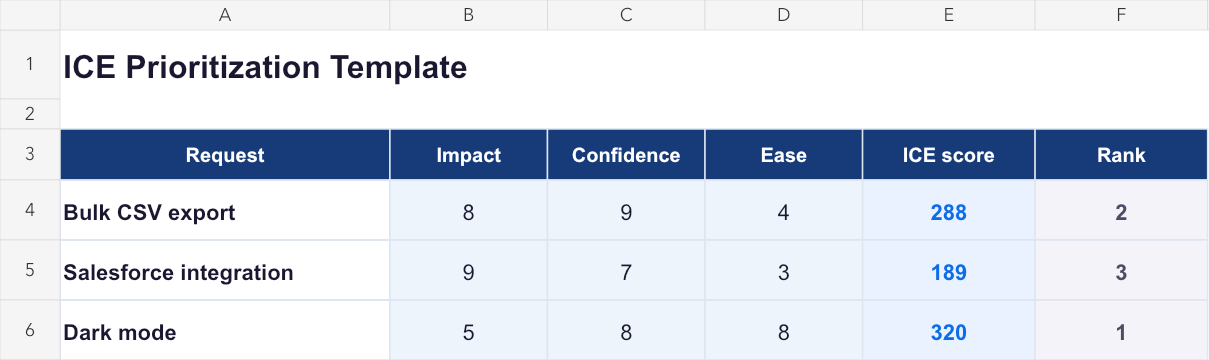
The Score column already contains the formula. Enter values from 1 to 10 for Impact, Confidence and Ease, then sort from largest to smallest.
Want to score several requests without downloading a file? Use the free ICE calculator. Need the score connected to voters, customer segments and roadmap status? See ICE prioritization in ProductLift.
- What is inside the template
- How to use the ICE Excel template
- Use the template in Google Sheets
- A worked example
- Run a useful scoring session
- When a spreadsheet stops being enough
- ICE or RICE?
- Common template mistakes
- Choose your next step
What is inside the template
The workbook includes one scoring table with these columns:
| Column | What to enter |
|---|---|
| Request | A short, recognizable name for the feature or experiment |
| Impact | How much the request could move the outcome selected for this session, from 1 to 10 |
| Confidence | How strong the supporting evidence is, from 1 to 10 |
| Ease | How straightforward the complete delivery path is, from 1 to 10 |
| ICE score | Calculated automatically with Impact × Confidence × Ease |
| Rank | The relative order after sorting the Score column |
It also includes example rows, so the formula is visible before you replace them with your own backlog.
The file is deliberately simple. A template should help you start the work, not teach the entire method again. For scoring anchors, a worked backlog and common mistakes, use the practical ICE guide.
How to use the ICE Excel template
- Download the
.xlsxfile. - Open the scoring sheet and replace the example rows with comparable requests.
- Write one outcome above the table, such as “improve activation during the next two quarters.”
- Agree what 1, 5 and 10 mean for Impact, Confidence and Ease.
- Enter the three values for every request.
- Sort the Score column from largest to smallest.
- Discuss which factor made each winner rise to the top.
- Record any deliberate override instead of changing the inputs to force the desired answer.
The workbook uses the multiplicative formula:
=Impact * Confidence * EaseFor example, a request with Impact 8, Confidence 9 and Ease 4 scores 288.
High Ease means the work is easier. If your team uses an Effort column instead, do not keep the same formula. Either invert the scale so a high number still means easy, or divide by Effort.
Use the template in Google Sheets
Google Sheets can import the same .xlsx file:
- Download the template.
- Open Google Sheets.
- Select File → Import → Upload.
- Upload the workbook and choose Create new spreadsheet or Replace spreadsheet.
- Check one example score before replacing the rows.
- Share the sheet with the people joining the scoring session.
The formula converts without a separate Sheets version. If several people score independently, give each person their own three factor columns or duplicate the tab. Reveal the scores together so the first opinion does not anchor everyone else.
A worked example
A SaaS team compares three requests against one outcome: improve activation and retention during the next two quarters.
| Request | Impact | Confidence | Ease | ICE score |
|---|---|---|---|---|
| Bulk CSV export | 8 | 9 | 4 | 288 |
| Salesforce integration | 9 | 7 | 3 | 189 |
| Dark mode | 5 | 8 | 8 | 320 |
Dark mode ranks first because it is much easier. That does not automatically make it the roadmap winner. The team should inspect whether Ease 8 includes every surface, test and dependency. If a short audit lowers Ease to 6, the score becomes 240 and bulk export moves to first.
That is the best use of the template. It shows which assumption has enough influence to deserve a closer look.
You can edit the same example in the browser-based ICE calculator and reveal the sorted list without setting up a spreadsheet.
Run a useful scoring session
Before the session
- Select one outcome and one time horizon.
- Bring a comparable set of requests, not every type of work in the company.
- Write scoring anchors before anyone enters a number.
- Bring customer, usage and delivery evidence.
During the session
- Score individually first.
- Compare the largest disagreements by factor.
- Ask what evidence would change a high or low number.
- Sort the complete table only after every row uses the same rubric.
After the session
- Record why the team overrode a score, if it did.
- Assign research to promising requests with weak Confidence.
- Move the selected work into planning.
- Revisit a score when its evidence changes, not because the ranking is inconvenient.
When a spreadsheet stops being enough
The template is a good fit for a workshop, a small backlog or a one-time comparison. It becomes harder to maintain when:
- new votes and comments arrive after the scoring session;
- the team needs to see which customer segments asked;
- revenue or company context affects the decision;
- several people need a lasting discussion and decision history;
- the selected request must move into a roadmap and release;
- requesters should be notified when the status changes.
ProductLift keeps the ICE fields on the live request instead of copying it into a separate sheet. The team can score, reorder, inspect voters and segments, discuss an override in internal comments, then move the selected work into delivery.
See the complete ProductLift ICE workflow or compare it with the broader prioritization module.
ICE or RICE?
ICE is faster because it does not estimate Reach separately. That is useful when reliable audience data is unavailable or the team needs a quick first pass.
RICE is more useful when the number of affected users differs materially. A request that helps 50 accounts and a request that helps 5,000 accounts may look similar in ICE when Reach is folded into Impact.
The RICE versus ICE comparison runs one backlog through both methods and shows why the winner can change.
Common template mistakes
Scoring before defining the outcome
Impact on revenue, activation and satisfaction are different measures. Put the selected outcome above the table.
Treating Confidence as enthusiasm
Confidence measures evidence. A confident presenter does not make the estimate better supported.
Mixing Ease and Effort
High Ease is good. High Effort is bad. Rename the column only when you also change the scale or formula.
Comparing unrelated work
Security obligations, growth experiments and cosmetic improvements may need different filters before they enter the same scoring table.
Assuming the highest score decides everything
ICE does not model strategy, dependencies or contractual commitments. Keep the honest score and document why another constraint changed the order.
Choose your next step
Last updated on Oct 7, 2026