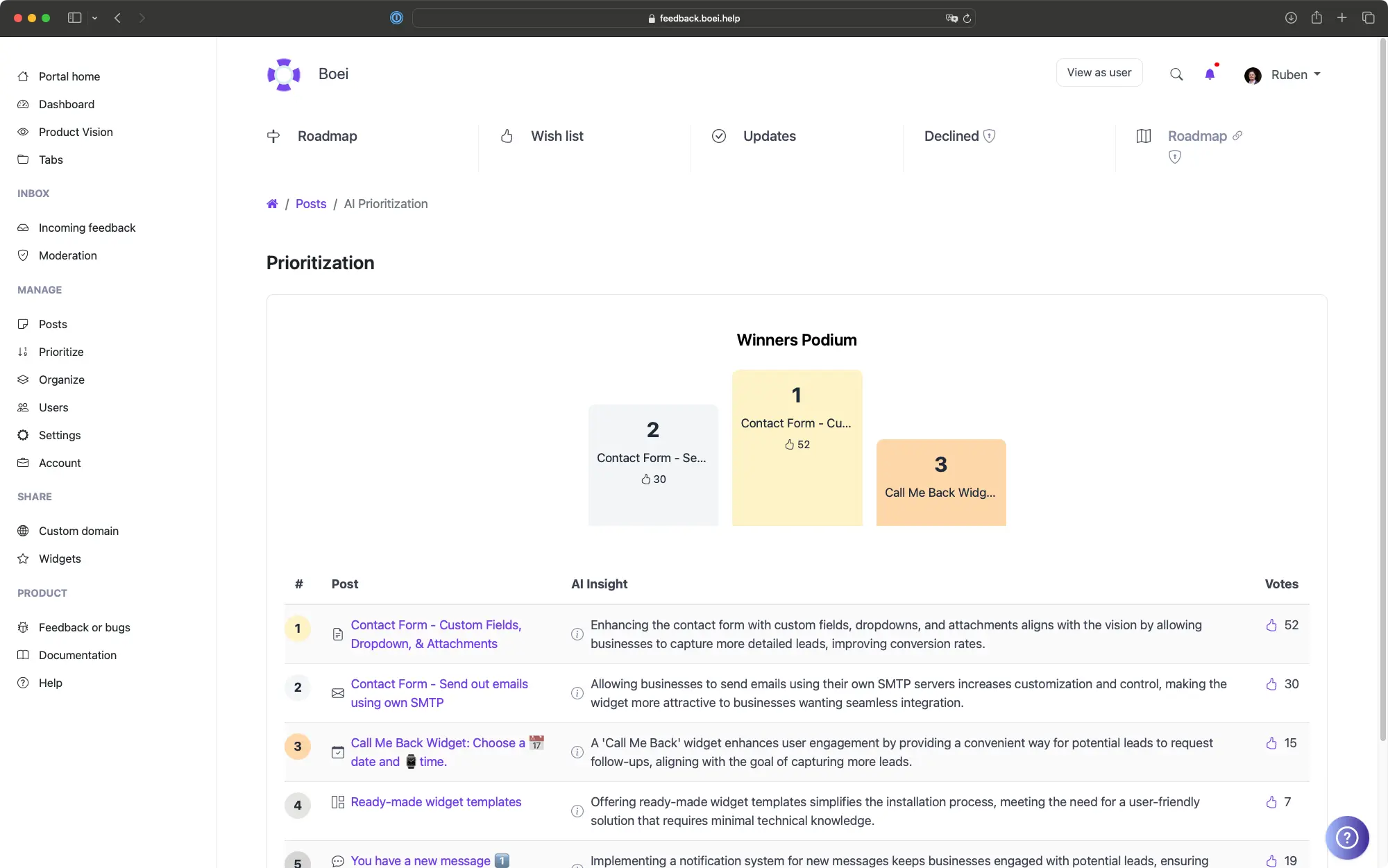
Your backlog has 200 feature requests. Your team can build 10 this quarter. This guide shows you how to choose the right 10 using prioritization frameworks, AI scoring, revenue data, and user segments.
Every prioritization framework is useless without a clear product vision. If you don't know where you are going, no scoring system will tell you what to build.
In ProductLift, you define your Product Vision in the settings. This is a clear statement of what your product is, who it serves, and what strategic goals you are pursuing this year. Once defined, AI Prioritization uses your vision as the anchor for scoring every request in your backlog.
Your vision doesn't need to be a polished manifesto. A few sentences work fine. Something like: "We help mid-market SaaS teams collect and act on customer feedback. This year we are focused on reducing time from feedback to shipped feature." That is enough for AI to score relevance and strategic alignment.
Each framework fits a different team and decision style. Use one or combine several.
Define your Product Vision and let AI score every request from 0 to 100 based on strategic alignment, user demand, and feasibility. AI reads the post title, description, vote count, and voter revenue data, then recommends what to build next. This is the fastest way to rank a large backlog because AI processes hundreds of posts in minutes. Best for teams with 50+ open requests who need a starting point.
Reach (how many users it affects), Impact (how much it matters), Confidence (how sure you are), Effort (how much work it takes). RICE produces a numerical score that makes different features directly comparable. ProductLift calculates the RICE score automatically from your inputs. Best for teams that want a systematic, defensible prioritization process they can explain to stakeholders.
Impact, Confidence, Ease. Similar to RICE but simpler because it drops the Reach component. Faster to score because there are only three dimensions. ProductLift calculates the ICE score automatically. Best for smaller teams that want structure without the overhead of estimating reach for every item.
Categorize every request as Must Have, Should Have, Could Have, or Won't Have. MoSCoW works well for release planning when you need to define the minimum viable scope. In ProductLift, use MoSCoW labels alongside vote counts to validate that your Must Haves actually match customer demand.
A visual quadrant chart with Impact on one axis and Effort on the other. Quick Wins (high impact, low effort) go first. Big Bets (high impact, high effort) need careful planning. Thankless Tasks (low impact, high effort) get deprioritized. ProductLift generates the matrix automatically from your scoring data. Best for teams that think visually and want to spot quick wins at a glance.
Connect Stripe and every voter's MRR, LTV, plan name, and subscription status appears alongside their votes. Sort by Total Voter MRR to see which features your highest value customers want. Combine revenue data with any scoring framework to add a financial dimension. Best for teams where retention of high-value accounts is a strategic priority.
Prioritization should not happen in a meeting where the loudest voice wins. Here's a better process that uses data.
Step 1: Let AI score your backlog. Run AI Prioritization against your Product Vision. This gives you a ranked list in minutes. Review the top 20 and bottom 20 to calibrate whether AI is capturing your intent correctly.
Step 2: Layer in revenue data. Sort by Total Voter MRR. Are your highest-paying customers asking for something AI ranked low? That is worth investigating. Revenue data doesn't override strategic alignment, but it adds an important signal.
Step 3: Apply a scoring framework. Use RICE or ICE on your top 30 candidates. This forces your team to estimate effort and impact explicitly instead of relying on gut feeling.
Step 4: Filter by User Segments. Use segments to see what percentage of Enterprise customers vs. Starter plan customers want each feature. A feature requested by 60% of your Enterprise segment is different from one requested by 60% of your free tier.
Step 5: Save your analysis. Use saved queries in ProductLift to save filtered views for recurring analysis. Create views like "High MRR requests this quarter" or "Top voted unplanned items" so you can revisit them without rebuilding the filter each time.
Match the framework to your situation.
You have a large backlog (50+ items) and need a fast first pass. Or when you want to validate your gut feeling against data. AI Prioritization is the quickest way to surface items you might have overlooked.
You need to justify priorities to stakeholders with numbers. RICE is the most defensible framework because every dimension is explicit. It is also the most time consuming, so reserve it for your top candidates.
You want structured scoring without the overhead of estimating reach. ICE is RICE lite. Good for teams of 2 to 5 people who make fast decisions and don't need to present scores to a board.
You are planning a specific release and need to define scope. MoSCoW is about drawing a line between what ships and what waits. Use it for sprint planning and quarterly roadmap reviews.
6,035
Product teams using ProductLift
157,624
Feature requests prioritized
4.8
Average rating on G2
Sebastian F.
Entrepreneur
Aaron Dye
Timothy M.
Product Manager
Ben
Product Owner
Marco
Chris R.
Founder
AI scoring, RICE, ICE, MoSCoW, revenue data, and user segments. All in one platform.