14 Best Knowledge Base Software in 2026

Find the perfect knowledge base for customer support, internal documentation, or both. Honest reviews with real pricing, search capabilities, and integration details.

Ruben Buijs Ruben Buijs January 2026 16 min read
Last updated: January 2026
14 tools compared
AI search included

Why This Comparison is Different

Most knowledge base comparisons are written by people who've never actually implemented one. This guide is different.

What makes this guide useful:

Full disclosure: ProductLift has a built-in knowledge base as part of its all-in-one platform, so yes, it's on this list. But we'll be honest about where standalone tools do it better.

Quick Picks by Use Case

Don't have time to read the full comparison? Here's the TL;DR:

🏆 Best All-in-One (KB + Feedback + Roadmap): ProductLift – Knowledge base included with feedback management for $14/mo.

🤖 Best AI-Powered Search: Guru – AI finds answers across all your tools, not just the KB.

📚 Best for Customer Support: Zendesk Guide – Native help desk integration, multilingual, AI suggestions.

👥 Best for Internal Teams: Confluence – Deep Jira integration, great for engineering teams.

💰 Best Free Option: Notion – Free for small teams, versatile wiki capabilities.

🎓 Best for Training/Onboarding: Trainual – Built for SOPs and employee onboarding.

🎯 Best Interactive KB: Stonly – Guided decision trees instead of static articles.

🆓 Best Open Source: BookStack – Self-hosted, completely free.

Internal vs External Knowledge Bases: Which Do You Need?

Before comparing tools, understand the fundamental difference:

🏢 Internal Knowledge Bases (Team Wikis)

Purpose: Company documentation, SOPs, engineering docs, HR policies

Users: Your employees

Key features: Collaboration, permissions, integrations with Slack/Jira, version control

Best tools: Confluence, Notion, Slite, Trainual

🌍 External Knowledge Bases (Customer Help Centers)

Purpose: Customer self-service, reducing support tickets

Users: Your customers

Key features: SEO optimization, multilingual, custom branding, analytics on what customers search for

Best tools: Zendesk Guide, Document360, Helpjuice

🔀 Hybrid (Both Internal & External)

Some tools handle both with permission controls:

Reality check: Most companies eventually need both. Starting with a tool that does both (even if not perfectly) beats juggling two separate systems.

What to Look for in Knowledge Base Software

1. Search Quality (This is Critical)

Bad search is the #1 reason knowledge bases fail. Users give up after one failed search.

Types of search:

Test it: Before choosing a tool, import 10 sample articles and search using customer language, not your internal jargon.

2. Organization & Structure

Can you structure content logically?

3. Collaboration Features

Who can edit? How do changes get approved?

4. Branding & Customization

For external KBs, does it look like YOUR brand or theirs?

5. Multilingual Support

If you serve international customers, can you translate articles? Can customers switch languages?

Watch out for: Some tools call themselves "multilingual" but just mean you can create separate KBs per language—no unified management.

6. Analytics

What do you actually need to measure?

1. ProductLift – Best All-in-One (KB + Feedback + Roadmap)

⭐ G2 Rating: 5.0/5 | 💰 Starting Price: $14/mo flat (KB included with feedback platform)

Best for: SaaS teams who want KB + feedback + roadmap + changelog in one affordable tool

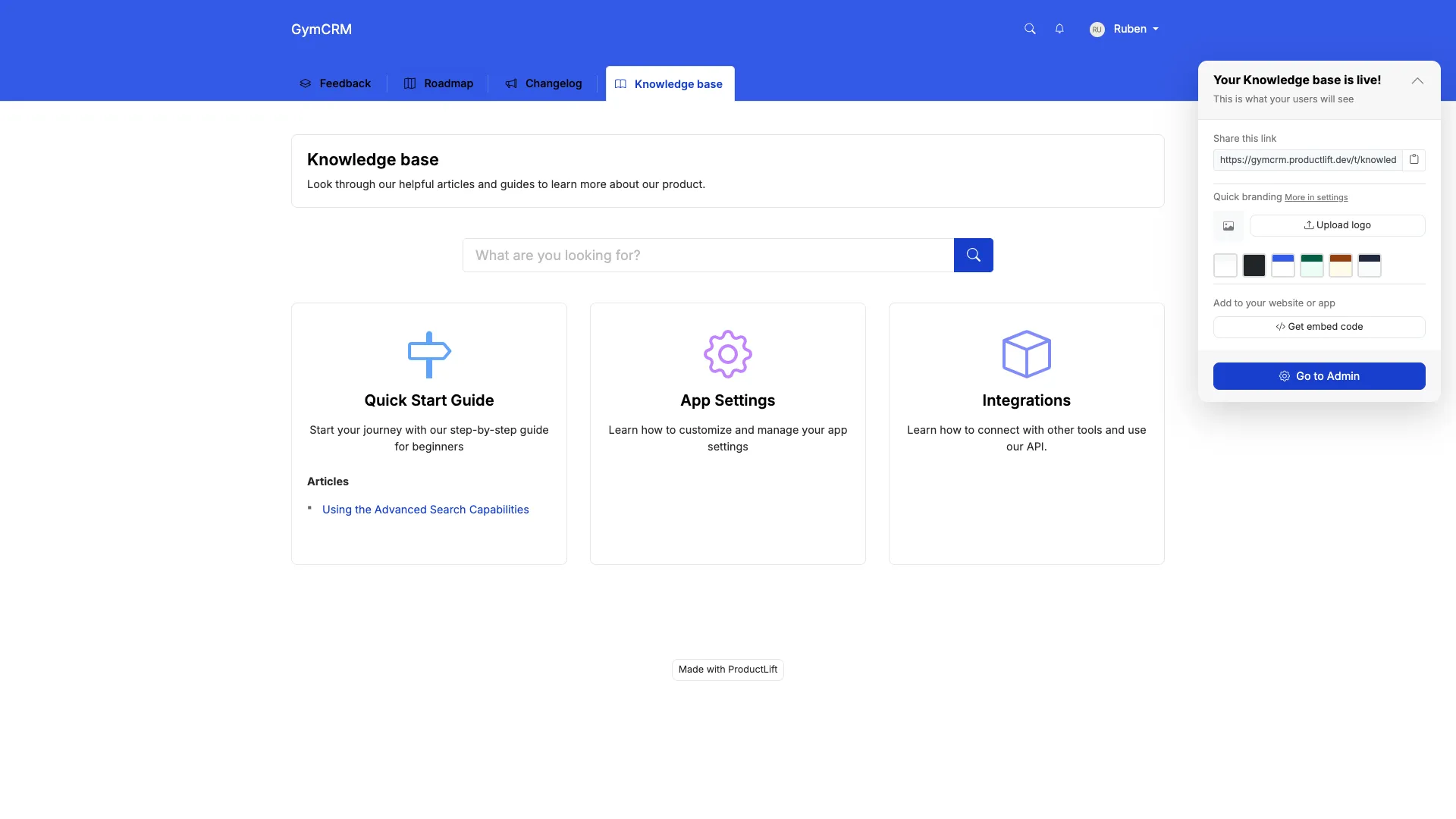
ProductLift knowledge base

What ProductLift's KB Does Well

Where ProductLift Falls Short

The Unique Advantage

Most knowledge bases exist in isolation. ProductLift connects your KB to your product development:

What Users Say

"We were paying $79/mo for Intercom Articles, $79/mo for Canny, and $49/mo for Beamer. ProductLift replaced all three for $14/mo. The KB isn't as fancy as Intercom's, but it's 90% as good for 10% the cost." – Founder, SaaS startup

Pricing

Who should use ProductLift: SaaS teams who want customer feedback, roadmap, changelog, AND documentation in one affordable platform.

Who should look elsewhere: Enterprises needing advanced KB workflows, or large support teams needing deep help desk integration.

Try ProductLift Free →

2. Zendesk Guide – Best for Customer Support Teams

⭐ G2 Rating: 4.3/5 | 💰 Starting Price: $55/agent/mo (Suite Team), Guide included

Best for: Support teams already using Zendesk who need a tightly integrated help center

What Zendesk Guide Does Well

The Pricing Reality

Zendesk Guide isn't sold separately—it's part of Zendesk Suite:

For a 5-agent team, that's $275-575/month. You're paying for the full help desk, not just KB.

What Users Say

"Zendesk Guide is excellent if you're already using Zendesk Support. The ticket deflection tracking alone justifies it. But if you don't need a full help desk, you're overpaying." – Support Lead, B2B SaaS

Where Zendesk Falls Short

Who should use Zendesk Guide: Support teams already using Zendesk Support who want tight integration and can justify the cost.

Who should look elsewhere: Anyone not using Zendesk for ticketing, or small teams on a budget.

3. Notion – Best Free Option for Internal Teams

⭐ G2 Rating: 4.7/5 | 💰 Starting Price: Free (unlimited individuals), $10/user/mo (teams)

Best for: Internal team wikis, project docs, and lightweight external docs

What Notion Does Well

Why It's Not Perfect for External KB

Notion is amazing for internal wikis, but has limitations for customer-facing knowledge bases:

What Users Say

"Notion is our internal wiki and we love it. We tried using it as our public KB but customers complained about search. Ended up using Document360 for external, Notion for internal." – Product Manager

Pricing

Who should use Notion: Teams wanting a flexible internal wiki, or startups needing a lightweight public KB on a budget.

Who should look elsewhere: Support teams needing analytics, multilingual support, or help desk integration.

4. Confluence – Best for Engineering Teams (Internal)

⭐ G2 Rating: 4.1/5 | 💰 Starting Price: Free (10 users), $6.05/user/mo (Standard)

Best for: Engineering teams using Jira who need technical documentation and runbooks

What Confluence Does Well

Why Engineers Love It (and Writers Don't)

Confluence is built for technical documentation, not customer support articles:

The Atlassian Lock-In

Confluence shines if you're already in the Atlassian ecosystem (Jira, Trello, Bitbucket). But if you're not, the learning curve is steep and you're locked into their platform.

What Users Say

"Our engineering team lives in Confluence for technical docs. But we use Document360 for customer-facing KB—Confluence's editor is too clunky for support articles." – CTO, SaaS company

Pricing

Who should use Confluence: Engineering teams deeply invested in Jira who need internal technical documentation.

Who should look elsewhere: Support teams needing customer-facing KB, or non-technical teams wanting simplicity.

5. Guru – Best AI-Powered Search Across All Tools

⭐ G2 Rating: 4.7/5 | 💰 Starting Price: Free (3 users), $10/user/mo (Starter)

Best for: Teams with knowledge scattered across multiple tools who need AI to find it all

What Makes Guru Different

Guru isn't a traditional knowledge base—it's a knowledge management platform that connects to your existing tools:

Where Guru Excels

What Guru Doesn't Do Well

Pricing

Who should use Guru: Teams with knowledge scattered across multiple tools who need AI-powered search and proactive suggestions.

Who should look elsewhere: Anyone needing a customer-facing help center, or teams wanting traditional long-form documentation.

6-10. Specialized Knowledge Base Solutions

Document360 – Best Dedicated KB Platform

💰 Price: $199/project/mo (Standard) | ⭐ G2: 4.7/5

Good for: Companies wanting a powerful, standalone KB without help desk lock-in.

Key features: Advanced analytics, multilingual, version control, Markdown support, API documentation, private/public projects.

Watch out for: $199/mo minimum (no cheaper tier), per-project pricing adds up, search is good but not AI-powered.


Helpjuice – Powerful Analytics

💰 Price: $120/mo (Starter, 4 users) | ⭐ G2: 4.6/5

Good for: Support teams obsessed with measuring KB performance and ticket deflection.

Key features: Deep analytics (search queries, no-result searches, article ratings), custom branding, multilingual, integrations with help desks.

Watch out for: Dated UI (feels like 2015), pricing increases with users, setup takes time.


Stonly – Interactive Decision Trees

💰 Price: $99/mo (Starter) | ⭐ G2: 4.8/5

Good for: Teams wanting interactive guides instead of static articles.

Key features: Decision trees ("If X, then Y"), checklists, step-by-step guides, in-app widgets, AI-powered.

Watch out for: Not great for long-form documentation, requires rethinking your content structure.


Trainual – Best for Employee Onboarding

💰 Price: $250/mo (up to 50 users) | ⭐ G2: 4.7/5

Good for: HR teams documenting SOPs, training materials, and onboarding processes.

Key features: Onboarding tracks, quizzes, role-based content, progress tracking, integrates with HR systems.

Watch out for: Built for internal use only, no customer-facing option. Overkill if you just need a simple wiki.


Slite – Clean Internal Wiki

💰 Price: Free (50 docs), $8/user/mo (Standard) | ⭐ G2: 4.7/5

Good for: Small teams wanting a simpler, prettier alternative to Confluence.

Key features: Ask AI questions about your docs, clean editor, fast search, integrations with Slack/Notion.

Watch out for: Internal-only (no public KB), limited at scale (best for <100 employees), no advanced permissions.

11-14. Budget & Open Source Options

Nuclino – Lightweight Team Wiki

💰 Price: Free (unlimited users, 50 items), $6/user/mo (Standard) | ⭐ G2: 4.7/5

Good for: Small teams wanting a minimal, fast wiki without complexity.

Key features: Real-time collaboration, graph view of content connections, embeds, Markdown support, clean design.

Missing: No customer-facing option, basic permissions, no workflows or approvals.


BookStack – Best Open Source

💰 Price: Free (self-hosted) | ⭐ GitHub: 13K+ stars

Good for: Technical teams who can self-host and want complete control.

Key features: Books/chapters/pages hierarchy, Markdown & WYSIWYG editor, LDAP/SAML SSO, API, image management.

Watch out for: Requires server setup & maintenance, no cloud option, basic search (no AI), you're responsible for backups/security.


GitBook – Best for Developer Docs

💰 Price: Free (1 user), $6.70/user/mo (Plus) | ⭐ G2: 4.7/5

Good for: Developer-focused teams documenting APIs, SDKs, and technical products.

Key features: Git sync (docs as code), OpenAPI spec import, code blocks with syntax highlighting, versioning, public/private spaces.

Watch out for: Better for technical docs than support KB, markdown-first (not WYSIWYG), limited integrations.


ReadMe – Interactive API Documentation

💰 Price: $99/mo (Startup) | ⭐ G2: 4.7/5

Good for: API-first companies needing beautiful, interactive developer documentation.

Key features: Auto-generate docs from OpenAPI, live code examples, try-it console, metrics on API usage, changelog.

Watch out for: Specifically for API docs—not a general-purpose KB. $99/mo minimum, pricing increases with API calls.

Feature Comparison Table

Here's how the top tools compare on essential features:

Feature ProductLift Zendesk Notion Confluence Document360
Customer-Facing KB⚠️ Limited
Internal Wiki⚠️ Basic
AI Search⚠️ Basic⚠️ Basic
Multilingual✅ (22)
Custom Domain
White-Label⚠️ Limited
Analytics⚠️ Basic✅ Advanced⚠️ Business+⚠️ Premium✅ Advanced
Version History
Approval Workflows
API Access
Real-Time Co-editing
SSO✅ (Pro+)✅ (Enterprise)✅ (Premium+)✅ (Pro+)

Pricing Comparison: What You'll Actually Pay

Forget marketing prices. Here's what these tools cost at different team sizes:

Tool 5 Users 15 Users 50 Users Notes
ProductLift$70/mo$210/mo$700/moIncludes feedback+roadmap+changelog
Zendesk Guide$275/mo$825/mo$2,750/moRequires full Zendesk Suite
Notion$50/mo$150/mo$500/moPlus plan, best for internal
Confluence$30/mo$91/mo$303/moStandard tier, internal only
Document360$199/mo$199/mo$399/moPer-project pricing
Helpjuice$120/mo$200/mo$289/moTiered by user count
Guru$50/mo$150/mo$500/moStarter plan, internal only
Slite$40/mo$120/mo$400/moStandard plan, internal only
BookStackFreeFreeFreeSelf-hosted, server costs apply

Key Insight: If you need KB + feedback/roadmap tools, buying them separately costs 2-5x more than an all-in-one like ProductLift.

Which Knowledge Base Should You Choose?

🎯 You need a customer-facing help center

Choose Zendesk Guide if you already use Zendesk for ticketing and can justify the cost.

Choose Document360 if you want a powerful standalone KB without help desk lock-in.

Choose ProductLift if you also need feedback management and want everything in one affordable tool.

👥 You need an internal team wiki

Choose Notion for flexibility and a generous free tier. Best for small teams.

Choose Confluence if you're already in the Atlassian ecosystem (Jira users).

Choose Slite if you want something simpler and prettier than Confluence.

🤖 You need AI-powered search across all tools

Choose Guru – it searches across your KB, Slack, Google Drive, Salesforce, etc.

💸 You're on a tight budget

Choose Notion's free tier for internal docs (unlimited individuals).

Choose BookStack if you can self-host (technical teams only).

Choose ProductLift if you need both KB and feedback tools—$14/mo gets you both.

🌍 You serve international customers

Choose ProductLift (22 languages), Zendesk Guide, or Document360.

Avoid: Notion, Confluence, Slite (no multilingual management).

🎓 You need employee training/onboarding

Choose Trainual – purpose-built for SOPs and onboarding with quizzes and progress tracking.

👨‍💻 You need developer documentation

Choose GitBook for technical docs with Git sync.

Choose ReadMe for API documentation with interactive examples.

🔀 You need both internal AND external KB

Choose ProductLift (public KB + internal notes on feedback).

Choose Document360 (separate projects for internal vs external).

Avoid separate tools – managing two KBs is 2x the work.

Frequently Asked Questions

What's the difference between a knowledge base and a wiki?

A knowledge base is typically customer-facing (help center, support articles, FAQs) with features like SEO optimization, custom branding, and analytics on what customers search for. A wiki is usually internal (team documentation, SOPs, project docs) with features like real-time collaboration, permissions, and version control. Some tools like ProductLift, Notion, and Document360 can do both.

How do I migrate my existing knowledge base?

Most tools support importing articles via CSV or API. ProductLift offers free migration assistance—just export your articles and we'll import them with proper formatting and categories. Expect to spend 2-4 hours for a typical migration (50-200 articles). Budget more time for reformatting if your old KB used custom HTML or complex layouts.

Do I need a separate knowledge base if I have a help desk?

It depends. If you use Zendesk, their built-in Guide is excellent and tightly integrated. If you use a help desk without a good KB (Freshdesk, Help Scout), you'll want a standalone tool like Document360 or Helpjuice that integrates. If you don't have a help desk yet, consider ProductLift which includes basic support features alongside KB.

Can customers search my knowledge base before submitting a ticket?

Yes, most customer-facing KBs (Zendesk Guide, Document360, Helpjuice, ProductLift) have search bars on the article widget. Some (Zendesk, Stonly) can suggest relevant articles while customers are typing a support ticket. This is called 'ticket deflection' and can reduce support volume by 20-40%.

What's the best knowledge base for a SaaS startup?

ProductLift if you also need feedback/roadmap tools ($14/mo gets you everything). Notion if you just need internal docs (free for small teams). Document360 if you have budget ($199/mo) and need advanced features. Avoid Zendesk unless you're already using their help desk—you'd be paying for features you don't need.

How important is AI search in a knowledge base?

Very important for customer-facing KBs. Customers don't know your internal jargon—they search using their own words. AI/semantic search understands intent, so 'How do I delete my account' finds the article even if it's titled 'Account Removal Process.' Tools with AI search: Guru, Zendesk Guide, Document360, Stonly. Tools without: Notion, Confluence (basic search), BookStack (keyword only).

Can I have both public and private articles in the same knowledge base?

Yes. ProductLift lets you mark articles as public (customers can see) or private (team-only). Document360 uses separate projects for public vs private. Notion lets you control sharing per page. Confluence has space-level permissions. Zendesk Guide can restrict articles by user role (logged-in customers, agents only, etc.).

What if I have 500+ articles? Will it be slow?

Dedicated KB tools (Document360, Zendesk Guide, Helpjuice) are built for scale and handle thousands of articles without slowdown. Notion can get sluggish with 500+ pages (use databases to organize). Confluence handles scale well. ProductLift works fine at this scale. BookStack performance depends on your server.

Should I use a knowledge base or just build an FAQ page on my website?

Start with a static FAQ if you have <10 articles. But once you hit 20+ articles, you need proper KB software with search, categories, and analytics. A static FAQ doesn't scale—customers can't find answers, you can't track what they're searching for, and updating 50 HTML pages is a nightmare. A KB pays for itself by reducing support tickets.

Can I embed my knowledge base into my app?

Yes. Most customer-facing KBs offer embeddable widgets or iframes. ProductLift has an embeddable widget. Zendesk Guide has Web Widget. Document360 provides iframe embed. Notion can embed public pages via iframe. For in-app help, consider Stonly (interactive guides) or Pendo (contextual tooltips).

Related Comparison Guides

Explore more tool comparisons to find the right software for your team:

Browse all comparison guides

Need a Knowledge Base + Feedback Platform in One?

ProductLift combines customer feedback, roadmap, changelog, and knowledge base in one affordable tool.

No credit card required · 14-day free trial · Free migration assistance · Knowledge base included