Guide

10 Ways to Promote Your Feedback Board and Get More Votes

You built a feedback board. Now you need people to use it. These 10 proven tactics will drive traffic to your board, increase vote counts, and give you the data you need to prioritize confidently.

4.8 on G2
6,000+ teams
10 min read
Aaron Dye Timothy M. Ben Marco Chris R.
from 124+ reviews
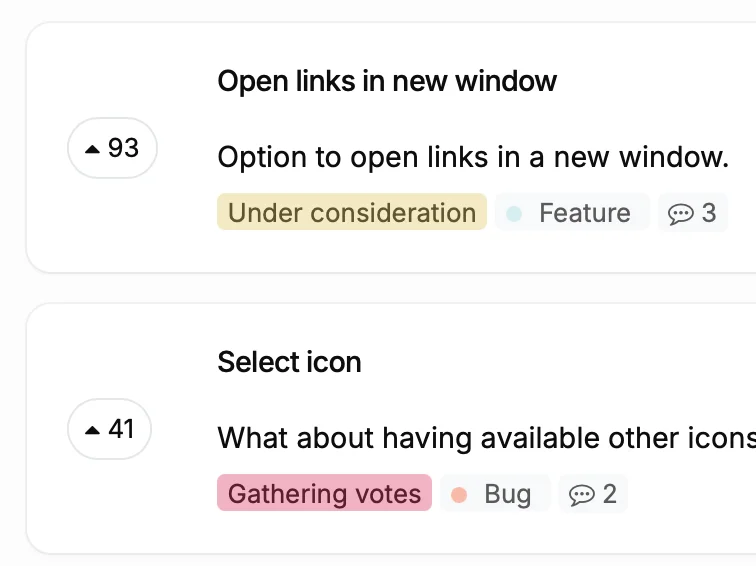
Feature requests with vote counts showing active community engagement

Why Promotion Matters More Than Setup

Most feedback boards fail because of distribution, not design. Teams spend hours configuring statuses and categories, then quietly link to the board in a footer and wonder why nobody votes.

The truth is that your feedback board is only as useful as the number of people who participate. Ten votes from your power users tell you more than a hundred assumptions from your planning meeting. But those votes only happen when customers know the board exists and find it at the right moment.

The strategies below are ordered from quickest wins to longer term investments. Start with the first three today, then layer in the rest over the next few weeks.

10 Proven Ways to Drive Votes

From quick wins to long term strategies. Start at the top and work your way down.

1

1. Add Your Board Link to Email Signatures

Every person on your team sends dozens of emails per day. Add a line like "Vote on what we build next" with a link to your feedback board. Support, sales, and success teams generate the most relevant traffic because they talk to customers who already have opinions.

2

2. Place the Feedback Widget Inside Your App

Use the ProductLift Add Post Widget or Sidebar Embed to let users submit feedback without leaving your app. Place it in your sidebar, settings page, or behind a "Give Feedback" button. Users who see the widget at the moment of frustration or inspiration are 5x more likely to submit something useful.

3

3. Add the Link to Support Auto-Replies

When a customer opens a support ticket, your auto-reply already tells them you received it. Add one sentence: "Have a feature idea? Vote on our roadmap at [link]." Every support interaction becomes a feedback opportunity. If you use Intercom, Zendesk, or HelpScout, this takes two minutes to set up.

4

4. Include It in Your Onboarding Email Sequence

New users are forming opinions about your product in their first week. Add an email on day 3 or 4 that says "Tell us what to build next" and links to your feedback board. New users who vote early become more invested in your product because they feel ownership over its direction.

5

5. Promote Through Changelog CTAs

Every changelog entry is proof that you ship. Add a call to action at the bottom: "What should we build next? Vote here." Users who just read about a shipped feature are primed to think about what else they want. In ProductLift, your changelog and feedback board are already connected, so this flow is seamless.

6

6. Share Specific Posts on Social Media

Do not just tweet "Check out our feedback board." Share a specific popular request with its vote count: "147 of you asked for dark mode. Vote to push it higher." Specific posts with real numbers create urgency and curiosity. Share the direct post URL so people land on something tangible.

7

7. Add Links in Your Website Footer and Navigation

Your website footer and main navigation are seen by every visitor. Add a "Roadmap" or "Feature Requests" link. This signals transparency and gives prospects confidence that you listen to customers. Many teams report that prospects mention the public roadmap as a reason they signed up.

8

8. Embed Your Board Directly in Your App

Instead of linking out, embed the full feedback board inside your app using the ProductLift JavaScript SDK or iframe. Users stay in context and are more likely to browse, vote, and submit. Use SSO with ProductLiftIdentify() so they are already logged in when the board loads.

9

9. Share Direct Post Type URLs for Targeted Feedback

ProductLift lets you create post types with custom fields. Share the direct URL to a specific post type form when you want targeted input. Running a beta? Share the bug report form. Planning Q3? Share the feature request form filtered to a specific category. Targeted links get better responses than generic board links.

10

10. Vote on Behalf After Calls and Meetings

Customers share feature ideas in sales calls, demos, and support calls every day. Use ProductLift's Vote on Behalf feature to log these as votes under the customer's name. The feedback is captured, the customer shows up as a voter, and they get notified when the status changes. Nothing falls through the cracks.

What Changes When You Actively Promote Your Board

Before

With ProductLift

A feedback board with 12 votes after three months
Hundreds of votes in the first month because every touchpoint drives traffic
Only power users and early adopters participate
Casual users, new signups, and even prospects contribute feedback
Prioritization based on who speaks loudest in meetings
Prioritization backed by vote counts, revenue data, and broad participation
Customers feel ignored because they never see the board
Customers feel heard because they voted and get notified when you ship

The Compounding Effect of Board Promotion

Feedback boards have a network effect. The more votes a post has, the more credible it looks to the next visitor. The more posts exist, the more likely a new visitor finds something they care about. The more activity on your board, the more Google indexes it (if public), driving organic traffic.

This means the first month of active promotion is the hardest. After that, momentum builds. Users start sharing specific post URLs with each other. Your board becomes a destination, not just a page you link to occasionally.

Pro tip: Use ProductLift's Notification settings to send a weekly digest email to all users. Each digest reminds them the board exists and shows trending requests. It is the easiest recurring promotion channel you'll ever set up.

What Teams Say About ProductLift

Sebastian F.

Sebastian F.

Entrepreneur

This app will help you connect with your users and gather feedback like never before. The UI is clean and focused. The different pages and forms can be fully customized. Ruben is an amazing developer and entrepreneur with a proven track record. ProductLift is going places and you should get onboard.
Aaron Dye

Aaron Dye

An excellent product with equally excellent support! Everything just works, and when I had questions, the team was incredibly responsive.
Timothy M.

Timothy M.

Product Manager

This tool is literally a needle in a haystack. I was using Frill, and this doesn't even compare. The user interface, the way it lays out — so amazing. Also amazing support team!
Ben

Ben

Product Owner

Helped us quickly move away from our antiquated spreadsheet to a user-interactive system. User feedback is now collected in real-time. Support has been super speedy!
Marco

Marco

Based in Europe, ideal for privacy-conscious customer interaction. Constant improvements by Ruben together with thorough support make ProductLift a solid and future-proof choice.
Chris R.

Chris R.

Founder

By far the most customizable of all the feedback tools and much better than Feedbear. Developer is super responsive and support has been great. Highly recommend!

Feedback Board Promotion FAQ

How many votes do I need before prioritization data is useful?

There is no magic number, but most teams find that 50 to 100 total votes across their board give them enough signal to see clear patterns. Focus on getting broad participation rather than high absolute numbers. Ten votes from ten different customers is more useful than fifty votes from two power users.

Should my feedback board be public or private?

Public boards attract more participation because prospects and casual visitors can browse and vote. Private boards (Members Only or Group-Restricted) work better when you need feedback from specific customer segments. Many teams run both: a public board for general feature requests and a private board for enterprise clients.

How do I prevent spam on a public feedback board?

ProductLift includes AI Auto-Moderation that catches spam, low quality posts, and duplicates automatically. You can also require email verification before posting, or use SSO so only authenticated users can submit. Most teams with public boards report very little spam thanks to the AI moderation.

What is the Vote on Behalf feature?

Vote on Behalf lets any team member cast a vote under a customer's name. When your sales rep hears a feature request on a call, they can log it as a vote from that customer. The customer shows up as a voter, gets notified on status changes, and the feedback is captured even though they never visited the board directly.

Can I track which promotion channels drive the most votes?

Use UTM parameters on your feedback board URLs to track traffic sources in your analytics tool. ProductLift also shows you when users were created and how they found specific posts, so you can see which channels bring the most engaged voters.

How do I get my team to actually use Vote on Behalf?

Make it part of the workflow, not an extra step. After every customer call, the rep logs one vote. After every support ticket with a feature request, the agent logs one vote. It takes 15 seconds. When the team sees their votes influencing the roadmap, they do it consistently.

Ready to Get More Votes?

Create your feedback board in 10 minutes. Start promoting it today.

No credit card required · 14-day free trial · Unlimited voters on every plan · Cancel anytime