14 Best Knowledge Base Software for SaaS in 2026

Find the perfect knowledge base for SaaS companies. Compare tools built for fast-moving product teams who ship weekly, need changelog integration, and connect docs to roadmap.

Ruben Buijs Ruben Buijs January 2026 18 min read
Last updated: January 2026
14 SaaS-focused tools
Changelog integration

Why This Comparison is Different

Most knowledge base comparisons are written for traditional support teams with static products. This guide is specifically for SaaS companies who ship features weekly and need their docs to keep up.

What makes this guide useful for SaaS teams:

Full disclosure: ProductLift has a built-in knowledge base as part of its all-in-one SaaS platform (feedback + roadmap + changelog + KB), so yes, it's on this list. But we'll be honest about where standalone tools do it better.

Why SaaS Companies Need Different KB Software

SaaS knowledge bases have unique requirements that generic KB tools completely miss:

1. You Ship Features Weekly (Not Yearly)

Traditional companies update their docs quarterly. SaaS teams ship features weekly—sometimes daily. You need:

2. Your Docs Connect to Product Development

In SaaS, documentation isn't separate from product development—it's part of it:

3. You Need API Documentation

Most SaaS products have APIs. Generic KB tools are built for support articles, not developer docs:

4. Your KB Must Scale with Your Product

SaaS products grow in complexity. You'll go from 20 articles to 200+ as you add features:

Bottom line: Generic KB tools (built for traditional support) force SaaS teams into workarounds. You need a KB that understands you ship fast, iterate constantly, and connect docs to product development.

Quick Picks by Use Case

Don't have time to read the full comparison? Here's the TL;DR for SaaS teams:

🏆 Best All-in-One for SaaS (KB + Feedback + Roadmap): ProductLift – KB included with feedback/roadmap for $14/mo. Ship feature → Auto-create KB article.

🤖 Best AI-Powered Search: Guru – AI finds answers across your entire stack (not just KB).

📚 Best for SaaS Support Teams: Zendesk Guide – If you're already using Zendesk for ticketing. Tracks KB → ticket deflection.

👥 Best for Internal SaaS Team Docs: Confluence – Deep Jira integration for engineering teams.

💰 Best Free Option for SaaS Startups: Notion – Free for small teams, publish select pages as public KB.

👨‍💻 Best for API Documentation: ReadMe – Interactive API docs with try-it console, OpenAPI import.

🎯 Best Dedicated KB for Growing SaaS: Document360 – Powerful standalone KB without help desk lock-in.

🆓 Best Open Source for Technical SaaS: BookStack – Self-hosted, free, full control.

What SaaS Companies Should Look For

Before comparing tools, here's what actually matters for SaaS teams:

✅ Must-Have Features

🚀 SaaS-Specific Features (Nice to Have)

📊 SaaS-Relevant Analytics

⚡ Speed & Integration

1. ProductLift – Best All-in-One for SaaS (KB + Feedback + Roadmap)

⭐ G2 Rating: 5.0/5 | 💰 Starting Price: $14/mo flat (KB included with feedback platform)

Best for: SaaS teams who want KB + feedback + roadmap + changelog in one affordable tool

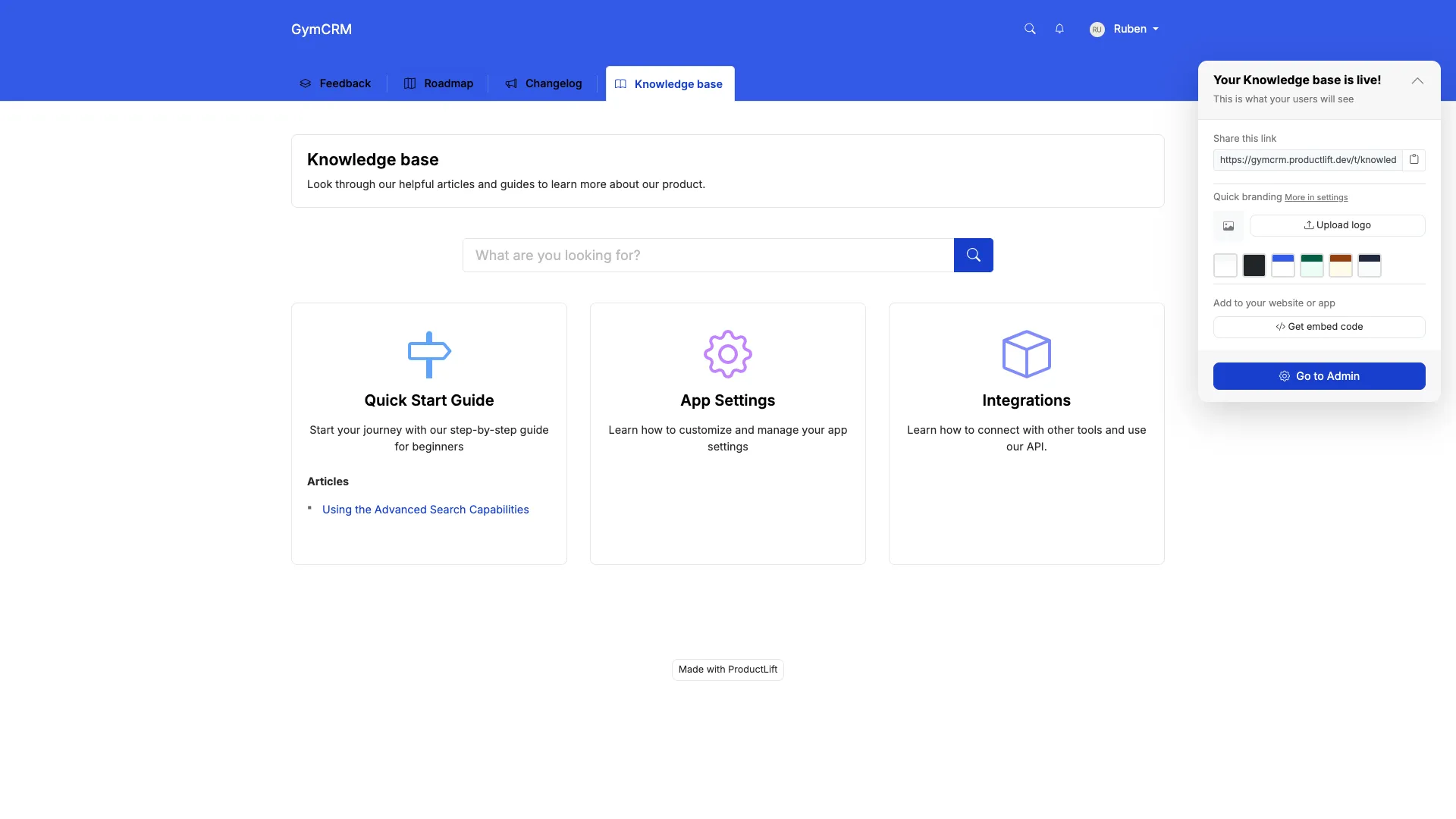
ProductLift knowledge base

What ProductLift's KB Does Well

Where ProductLift Falls Short

Why SaaS Companies Choose ProductLift

The SaaS workflow advantage: Most SaaS teams need 4 tools: feedback (Canny/UserVoice), roadmap (Productboard/Aha), changelog (Beamer/Headway), and KB (Zendesk/Intercom). That's $200-400/mo combined.

ProductLift gives you all four for $14/mo per admin. The workflow is designed for SaaS:

Everything stays connected. When you ship a feature, voters are notified AND you have a KB article ready.

What Users Say

"We were paying $79/mo for Intercom Articles, $79/mo for Canny, and $49/mo for Beamer. ProductLift replaced all three for $14/mo. The KB isn't as fancy as Intercom's, but it's 90% as good for 10% the cost." – Founder, SaaS startup

Pricing

Who should use ProductLift: Early-stage to growth SaaS teams (<$5M ARR) who want feedback, roadmap, changelog, AND documentation in one affordable platform. Perfect if you ship weekly and want everything connected.

Who should look elsewhere: Large enterprises needing advanced KB workflows, or support teams needing deep help desk integration without feedback/roadmap features.

Try ProductLift Free →

2. Zendesk Guide – Best for SaaS Support Teams

⭐ G2 Rating: 4.3/5 | 💰 Starting Price: $55/agent/mo (Suite Team), Guide included

Best for: SaaS support teams already using Zendesk who need tightly integrated help center

What Zendesk Guide Does Well

Why SaaS Companies Choose Zendesk Guide

If you're a growing SaaS company (>$1M ARR) with a dedicated support team already using Zendesk Support, Guide is the obvious choice. The ticket deflection tracking is invaluable—you can prove your KB is reducing support volume.

SaaS-specific win: Content Cues uses AI to analyze ticket trends and tell you which KB articles to create or update. For SaaS teams shipping weekly, this keeps docs relevant.

Why SaaS Companies Avoid Zendesk Guide

Pricing Reality for SaaS Teams

A 5-person SaaS support team pays $275-575/month. You're paying for enterprise help desk, not just KB.

Who should use Zendesk Guide: SaaS companies with dedicated support teams (5+ agents) already using Zendesk Support.

Who should look elsewhere: Early-stage SaaS teams, or anyone not using Zendesk for ticketing.

3. Notion – Best Free Option for SaaS Startups

⭐ G2 Rating: 4.7/5 | 💰 Starting Price: Free (unlimited individuals), $10/user/mo (teams)

Best for: Early-stage SaaS startups needing internal docs + lightweight external KB on a budget

What Notion Does Well

Why SaaS Startups Choose Notion

Early-stage SaaS teams (pre-$100K ARR) love Notion because it's free and flexible. Use it for:

You're basically getting 3 tools in one (internal wiki + public KB + roadmap) for free.

Why SaaS Companies Outgrow Notion

As your SaaS grows, Notion's limitations become painful:

Pricing

Who should use Notion: SaaS startups (<$100K ARR) who need internal docs + lightweight public KB on $0 budget.

Who should look elsewhere: Growing SaaS teams needing analytics, changelog, feedback collection, or handling 200+ articles.

4. Confluence – Best for SaaS Engineering Teams (Internal)

⭐ G2 Rating: 4.1/5 | 💰 Starting Price: Free (10 users), $6.05/user/mo (Standard)

Best for: SaaS engineering teams using Jira who need technical documentation and runbooks

What Confluence Does Well

Why SaaS Engineering Teams Choose Confluence

If your SaaS product team lives in Jira (common for B2B SaaS), Confluence is the natural choice for internal docs:

SaaS-specific win: When you ship a feature, update the Confluence doc and it auto-links to the Jira ticket. Great for internal knowledge.

Why SaaS Companies Avoid Confluence for Customer KB

Pricing for SaaS Teams

A 20-person SaaS product team pays $121-231/mo.

Who should use Confluence: SaaS engineering teams deeply invested in Jira who need internal technical docs.

Who should look elsewhere: Customer-facing KB, non-technical teams, or anyone wanting modern UX.

5. Guru – Best AI Search Across SaaS Stack

⭐ G2 Rating: 4.7/5 | 💰 Starting Price: Free (3 users), $10/user/mo (Starter)

Best for: SaaS teams with knowledge scattered across Notion, Confluence, Slack, Google Drive who need AI to find it all

What Makes Guru Different for SaaS Teams

Guru isn't a traditional KB—it's a knowledge layer that sits on top of your entire SaaS stack:

Why SaaS Teams Choose Guru

SaaS companies move fast. Knowledge ends up everywhere:

Instead of consolidating (which never works), Guru searches across all of them. Perfect for SaaS teams who don't want to change their workflow.

Why SaaS Companies Avoid Guru

Pricing

Who should use Guru: SaaS teams (especially sales/support) with knowledge scattered across 5+ tools who need AI-powered search.

Who should look elsewhere: Customer-facing KB, or teams wanting traditional long-form documentation.

6-10. Specialized KB Solutions for SaaS

Document360 – Best Dedicated KB for Growing SaaS

💰 Price: $199/project/mo (Standard) | ⭐ G2: 4.7/5

Why SaaS companies choose it: Powerful standalone KB without help desk lock-in. Great for SaaS teams ($500K-$5M ARR) who need advanced analytics, multilingual support, and version control but don't want to pay for Zendesk's full suite.

Key SaaS features: API documentation support, version control (critical for SaaS), Markdown support, private/public projects, advanced search analytics.

Why SaaS companies avoid it: $199/mo minimum (steep for early-stage), no changelog integration, no feedback collection, search is good but not AI-powered.


Helpjuice – Analytics-Focused

💰 Price: $120/mo (Starter, 4 users) | ⭐ G2: 4.6/5

Why SaaS companies choose it: If you're obsessed with measuring KB performance and proving ROI to stakeholders. Deep analytics show exactly which articles reduce support load.

Key SaaS features: Track no-result searches (these are your feature gaps), article ratings, ticket deflection metrics, custom branding.

Why SaaS companies avoid it: Dated UI (doesn't match modern SaaS aesthetics), no changelog or roadmap integration, pricing increases with team size.


Stonly – Interactive Guides

💰 Price: $99/mo (Starter) | ⭐ G2: 4.8/5

Why SaaS companies choose it: Instead of static articles, Stonly creates interactive decision trees. Perfect for complex SaaS onboarding ("If you're on Pro plan, click here; if Enterprise, click here").

Key SaaS features: Decision trees, checklists, step-by-step guides, in-app widgets, AI-powered suggestions.

Why SaaS companies avoid it: Not great for traditional documentation or API docs. Requires rethinking your content structure.


Trainual – Employee Onboarding

💰 Price: $250/mo (up to 50 users) | ⭐ G2: 4.7/5

Why SaaS companies choose it: Fast-growing SaaS startups (50-200 employees) need to onboard new hires quickly. Trainual is purpose-built for SOPs and training.

Key SaaS features: Onboarding tracks, quizzes, role-based content, progress tracking, integrates with HR systems.

Why SaaS companies avoid it: Internal-only (no customer KB), overkill if you just need simple wiki.


Slite – Clean Internal Wiki

💰 Price: Free (50 docs), $8/user/mo (Standard) | ⭐ G2: 4.7/5

Why SaaS companies choose it: Simpler, prettier alternative to Confluence for small SaaS teams (<50 people). Ask AI questions about your docs.

Key SaaS features: AI Q&A, clean editor, fast search, Slack integration, modern UI.

Why SaaS companies avoid it: Internal-only, limited at scale (best for <100 employees), no customer-facing option.

11-14. Developer Docs & Open Source for SaaS

ReadMe – Best for API Documentation

💰 Price: $99/mo (Startup) | ⭐ G2: 4.7/5

Why SaaS companies choose it: API-first SaaS products need beautiful, interactive developer docs. ReadMe is the gold standard.

Key SaaS features: Auto-generate docs from OpenAPI spec, live code examples, try-it console (test API calls in the docs), metrics on API usage, changelog integration.

Why SaaS companies avoid it: Specifically for API docs—not a general KB. $99/mo minimum, pricing increases with API calls tracked.

Perfect for: Developer-focused SaaS products (Stripe, Twilio, SendGrid style) where API docs are the primary KB.


GitBook – Docs as Code

💰 Price: Free (1 user), $6.70/user/mo (Plus) | ⭐ G2: 4.7/5

Why SaaS companies choose it: Developer-focused SaaS teams who want to manage docs like code. Git sync means docs live in your repo alongside code.

Key SaaS features: Git sync (docs as code), OpenAPI spec import, versioning (critical for SaaS), code blocks with syntax highlighting, public/private spaces.

Why SaaS companies avoid it: Better for technical docs than support KB, markdown-first (not WYSIWYG for non-technical writers).


BookStack – Best Open Source

💰 Price: Free (self-hosted) | ⭐ GitHub: 13K+ stars

Why SaaS companies choose it: Technical SaaS teams who want complete control, data sovereignty, and $0 licensing cost. Popular in privacy-focused SaaS.

Key SaaS features: Books/chapters/pages hierarchy, Markdown & WYSIWYG, LDAP/SAML SSO, API, full control over data.

Why SaaS companies avoid it: Requires DevOps time to maintain (server, backups, security), basic search (no AI), you're responsible for uptime.


Nuclino – Lightweight Team Wiki

💰 Price: Free (unlimited users, 50 items), $6/user/mo (Standard) | ⭐ G2: 4.7/5

Why SaaS companies choose it: Small SaaS teams (5-20 people) wanting a minimal, fast internal wiki without Notion's complexity.

Key SaaS features: Real-time collaboration, graph view of content connections, embeds, Markdown, clean design, affordable.

Why SaaS companies avoid it: No customer-facing option, basic permissions, no workflows or approvals, limited at scale.

Feature Comparison Table (SaaS Focus)

Here's how the top tools compare on SaaS-critical features:

Feature ProductLift Zendesk Notion Document360 ReadMe
Changelog Integration✅ Built-in
Feedback Collection✅ Built-in
Public Roadmap Link✅ Built-in⚠️ Manual
API Documentation⚠️ Basic⚠️ Basic⚠️ Basic✅ Good✅ Excellent
AI Search⚠️ Basic
Version Control
Multilingual✅ (22)
Analytics (No-Result Searches)
Fast Editing (No Workflows)⚠️ Workflows
API Access
White-Label⚠️ Limited

Pricing Reality for SaaS Teams

Forget marketing prices. Here's what these tools cost at typical SaaS team sizes:

Tool Early Stage
(3-5 people)
Growth
(10-15 people)
Scale
(30-50 people)
Best for SaaS Stage
ProductLift$42/mo$140/mo$420/moEarly to growth SaaS
NotionFree-$50$150/mo$500/moPre-revenue to early
Zendesk Guide$275/mo$825/mo$2,750/moScale+ (>$1M ARR)
Document360$199/mo$199/mo$399/moGrowth to scale SaaS
ReadMe (API docs)$99/mo$99/mo$299+/moAPI-first SaaS
ConfluenceFree-$30$91/mo$303/moInternal docs only
GitBookFree-$20$67/mo$201/moDev-focused SaaS
BookStackFree*Free*Free*Technical SaaS teams

*BookStack is free software but requires server costs ($10-50/mo) and DevOps time to maintain.

SaaS Reality: Most growing SaaS teams need KB + changelog + feedback tools. Buying separately costs $200-500/mo. All-in-one (ProductLift) costs $42-420/mo depending on team size.

Which KB Should You Choose? (SaaS Decision Guide)

🚀 You're a SaaS Startup (<$100K ARR)

Budget: $0-50/mo

Choose Notion (free) if you just need internal docs + lightweight public KB and can live without analytics or changelog.

Choose ProductLift ($42/mo for 3 admins) if you want KB + feedback + roadmap + changelog in one tool. Perfect for shipping weekly and needing everything connected.

Choose BookStack (free) if you're technical, want complete control, and can self-host.

📈 You're Scaling SaaS ($100K-$1M ARR)

Budget: $100-300/mo

Choose ProductLift ($140/mo for 10 admins) if you need KB + feedback + roadmap + changelog and want to avoid tool sprawl. Scales with you without pricing anxiety.

Choose Document360 ($199/mo) if you want a powerful standalone KB and already have separate feedback/changelog tools you're happy with.

Choose ReadMe ($99/mo) if you're API-first SaaS and developer docs are your primary KB need.

Choose GitBook ($67/mo for 10 users) if your engineering team wants docs-as-code with Git sync.

🏢 You're Enterprise SaaS (>$1M ARR)

Budget: $300-1,000+/mo

Choose Zendesk Guide ($825+ for 15 agents) if you have a dedicated support team already using Zendesk and need enterprise help desk integration.

Choose Document360 ($399/mo for multiple projects) if you need advanced workflows, approvals, and separate KBs for different products/audiences.

Choose ReadMe (Custom pricing) if you're API-heavy SaaS (like Stripe, Twilio) and developer docs are mission-critical.

🎯 Specific SaaS Scenarios

API-first product (developers are your users): ReadMe > GitBook > Document360

Ship features weekly, need changelog integration: ProductLift > ReadMe (API docs only)

Need feedback + roadmap + KB in one: ProductLift (only option)

Already using Zendesk for ticketing: Zendesk Guide (obvious choice)

Engineering team lives in Jira: Confluence (internal docs) + separate customer KB

International SaaS (multilingual required): ProductLift (22 langs) > Zendesk > Document360

Bootstrapped SaaS on tight budget: Notion (free) > ProductLift ($42) > GitBook ($20)

SaaS-Specific KB Questions

What KB features do SaaS companies need most?

Fast editing (you ship weekly, docs must keep up), AI/semantic search (customers don't know your jargon), analytics on no-result searches (these reveal feature gaps), changelog integration (ship feature → auto-create KB article), and feedback loops ("article not helpful?" → submit feature request). Generic KB tools miss these SaaS workflows.

Should my KB connect to my product roadmap?

Yes, if you're SaaS. Customers constantly ask "Will you add X?" Being able to link from a KB article to your public roadmap is powerful. Even better: ProductLift lets customers search KB, not find an answer, then submit a feature request right there. This feedback loop is what SaaS teams need but traditional KBs don't offer.

How do SaaS companies keep KB updated with weekly releases?

Three strategies: (1) Use tools with changelog integration like ProductLift or ReadMe—ship feature → auto-generate or link KB article. (2) Make KB updates part of your definition of done: feature isn't "shipped" until docs are updated. (3) Track no-result searches weekly—these are content gaps. SaaS teams who ship weekly need fast editing workflows, not approval processes that slow you down.

Do I need separate tools for KB, changelog, and feedback?

Most SaaS companies use 3-4 separate tools and pay $200-500/mo combined: KB (Zendesk/Intercom $50-200), changelog (Beamer/Headway $49-100), feedback (Canny/UserVoice $19-200+), roadmap (Productboard/Aha $100+). ProductLift combines all four for $42-420/mo depending on team size. The integrated workflow (feedback → roadmap → changelog → KB) saves hours of manual work weekly.

What's the best KB for API-first SaaS products?

ReadMe is the gold standard for API documentation. Auto-generates docs from OpenAPI spec, has try-it console for live API testing, versioning for v1/v2/v3, and tracks API usage in the docs. GitBook is a close second for developer-focused teams wanting Git sync (docs-as-code). Document360 works if you need both API docs and support articles. Generic KBs (Notion, Confluence) are not built for API docs.

How important is search quality for SaaS knowledge bases?

Critical. Customers don't know your internal jargon. AI/semantic search understands intent—"How do I delete my account" finds the article even if titled "Account Removal Process." Tools with AI search: Guru, Zendesk Guide, Document360, ReadMe. Tools without: Notion, Confluence (basic keyword), BookStack (keyword only). Bad search = customers give up after one query = support tickets increase = your KB ROI is negative.

Should SaaS startups use Notion for their knowledge base?

Notion is great for pre-$100K ARR SaaS startups: free, flexible, works for internal docs + lightweight public KB. BUT you'll outgrow it as you scale: no analytics (can't track what customers search), no changelog (need separate tool), performance issues with 500+ pages, no feedback collection. Most SaaS companies switch from Notion to dedicated KB around $100K-500K ARR when support volume increases.

What if my SaaS product has multiple user types (end users vs admins)?

You need permission-based content or separate KBs. ProductLift and Document360 let you mark articles as public vs private. Zendesk Guide can restrict by user role (logged-in customers, admins, agents). Notion lets you control sharing per page. Confluence has space-level permissions. For complex needs (separate KB per customer type), Document360's multi-project setup or custom-built solutions work best.

How do I prove my KB is reducing support tickets?

Measure ticket deflection: (views / (views + ticket submits)) × 100. If 1,000 people read KB articles and 100 submit tickets, deflection is 91%. Tools with built-in deflection tracking: Zendesk Guide (best), Helpjuice, Document360. DIY approach: Compare support volume before/after KB launch, track searches with no results (content gaps), measure "Was this helpful?" ratings. Typical SaaS KB deflects 20-40% of tickets when done right.

Can I migrate from one KB to another without losing SEO?

Yes, with proper redirects. Export articles from old KB (CSV/API), import to new KB with same URL structure or set up 301 redirects (old-kb.com/article-1 → new-kb.com/article-1). ProductLift, Document360, Zendesk all support custom domains and URL structures. Budget 4-8 hours for 100-200 article migration. SEO tip: Keep same titles/headings, update internal links, submit new sitemap to Google. Most SaaS companies see no SEO drop if redirects are done correctly.

Related Comparison Guides

Explore more tool comparisons to find the right software for your team:

Browse all comparison guides

Need KB + Feedback + Roadmap in One Tool?

ProductLift is built for SaaS teams who ship weekly. Combine customer feedback, roadmap, changelog, and knowledge base in one affordable platform.

No credit card required · 14-day free trial · Free migration from existing KB · Built for SaaS workflows