 Ruben Buijs
Download this RICE PPT template to explain your feature priorities and tradeoffs.
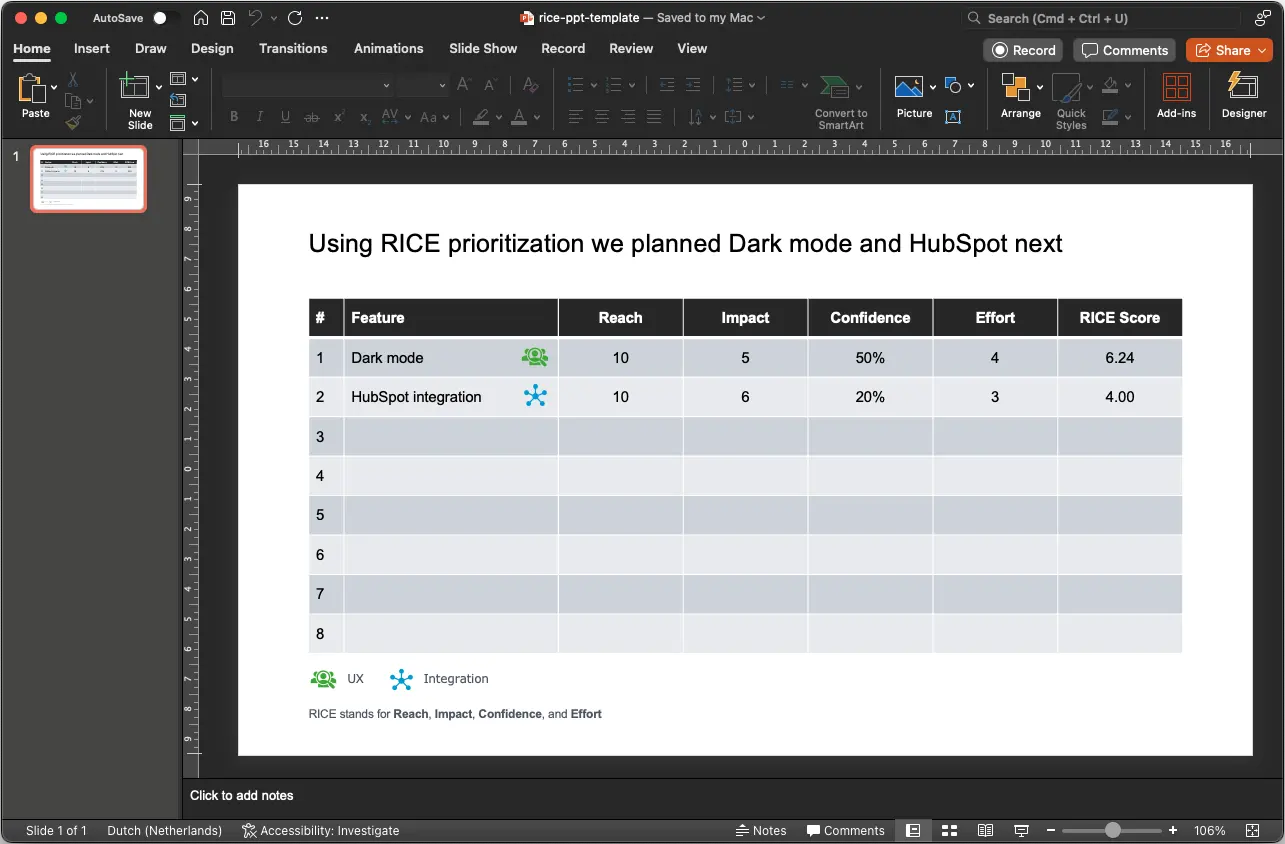
👉 Download the RICE PowerPoint template
What is RICE Prioritization?
RICE is a prioritization framework that stands for Reach, Impact, Confidence, and Effort. Product teams use it to score and rank feature requests, bug fixes, and initiatives so the highest value work rises to the top. You can calculate your own scores with our RICE Calculator.
For a more detailed explanation, check out: Understanding RICE Prioritization
When to Present RICE Scores
A RICE scoring spreadsheet is useful on its own, but a well structured presentation turns raw numbers into a persuasive story. Here are the situations where a RICE PowerPoint deck adds the most value:
- Sprint planning: Share the latest RICE rankings with engineers so the team commits to the highest scoring items first. A quick five slide deck keeps the meeting focused.
- Stakeholder reviews: Product managers often need to explain why one feature was chosen over another. Showing the RICE breakdown gives stakeholders a transparent, data driven rationale.
- Quarterly roadmap alignment: When leadership asks what the next quarter looks like, a RICE presentation connects individual features to business outcomes. It also highlights where confidence scores are low and more research is needed.
- Board meetings: Executives care about impact and reach, not implementation details. A RICE deck lets you frame priorities in terms the board understands: how many users benefit and how much revenue is at stake.
- Cross functional workshops: When design, engineering, and customer success sit down together to prioritize feature requests, walking through a RICE deck aligns everyone on the same scoring criteria before discussion begins.
About the RICE PowerPoint Template
Our PowerPoint RICE prioritization template is designed to help you:
- Visualize Your Priorities: Present your RICE scores in a clear and engaging format.
- Customize Presentations: Tailor slides to fit your audience and context.
- Communicate Effectively: Share your prioritization decisions with stakeholders.
Prefer a different format? Excel version | Google Sheets version | All RICE templates
Slide by Slide Walkthrough
A strong RICE presentation follows a logical arc. Here is what each slide should contain:
Slide 1: Title Slide
State the meeting purpose, the date, and the time period the scores cover. Example: "Q3 Feature Prioritization: RICE Results." Keep it clean and include your company logo.
Slide 2: Framework Overview
Briefly define the four RICE components so everyone in the room shares the same understanding:
- Reach: How many users or accounts will this affect in a given time period?
- Impact: How much will this move the needle for each user? (Scored on a scale from 0.25 to 3.)
- Confidence: How certain are we about our estimates? (Expressed as a percentage.)
- Effort: How many person months will this take to build?
If your audience already knows how RICE works, you can skip this slide or leave it as an appendix.
Slide 3: Scoring Criteria
Show the specific scales your team agreed on. For example, define what a "3" means for Impact versus a "1." This slide prevents debates about methodology during the review itself.
Slide 4: Ranked Features Table
This is the core of the deck. Display a table with columns for Feature Name, Reach, Impact, Confidence, Effort, and the final RICE Score. Sort from highest to lowest. Use conditional formatting or color coding so the top items stand out immediately.
Slide 5: Visual Chart
A horizontal bar chart or bubble chart makes the ranking intuitive at a glance. Plot features on one axis and RICE scores on the other. Stakeholders who skim the deck will absorb this slide fastest.
Slide 6: Deep Dive on Top 3
For the three highest scoring features, add a slide each (or combine them) with a short description, the score breakdown, and any relevant customer quotes or data points.
Slide 7: What We Are Not Building (and Why)
Address the features that scored low. This shows that the process is rigorous and prevents questions like "but what about Feature X?" later.
Slide 8: Recommended Next Steps
Close with clear actions: which features move into the next sprint, which need further research (low confidence), and which are deprioritized. Include owners and timelines if available.
How to Use the RICE Prioritization PPT Template
- Download the PowerPoint file from the link above.
- Open the file in Microsoft PowerPoint.
- Calculate your RICE scores using the RICE Calculator or an Excel spreadsheet.
- Input your initiatives, scores, and any additional information into the slides.
- Customize the slides to match your branding and style.
- Use charts and visuals to enhance understanding.
- Present your prioritization to your team or stakeholders.
Presentation Tips: Explaining RICE to Non Technical Stakeholders
Not everyone in the room will be familiar with prioritization frameworks. These tips help you communicate RICE scores clearly:
- Lead with business impact. Instead of opening with the formula, start with the outcome: "We scored 23 feature requests and the top three will increase retention by an estimated 15%." That grabs attention before you explain the method.
- Use visual charts over raw tables. A bar chart sorted by RICE score is far easier to digest than a spreadsheet full of numbers. Reserve the detailed table for the appendix.
- Keep the deck to 10 slides or fewer. Prioritization reviews should be concise. If you need more than 10 slides, the meeting is probably trying to cover too much scope at once.
- Explain confidence honestly. Stakeholders respect transparency. If a high scoring feature has only 50% confidence, say so and explain what research would raise that number.
- Anticipate "why not" questions. Executives will ask about their pet features. Having a slide that explicitly covers deprioritized items (with scores) saves time and reduces friction.
- Connect scores to the roadmap. Show how the RICE results feed into your product roadmap. Prioritization without execution context feels abstract.
Customizing the Template for Different Audiences
The same RICE data can be presented in very different ways depending on who is in the room.
For engineering teams: Focus on effort estimates and confidence levels. Engineers want to know how realistic the scope is and whether the team has enough information to start building. Include technical details and link to specs where available.
For executives and board members: Emphasize reach and impact. Strip out implementation complexity and instead highlight revenue potential, user growth, and strategic alignment. Use larger fonts, fewer slides, and more charts.
For customer success teams: Highlight which features address the most common customer complaints or requests. Include customer quotes or ticket counts alongside the RICE scores. This audience cares about reach in terms of support volume reduction and satisfaction improvement.
For external stakeholders or customers: If you share a version of your roadmap publicly, simplify the RICE output into a "what's coming next" narrative. You do not need to expose raw scores. Instead, frame the top items as "most requested" or "highest impact."
Real Example: Presenting 5 Feature Requests
Let's walk through how a fictional SaaS team might present their RICE results. They have scored five feature requests using the RICE framework:
| Feature | Reach | Impact | Confidence | Effort | RICE Score |
|---|---|---|---|---|---|
| Slack integration | 3,000 users/qtr | 2 | 90% | 3 person months | 1,800 |
| Dark mode | 5,000 users/qtr | 1 | 80% | 4 person months | 1,000 |
| Advanced reporting | 1,200 users/qtr | 3 | 70% | 5 person months | 504 |
| Bulk CSV export | 800 users/qtr | 2 | 95% | 1 person month | 1,520 |
| Custom branding | 400 users/qtr | 2 | 60% | 6 person months | 80 |
Here is how the product manager would present these results:
"Our top priority is Slack integration." It reaches 3,000 users per quarter with a high confidence score of 90%. The effort is moderate at three person months, but the combination of reach and impact makes this the clear winner.
"Bulk CSV export is our quick win." Despite lower reach, the effort is just one person month and confidence is 95%. This is a strong candidate for the current sprint because it delivers value fast.
"Dark mode has high reach but lower impact." It scores well overall but sits behind the top two. We recommend scheduling it for next quarter.
"Advanced reporting needs more research." The impact is high but confidence is only 70%. Before committing five person months, the team should run user interviews to validate demand. This drops to the backlog with a research task attached.
"Custom branding is deprioritized." Low reach, low confidence, and high effort produce the lowest score. Unless new data emerges, this stays off the roadmap.
This kind of narrative turns a table of numbers into a clear, actionable recommendation that any stakeholder can follow.
Looking for a Long-Term Solution?
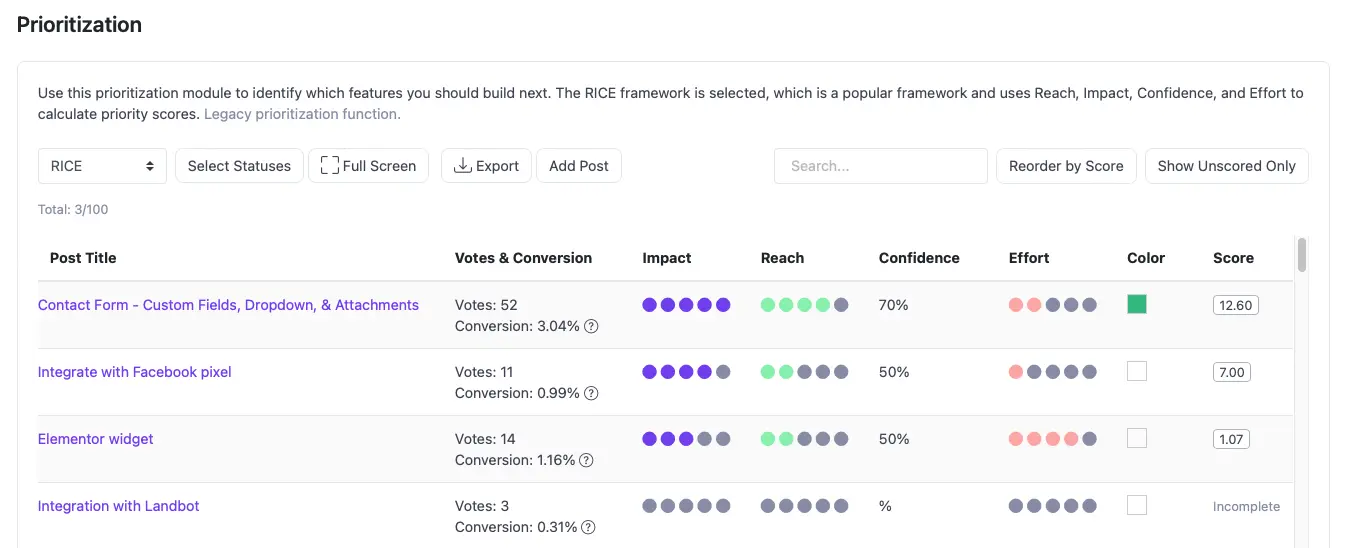
PowerPoint explains a finished decision. It does not keep the score connected to the request after the meeting. ProductLift's RICE prioritization workflow keeps the underlying work together:
- Live Requests: Keep RICE fields attached to each feature request
- Customer Evidence: Review votes, comments, segments, MRR, and LTV while deciding
- Roadmap Workflow: Move selected requests into delivery without rebuilding the list
- Voter Updates: Notify voters when a request changes status or ships
RICE Calculator Tool
To calculate the scores to enter in the PPT file, try this online RICE Calculator tool: RICE Calculator
Whether you choose Excel, Google Sheets, PowerPoint, Notion, or Miro, our RICE templates are here to help you make informed, objective decisions about your product features. And if you're looking for a solution that grows with your team and product, ProductLift offers the tools you need for long term success.
Keep the deck connected to delivery: Start a 14-day ProductLift trial when your RICE decision needs to stay attached to customer feedback and roadmap status. No credit card is required.
Learn More About Prioritization
- RICE Prioritization Guide: How RICE works with examples
- RICE vs ICE: Explain why you chose a four-factor or three-factor scoring method
- How to Prioritize Feature Requests: A complete guide to choosing what to build next
- All 10 Prioritization Frameworks: Compare RICE, ICE, MoSCoW and more
- Framework Comparison: RICE vs ICE vs MoSCoW side by side
- Feature Prioritization Tool: Keep the decisions behind your presentation connected to live requests
Last updated on Oct 3, 2026