Guide

Set Up Your Feedback Board in 10 Minutes

From zero to a fully branded, embedded feedback board in under ten minutes. This guide walks you through every step so you can start collecting customer votes today.

4.8 on G2
6,000+ teams
8 min read
Aaron Dye Timothy M. Ben Marco Chris R.
from 124+ reviews
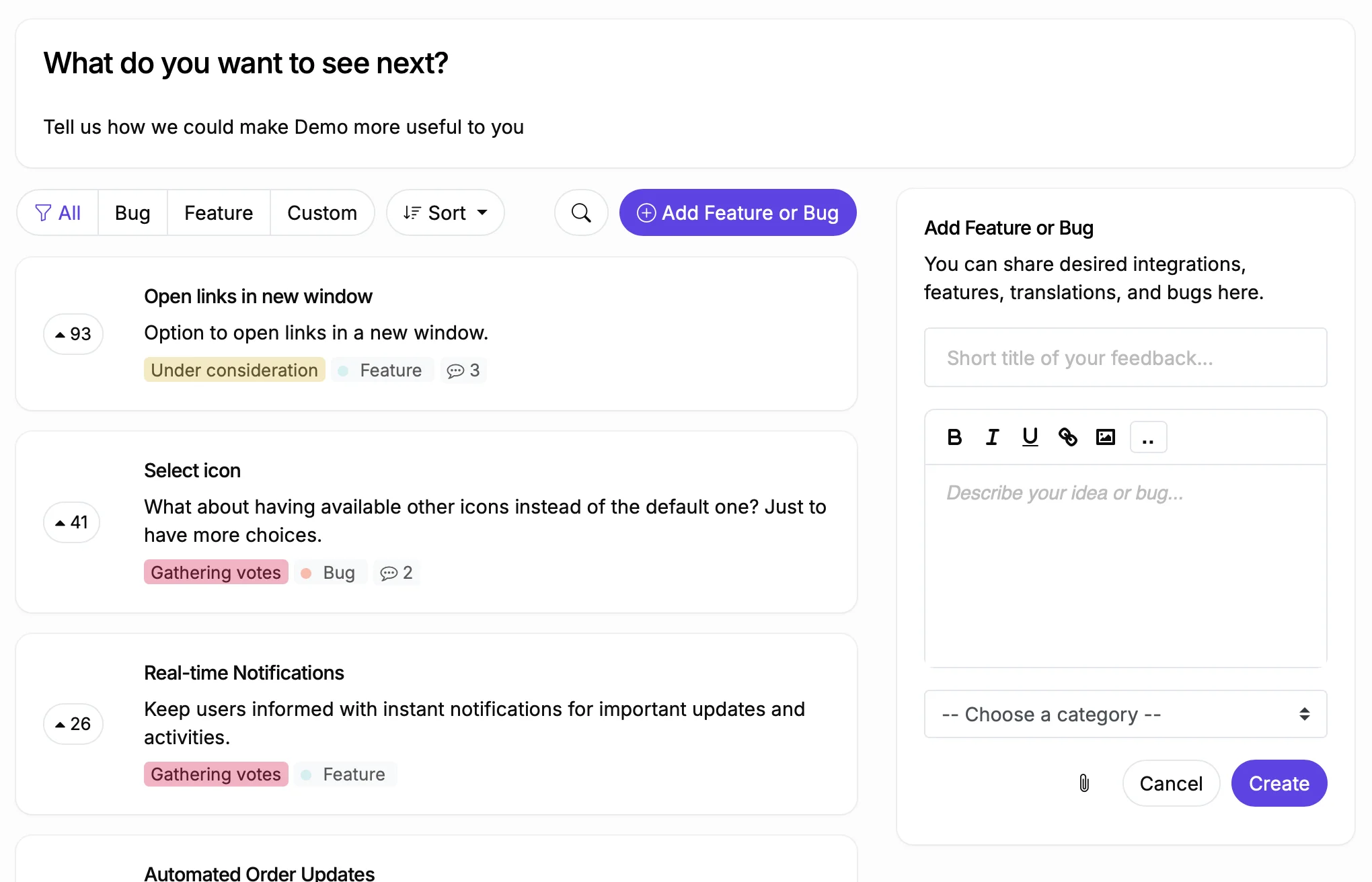
ProductLift feedback board with feature requests and voting

Before You Start: Think About Your Board Structure

ProductLift supports four board types: Feedback, Roadmap, Changelog, and Knowledge Base. Most teams start with a Feedback board to collect feature requests, then add a Roadmap board once they have enough votes to prioritize.

You can create multiple boards of the same type. For example, one public Feedback board for customers and one private Feedback board for internal ideas. Or separate Feedback boards per product if you run a multi-product company.

The steps below focus on your first Feedback board. Once that is live and collecting votes, you can add Roadmap, Changelog, and Knowledge Base boards to complete the full product lifecycle.

8 Steps to Your First Board

Follow these steps in order. Most teams finish in under 10 minutes.

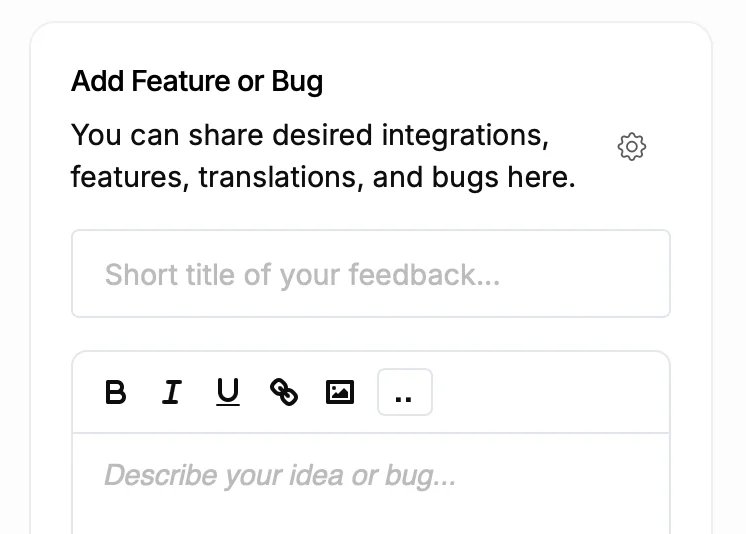
Creating a new feedback board
1

1. Create Your First Board

After signing up, click "Add Board" and choose Feedback. Give it a name like "Feature Requests" or "Ideas." Choose a URL slug. Your board is live immediately at yourproject.productlift.dev/your-slug.

2

2. Configure Your Statuses

Statuses tell users where their request stands. The defaults (Gathering Votes, Under Consideration) work well for most teams. Add statuses like Planned, In Progress, and Shipped when you are ready. You can also create Unlisted statuses to hide declined or duplicate posts from the main view without deleting them.

3

3. Set Up Categories

Categories help users browse and help you filter. Create 4 to 8 categories based on your product areas. Examples: Dashboard, Integrations, Mobile App, Reporting. Too many categories slow users down. Too few make filtering useless. You can always add more later.

4

4. Choose Your Visibility Settings

Public boards are visible to anyone with the link. Members Only requires users to log in before seeing posts. Group-Restricted limits access to specific User Groups (useful for enterprise clients or beta testers). Admin Only is for internal boards your team uses privately. Most teams start with Public.

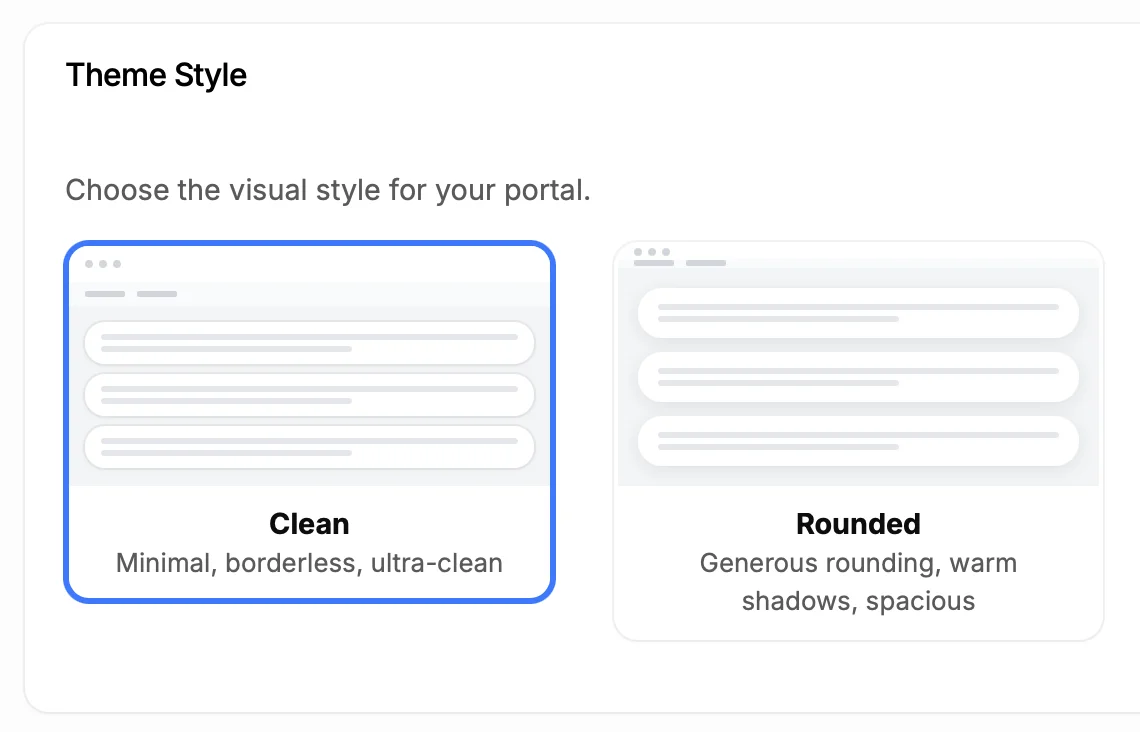
Theme customization with color picker and style options
5

5. Add Your Logo and Colors

Upload your logo and favicon. Pick a pre-built theme or let ProductLift extract colors from a screenshot of your website. For full control, use the Custom CSS/SCSS editor to override any element. The goal is to make the board look like part of your product, not a third party tool.

6

6. Embed on Your Site or Use a Custom Domain

Three options: embed with a JavaScript snippet (works with any website), use an iframe, or set up a custom domain like feedback.yoursite.com with a CNAME record and automatic SSL. Embedding is the fastest. Custom domain looks the most professional. Both work with SSO.

7

7. Invite Your Team

Add team members as Admins or Moderators. Admins can change settings and manage boards. Moderators can manage posts, comments, and statuses. Set up Slack integration so your team gets notified about new feedback without checking the dashboard constantly.

8

8. Import Existing Feedback

Have feature requests in a spreadsheet, Trello board, or another tool? Use ProductLift's CSV/Excel import to bring up to 10,000 posts at once. Column auto-detection maps your data automatically. Duplicate handling prevents repeated entries. This gives your board instant content so new visitors see an active community.

What to Set Up Next

Once your feedback board is collecting votes, extend it with these features.

Add a Roadmap Board

Create a Roadmap board with columns like Now, Next, and Later. Drag feedback items to the roadmap when you commit to building them. Voters get notified automatically.

Roadmap Guide

Set Up Single Sign-On

Use ProductLiftIdentify() with your JavaScript SDK or JWT server-side auth so users log in automatically. No separate accounts, no friction. SSO also syncs user data like plan type and MRR.

SSO Documentation

Connect Stripe

Link your Stripe account to see MRR, LTV, plan name, and subscription status for every voter. Sort feedback by Total Voter MRR to prioritize what your highest value customers want.

Stripe Integration

Enable AI Features

Turn on AI Auto-Moderation to catch spam and duplicates. Define your Product Vision to unlock AI Prioritization scoring. Enable AI Writing Improvements to help users submit clearer feedback.

AI Features

Create a Changelog Board

When you ship features, announce them in your changelog. Use the What's New Widget to show a notification popup inside your app. Voters who requested the feature get notified automatically.

Changelog Guide

Build Your Knowledge Base

Create help articles and documentation. Use AI to generate KB articles from shipped changelog entries. Organize with unlimited topics and subtopics. Embed alongside your feedback board.

Knowledge Base

Common Mistakes to Avoid

Too many categories: Start with 4 to 8 categories. You can always add more. Users who face 25 category options abandon the submission form.

Too many statuses: Start with the defaults. Add statuses as your workflow matures. A new board with 12 statuses confuses both your team and your users.

Not importing existing feedback: An empty board discourages participation. Import your backlog from spreadsheets, Trello, or another tool. Even 20 seed posts make the board feel alive.

Hiding the board: A feedback board buried three clicks deep in your app will collect zero votes. Put it in your main navigation, your onboarding emails, and your support auto-replies. See our promotion guide for 10 specific strategies.

Not responding to feedback: Users who submit feedback and never hear back stop participating. Change the status when you make a decision. Even "Won't Do" with an explanation is better than silence.

What Teams Say After Getting Started

Sebastian F.

Sebastian F.

Entrepreneur

This app will help you connect with your users and gather feedback like never before. The UI is clean and focused. The different pages and forms can be fully customized. Ruben is an amazing developer and entrepreneur with a proven track record. ProductLift is going places and you should get onboard.
Aaron Dye

Aaron Dye

An excellent product with equally excellent support! Everything just works, and when I had questions, the team was incredibly responsive.
Timothy M.

Timothy M.

Product Manager

This tool is literally a needle in a haystack. I was using Frill, and this doesn't even compare. The user interface, the way it lays out — so amazing. Also amazing support team!
Ben

Ben

Product Owner

Helped us quickly move away from our antiquated spreadsheet to a user-interactive system. User feedback is now collected in real-time. Support has been super speedy!
Marco

Marco

Based in Europe, ideal for privacy-conscious customer interaction. Constant improvements by Ruben together with thorough support make ProductLift a solid and future-proof choice.
Chris R.

Chris R.

Founder

By far the most customizable of all the feedback tools and much better than Feedbear. Developer is super responsive and support has been great. Highly recommend!

Getting Started FAQ

Do I need a developer to set up ProductLift?

No. The basic setup (create board, configure statuses, add branding, share link) requires zero code. Embedding on your website uses a simple copy-paste snippet. Only SSO integration requires a developer to add the ProductLiftIdentify() call to your app.

Can I change my board structure after launching?

Yes. You can add, rename, and reorder statuses, categories, and boards at any time. Existing posts keep their current status. Nothing breaks when you restructure.

How do I migrate from Canny, UserVoice, or another tool?

Export your data from the other tool as CSV, then use ProductLift's import feature. Column auto-detection maps fields automatically. Votes, comments, and user data transfer over. Our support team can help with complex migrations.

What is the difference between Public and Members Only boards?

Public boards are visible to anyone with the URL. Visitors can browse without logging in, though they need to log in (or use anonymous voting if enabled) to vote. Members Only boards require authentication before any content is visible. Use Members Only when your feedback is sensitive or when you only want paying customers to participate.

Can I run multiple boards for different products?

Yes. Three approaches: create a separate ProductLift project per product (separate portals and URLs), create multiple boards within one project (shared user base), or use categories within a single board to organize by product. Most multi-product teams use separate boards within one project.

Is there a free trial?

Yes. 14-day free trial with full access to every feature. No credit card required. Plans start at $19/month billed annually with unlimited voters on every plan.

Build Your Board in 10 Minutes

Join 6,000+ product teams collecting feedback and shipping features customers actually want.

No credit card required · 14-day free trial · No developer needed · Cancel anytime