Knowledge Base Software That Cuts Support Tickets in Half

Create organized documentation with AI-powered content creation and intelligent search. Users find answers on their own instead of opening tickets. Set up your knowledge base in minutes.

3,051 product teams
4.8 on G2
AI-powered content

Aaron Dye Timothy M. Ben Marco Chris R.
from 124+ reviews
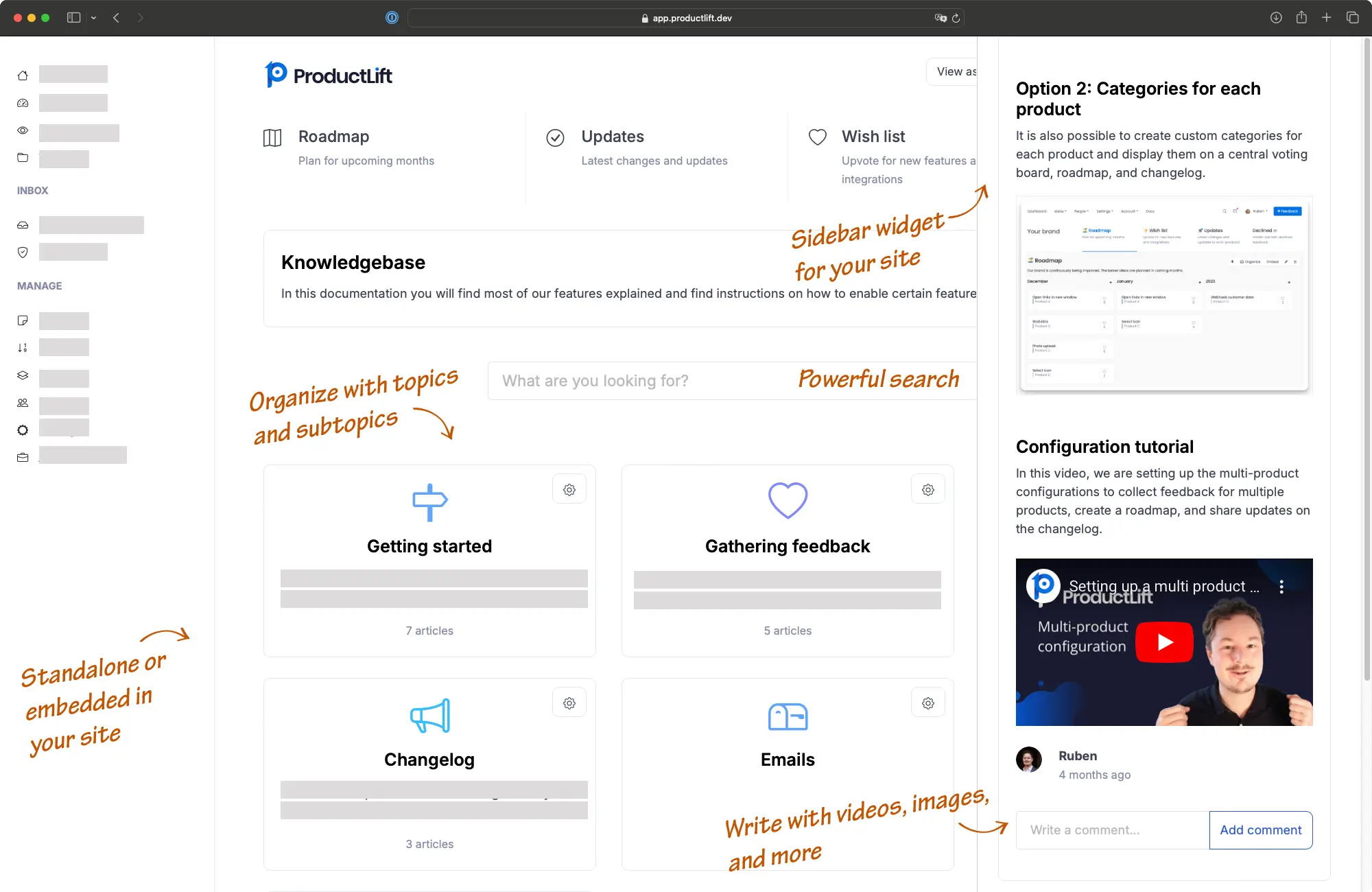
ProductLift knowledge base with organized articles and search

What Happens Without a Knowledge Base

Before

With ProductLift

Same questions answered by support 50 times a month
Users find the answer in your knowledge base first
New users confused during onboarding, asking basic questions
Structured guides walk users through every step
Documentation scattered across Google Docs, Notion, PDFs
Everything searchable in one organized place
Support team overwhelmed, response times growing
Fewer tickets, team focuses on complex issues
Writing documentation takes hours of editing and formatting
AI helps write and improve articles in minutes

How It Works

From blank page to published knowledge base in three steps

1

Create and organize content

Use the WYSIWYG editor to write articles. AI helps rewrite and improve your content. Organize with unlimited topics and subtopics for any documentation structure.

2

Embed on your site

Paste an iframe or JavaScript snippet into any webpage. Or host on a custom subdomain like help.yoursite.com. Match your brand with custom colors, fonts, and layout.

3

Users find answers on their own

AI-powered search helps users find the right article instantly. Track which articles are most viewed and where users still need help.

Everything You Need in Knowledge Base Software

AI Content Creation

AI rewrites and improves articles so any team member can create polished documentation without extensive editing.

Unlimited Hierarchy

Create unlimited levels of topics and subtopics. Organize complex documentation structures however makes sense for your users.

AI-Powered Search

Users find what they need instantly with intelligent search that understands intent, not just keywords.

Rich Content Editor

WYSIWYG editor with support for images, Loom videos, tables, code blocks, and file attachments like PDFs and spreadsheets.

Analytics and Insights

Track article views, search queries, and user engagement. Identify gaps in your documentation where users still need help.

Embed Anywhere

Add your knowledge base as an iframe, sidebar widget, or hosted page on your domain. Works with any website, CMS, or app.

See the Knowledge Base in Action

This is a live ProductLift knowledge base embedded on this page. Try searching for an article.

Other Demo Options

Sidebar Widget Demo

See how the knowledge base works as a sidebar widget, letting users access help without leaving the current page.

Try Sidebar Widget

Standalone Page Demo

View the full standalone knowledge base on its own page, hosted on a custom subdomain.

View Standalone Demo

3,051

Product teams using ProductLift

4.8

Average rating on G2

AI

Powered content creation and search

Trusted by Product Teams Worldwide

Sebastian F.

Sebastian F.

Entrepreneur

This app will help you connect with your users and gather feedback like never before. The UI is clean and focused. The different pages and forms can be fully customized. Ruben is an amazing developer and entrepreneur with a proven track record. ProductLift is going places and you should get onboard.
Aaron Dye

Aaron Dye

An excellent product with equally excellent support! Everything just works, and when I had questions, the team was incredibly responsive.
Timothy M.

Timothy M.

Product Manager

This tool is literally a needle in a haystack. I was using Frill, and this doesn't even compare. The user interface, the way it lays out — so amazing. Also amazing support team!
Ben

Ben

Product Owner

Helped us quickly move away from our antiquated spreadsheet to a user-interactive system. User feedback is now collected in real-time. Support has been super speedy!
Marco

Marco

Based in Europe, ideal for privacy-conscious customer interaction. Constant improvements by Ruben together with thorough support make ProductLift a solid and future-proof choice.
Chris R.

Chris R.

Founder

By far the most customizable of all the feedback tools and much better than Feedbear. Developer is super responsive and support has been great. Highly recommend!

Who Uses Knowledge Base Software

SaaS Product Teams

Reduce support tickets with self-service documentation. Onboard new users faster with structured guides. Track which articles need updating based on user engagement.

E-commerce Platforms

Document shipping policies, return processes, and product guides. Customers find answers without contacting support, reducing response times during peak seasons.

EdTech and Course Platforms

Organize learning materials, FAQs, and platform guides in one searchable place. Reduce the same onboarding questions from every new cohort.

Internal Team Documentation

Centralize SOPs, onboarding guides, and process documentation. New hires find answers without interrupting colleagues. Keep institutional knowledge accessible.

Part of a Complete Product Suite

Your knowledge base works alongside feedback boards, roadmaps, and changelogs in one platform. Users find documentation, request features, and track updates without leaving your site.

  • Knowledge base articles can link to related feature requests
  • Changelog entries reference documentation for new features
  • One platform, one embed, complete product communication

Part of a Complete Product Suite

Works With All Popular Platforms

Embed your knowledge base on any website or app

WordPress

Add a knowledge base to any WordPress site with a simple embed code.

WordPress KB

Shopify

Add self-service documentation to your Shopify store.

Shopify KB

Webflow

Embed a knowledge base on your Webflow site with zero code.

Webflow KB

All Platforms

View all 35+ platform integrations including Wix, Squarespace, and more.

View All Platforms

Most knowledge bases are dumping grounds for articles nobody reads. The problem is not the content. It is discoverability and maintenance.

ProductLift uses AI to help you write better articles faster, and AI-powered search to help users find the right answer instantly. Combined with analytics that show you where your documentation has gaps, you build a knowledge base that actually reduces support load. That's why over 3,000 product teams use ProductLift.

Ruben Buijs

Ruben Buijs

Founder of ProductLift

Knowledge Base Software FAQ

How do I organize my knowledge base documentation?

Create unlimited topics with unlimited depth (subtopics). Drag and drop to reorder. Your structure can be as simple as a flat list of articles or as complex as a multi-level documentation hierarchy.

Can AI help me write knowledge base articles?

Yes. AI can rewrite and improve your drafts, making it easy for any team member to create polished documentation without extensive editing. Write a rough draft and let AI polish it.

How do I embed the knowledge base on my site?

Paste a small iframe or JavaScript snippet into any webpage, or host your knowledge base on a custom subdomain like help.yoursite.com. Works with WordPress, Shopify, Webflow, or any website.

Can I attach files to articles?

Yes. Attach PDFs, Excel files, and other documents. Embed Loom videos, add tables, code blocks, and images. The WYSIWYG editor supports rich content formatting.

Can the knowledge base be private?

Yes. Make your knowledge base public for all visitors or restrict access to authenticated users. Useful for internal team documentation or customer-only help centers.

How do I track what users are searching for?

Analytics show you which articles are most viewed, which search queries return no results, and where users drop off. This helps you identify documentation gaps and prioritize new content.

Can I customize the appearance?

Full customization for colors, fonts, and layout. White-label branding removes all ProductLift references. Use your own domain for a fully branded experience.

Is there a free trial?

Yes. ProductLift offers a 14-day free trial with full access, no credit card required. Plans start at $14/month per team member with AI features, analytics, and advanced customization included.

Start Your Knowledge Base Free

Reduce support tickets and help users find answers on their own

No credit card required · 14-day free trial · AI-powered content creation · Cancel anytime