MoSCoW Method for Product Prioritization

Prioritize features using the MoSCoW framework: Must Have, Should Have, Could Have, Won't Have. The categorization method stakeholders actually understand.

4.8 on G2
Stakeholder-friendly
Free trial

Aaron Dye Timothy M. Ben Marco Chris R.
from 124+ reviews
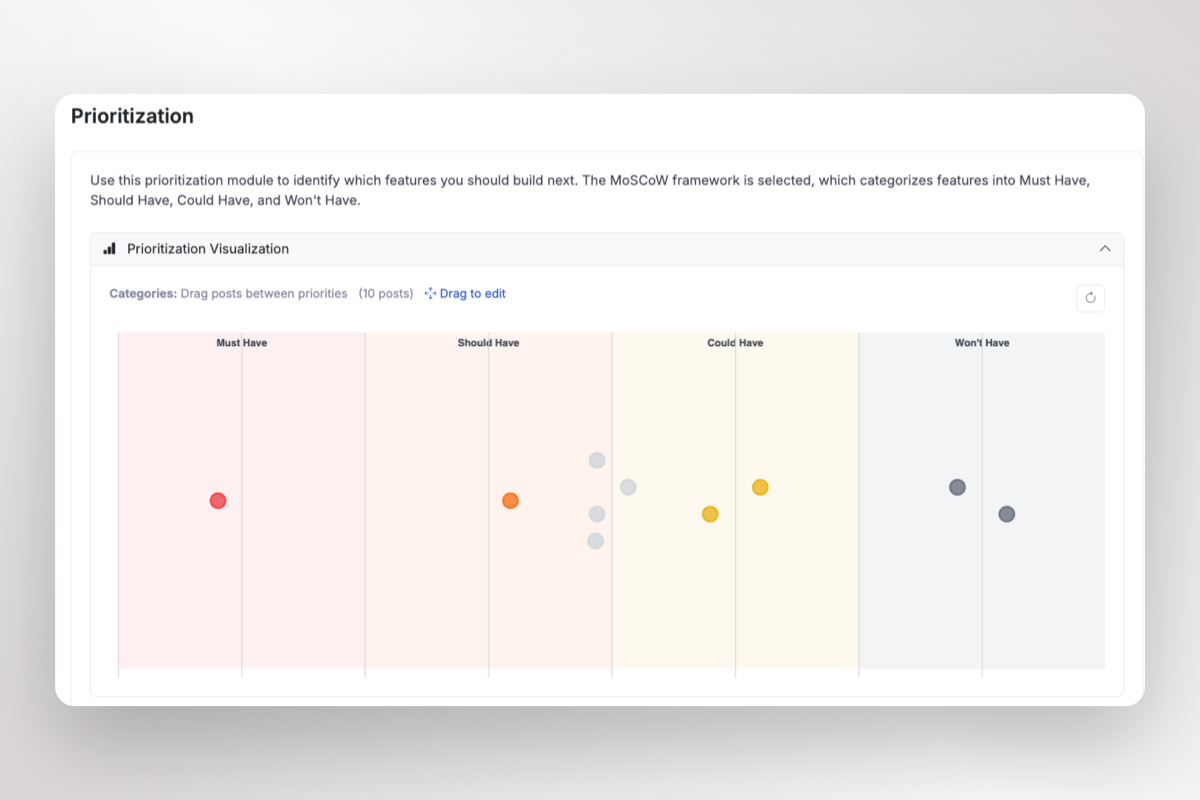
ProductLift MoSCoW prioritization interface
G2 High Performer G2 Best ROI G2 High Performer Small Business G2 Most Likely to Recommend
6,035 Teams
157K Prioritized
39K Shipped

What is MoSCoW? The 4 Priority Categories

MoSCoW stands for Must Have, Should Have, Could Have, Won't Have - simple categories everyone understands

M

Must Have

Critical requirements. The product won't work without these. Non-negotiable for launch - legal requirements, core functionality, blocking issues.

S

Should Have

Important but not critical. High value features that have workarounds. Would significantly improve user experience if included.

C

Could Have

Nice-to-have items. Desirable if time and resources permit. First to be cut when deadlines approach or scope needs trimming.

W

Won't Have

Explicitly out of scope for now. May be considered for future releases. Sets clear boundaries and manages stakeholder expectations.

Why Use MoSCoW for Feature Prioritization?

The MoSCoW method transforms chaotic prioritization into clear decisions

Before

With ProductLift

Everything is marked as 'high priority'
Clear distinction between Must Have and Should Have
Scope creep in every release
Won't Have category sets clear boundaries
Stakeholders disagree on what's important
Simple categories everyone understands
No clear definition of MVP
Must Haves define your minimum viable product
Categorical Prioritization

MoSCoW vs RICE and ICE: When to Use Categories

Unlike scoring methods like RICE or ICE, the MoSCoW method uses intuitive categories that non-technical stakeholders understand immediately. There's no formula to calculate - just honest conversation about what truly matters for this release.

  • No complex scoring or formulas
  • Stakeholders understand it immediately
  • Perfect for release planning and MVPs
  • Forces hard decisions about scope
  • Works great in workshops and meetings
MoSCoW categorization in ProductLift

How to Apply MoSCoW Categories Effectively

Guidelines for categorizing features into Must, Should, Could, and Won't Have

Must Have Criteria

The release is a failure without it. No workaround exists. Legal or compliance requirement. Core value proposition depends on it. Aim for 60% of effort maximum.

Should Have Criteria

Important but painful to leave out. Workaround exists but isn't ideal. Significantly impacts user satisfaction. Target for inclusion if schedule allows.

Could Have Criteria

Nice enhancement but not essential. Minimal impact if left out. Can easily wait for next release. Use for stretch goals when ahead of schedule.

Won't Have Criteria

Explicitly excluded from this release. May be reconsidered later. Helps manage expectations. Documents decisions for future reference.

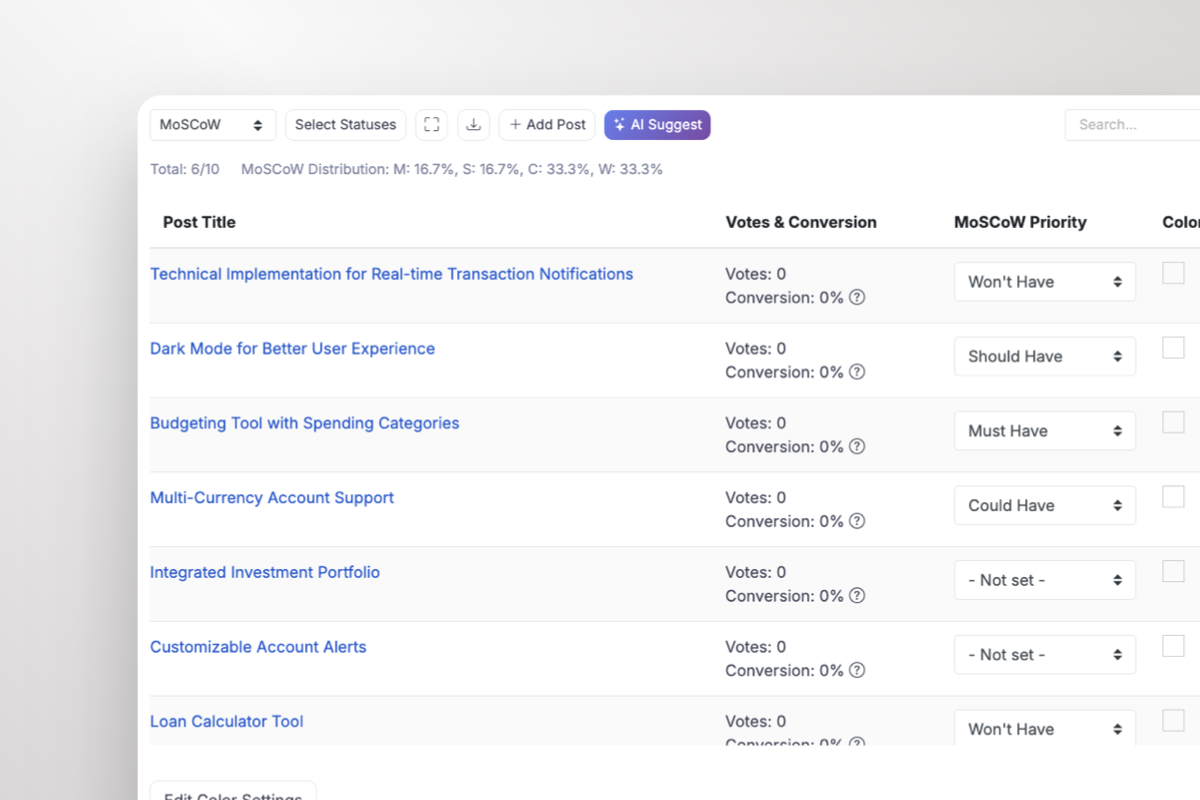
ProductLift MoSCoW categorization AI interface suggesting scores
Categorize With Context

See Customer Feedback While You Categorize

ProductLift shows votes and conversion rates right next to each feature as you assign MoSCoW categories. AI can even suggest categories based on your product vision and customer votes.

  • AI suggests categories based on product vision and votes
  • Visual MoSCoW graph to see distribution at a glance
  • Drag and drop to easily move features between categories
  • Votes & conversion rate visible for every feature
  • Simple dropdown to assign Must/Should/Could/Won't
  • Live distribution tracking (M: X%, S: X%, C: X%, W: X%)
  • Color coding for workflow status
  • Export your categorized list

From Feedback to Shipped Features

MoSCoW categorization is just one part of the complete ProductLift workflow

1

Gather Feedback

Collect feature requests from customers. They can vote, comment, and explain why they need each feature.

2

Categorize with MoSCoW

Assign Must/Should/Could/Won't categories while seeing customer votes. Track your distribution in real-time.

3

Build Your Roadmap

Drag Must Haves and Should Haves onto your roadmap. Share publicly or with specific customer groups.

4

Announce & Notify

Publish changelog when you ship. Voters get notified automatically - closing the feedback loop.

Compare All Prioritization Frameworks

Choose the right method for your team - or switch between them anytime

RICE Framework

Most comprehensive. 4 factors: Reach × Impact × Confidence ÷ Effort. Best when you have good reach data and want maximum objectivity.

Switch to RICE

ICE Framework

Simpler & faster. 3 factors: Impact × Confidence × Ease. Best for quick decisions when features affect similar user groups.

Switch to ICE

MoSCoW Method

Stakeholder-friendly. Categories: Must, Should, Could, Won't. Best for release planning and communicating with non-technical teams.

Current Framework

Impact-Effort Matrix

Most visual. 2×2 grid: Quick Wins, Big Bets, Fill-Ins, Time Sinks. Best for identifying obvious priorities at a glance.

Switch to Impact-Effort

MoSCoW Prioritization Tool vs Excel Templates

Why product teams switch from MoSCoW spreadsheets to dedicated tools

Before

With ProductLift

Manual category tracking in spreadsheets
One-click dropdown categorization
No customer context while categorizing
See votes & conversion for every feature
Calculate distribution percentages manually
Live distribution tracking: M: X%, S: X%, C: X%, W: X%
No way to notify customers when you ship
Automatic email notifications to voters

Best MoSCoW Prioritization Software Features

Everything you need to implement MoSCoW for your product backlog

Distribution Tracking

See your MoSCoW distribution in real-time. Keep Must Haves under 60% and ensure you're actually prioritizing, not just listing features.

Switch Frameworks Anytime

Start with MoSCoW, switch to ICE or RICE for numerical scoring when you need more precision. All frameworks available in one dropdown.

Close the Loop

When you ship a feature, voters get notified automatically. Show customers their feedback matters - improve retention and NPS.

Export Anywhere

Export your categorized list to CSV, sync with Jira, or use the API. Your data isn't locked in.

Revenue-Based Prioritization

Connect Stripe to see MRR and LTV per voter. Prioritize based on which high-value customers are requesting features.

Learn About Stripe

User Segments

Create segments like 'Enterprise' or 'High MRR' and see what percentage of voters belong to each. Filter features by segment.

Learn About Segments

Trusted by Product Teams Worldwide

Sebastian F.

Sebastian F.

Entrepreneur

This app will help you connect with your users and gather feedback like never before. The UI is clean and focused. The different pages and forms can be fully customized. Ruben is an amazing developer and entrepreneur with a proven track record. ProductLift is going places and you should get onboard.
Aaron Dye

Aaron Dye

An excellent product with equally excellent support! Everything just works, and when I had questions, the team was incredibly responsive.
Timothy M.

Timothy M.

Product Manager

This tool is literally a needle in a haystack. I was using Frill, and this doesn't even compare. The user interface, the way it lays out — so amazing. Also amazing support team!
Ben

Ben

Product Owner

Helped us quickly move away from our antiquated spreadsheet to a user-interactive system. User feedback is now collected in real-time. Support has been super speedy!
Marco

Marco

Based in Europe, ideal for privacy-conscious customer interaction. Constant improvements by Ruben together with thorough support make ProductLift a solid and future-proof choice.
Chris R.

Chris R.

Founder

By far the most customizable of all the feedback tools and much better than Feedbear. Developer is super responsive and support has been great. Highly recommend!

MoSCoW Method FAQ

What does MoSCoW stand for?

MoSCoW is an acronym for Must Have, Should Have, Could Have, and Won't Have. The 'o's are added to make it pronounceable (like 'Moscow'). It was developed by Dai Clegg at Oracle in the late 1990s for software development prioritization.

When should I use MoSCoW vs RICE/ICE?

Use MoSCoW when stakeholders need simple, intuitive categories - especially for release planning, MVP definition, or workshops with non-technical participants. Use RICE or ICE when you need precise numerical ranking or have many similar-priority features.

How do I prevent everything becoming a Must Have?

Set a budget: Must Haves should be max 60% of your total effort. Ask 'Would we delay the release if this wasn't done?' - if no, it's not a Must Have. Having a facilitator who enforces category discipline helps in workshops.

Can I combine MoSCoW with scoring methods?

Absolutely! Many teams use MoSCoW for release planning (what's in vs out), then use ICE or RICE to prioritize within the Must Have and Should Have categories. ProductLift supports all methods together.

How many items should be in each category?

A healthy ratio is roughly 60% Must Have, 20% Should Have, 20% Could Have (by effort, not count). If most items are Must Have, you're not prioritizing - you're just listing features. The Won't Have list should capture all explicitly excluded items.

How do I handle disagreements on categories?

Use voting in workshops - let stakeholders vote on categories, then discuss outliers. Ask specific questions: 'Can we launch without this?' helps distinguish Must from Should. Document the reasoning so you can revisit decisions later with context.

Free MoSCoW Prioritization Resources

MoSCoW template, complete guide, and framework comparison

MoSCoW Excel Template

Download our free MoSCoW template for Excel or Google Sheets.

Download Template

Complete MoSCoW Guide

Learn everything about MoSCoW prioritization with examples.

Read Guide

All Prioritization Templates

RICE, ICE, MoSCoW, and more - all free to download.

View Templates

Start Prioritizing with MoSCoW Today

Join 6,000+ product teams getting stakeholder alignment with ProductLift.

14-day free trial · No credit card required · MoSCoW, RICE, ICE included