Best Knowledge Base for SaaS: Help Centers That Reduce Tickets
 Ruben Buijs
April 2026 18 min read
Ruben Buijs
April 2026 18 min read TL;DR
For most SaaS teams, ProductLift offers the best value starting at $19/mo with a built-in knowledge base alongside feedback, roadmap, and changelog. Prices across 14 tools range from free (Notion, BookStack) to $250+/mo (Trainual, Zendesk). The biggest trend in 2026 is the shift toward all-in-one platforms that connect documentation to product development workflows, rather than standalone KB tools.
Comparison Table
| Tool | Best For | Starting Price | G2 Rating |
|---|---|---|---|
| ProductLift | All-in-one for SaaS (KB + Feedback + Roadmap) | From $19/mo | 5.0/5 |
| Zendesk Guide | SaaS support teams already using Zendesk | $55/agent/mo | 4.3/5 |
| Notion | Free option for SaaS startups | Free | 4.7/5 |
| Confluence | SaaS engineering teams using Jira | Free (10 users) | 4.1/5 |
| Guru | AI search across SaaS stack | Free (3 users) | 4.7/5 |
| Document360 | Dedicated KB for growing SaaS | $199/project/mo | 4.7/5 |
| Helpjuice | Analytics-focused KB | $120/mo | 4.6/5 |
| Stonly | Interactive guides | $99/mo | 4.8/5 |
| Trainual | Employee onboarding | $250/mo | 4.7/5 |
| Slite | Clean internal wiki | Free (50 docs) | 4.7/5 |
| ReadMe | API documentation | $99/mo | 4.7/5 |
| GitBook | Docs as code | Free (1 user) | 4.7/5 |
| BookStack | Open source, self-hosted | Free | 13K+ GitHub stars |
| Nuclino | Lightweight team wiki | Free (50 items) | 4.7/5 |
Tools Covered
- ProductLift — Best All-in-One for SaaS (KB + Feedback + Roadmap)
- Zendesk Guide — Best for SaaS Support Teams
- Notion — Best Free Option for SaaS Startups
- Confluence — Best for SaaS Engineering Teams
- Guru — Best AI Search Across SaaS Stack
- Document360 — Best Dedicated KB for Growing SaaS
- Helpjuice — Analytics-Focused
- Stonly — Interactive Guides
- Trainual — Employee Onboarding
- Slite — Clean Internal Wiki
- ReadMe — Best for API Documentation
- GitBook — Docs as Code
- BookStack — Best Open Source
- Nuclino — Lightweight Team Wiki
Why This Comparison is Different
Most knowledge base comparisons are written for traditional support teams with static products. This guide is specifically for SaaS companies who ship features weekly and need their docs to keep up.
What makes this guide useful for SaaS teams:
- Real pricing for SaaS scale – What you'll pay at 100, 500, or 1,000 articles (not 10)
- Changelog integration – Which tools connect docs to feature releases
- Feedback loops – Can customers submit feedback directly from KB articles that don't help?
- API documentation – Support for code examples, OpenAPI specs, versioning
- Fast iteration – Can you update docs as fast as you ship features?
Why SaaS Companies Need Different KB Software
SaaS knowledge bases have unique requirements that generic KB tools completely miss:
1. You Ship Features Weekly (Not Yearly)
Traditional companies update their docs quarterly. SaaS teams ship features weekly, sometimes daily. You need:
- Changelog integration: Ship a feature → Auto-generate KB article from release notes
- Fast editing: No approval workflows that slow you down
- Version control: Track what changed when (especially for API docs)
2. Your Docs Connect to Product Development
In SaaS, documentation isn't separate from product development. It's part of it:
- Roadmap visibility: Customers ask "Will you add X?" → Link to roadmap directly from KB
- Feedback loops: "Was this article helpful? No" → Customer can submit feature request right there
- Usage data: See which features confuse users (high KB search, low satisfaction)
3. You Need API Documentation
Most SaaS products have APIs. Generic KB tools are built for support articles, not developer docs:
- Code syntax highlighting – Not just screenshots
- Try-it consoles – Live API testing in the docs
- Versioning – Different docs for v1, v2, v3 of your API
4. Your KB Must Scale with Your Product
SaaS products grow in complexity. You'll go from 20 articles to 200+ as you add features:
- Search quality matters – AI/semantic search finds answers even with vague queries
- Organization at scale – Categories, tags, cross-references that actually work
- Performance – Fast search even with 500+ articles
Bottom line: Generic KB tools (built for traditional support) force SaaS teams into workarounds. You need a KB that understands you ship fast, iterate constantly, and connect docs to product development. For a broader comparison, see our general knowledge base software guide. For practical advice, read how to create a knowledge base and our knowledge base best practices.
Quick Picks by Use Case
Don't have time to read the full comparison? Here's the TL;DR for SaaS teams:
🏆 Best All-in-One for SaaS (KB + Feedback + Roadmap): ProductLift – KB included with feedback/roadmap from $19/mo. Ship feature → Auto-create KB article.
🤖 Best AI-Powered Search: Guru – AI finds answers across your entire stack (not just KB).
📚 Best for SaaS Support Teams: Zendesk Guide – If you're already using Zendesk for ticketing. Tracks KB → ticket deflection.
👥 Best for Internal SaaS Team Docs: Confluence – Deep Jira integration for engineering teams.
💰 Best Free Option for SaaS Startups: Notion – Free for small teams, publish select pages as public KB.
👨💻 Best for API Documentation: ReadMe – Interactive API docs with try-it console, OpenAPI import.
🎯 Best Dedicated KB for Growing SaaS: Document360 – Powerful standalone KB without help desk lock-in.
🆓 Best Open Source for Technical SaaS: BookStack – Self-hosted, free, full control.
What SaaS Companies Should Look For
Before comparing tools, here's what actually matters for SaaS teams:
✅ Must-Have Features
- Fast editing workflow – You ship features weekly. Can you update docs just as fast?
- AI/semantic search – Customers use their own words, not your internal jargon
- Code syntax highlighting – If you have an API, code blocks must look professional
- Custom branding – Your KB should look like your product, not a generic help center
- Analytics on what customers search – No-result searches = content gaps = feature ideas
🚀 SaaS-Specific Features (Nice to Have)
- Changelog integration – Ship feature → Auto-generate or link KB article
- Feedback connection – "Article not helpful?" → Submit feature request
- Roadmap visibility – Link from KB to public roadmap when customers ask "Will you add X?"
- API documentation support – OpenAPI import, try-it console, versioning
- Staging/production environments – Test docs changes before publishing
📊 SaaS-Relevant Analytics
- Search queries with no results – These are your content gaps (and feature ideas)
- Low-rated articles – Which features confuse users?
- Drop-off points – Where do users give up and contact support?
- Ticket deflection – Is your KB actually reducing support volume?
⚡ Speed & Integration
- API access – Automate doc creation, sync with your tools
- Git sync (for dev teams) – Manage docs as code
- Fast search – Sub-second results even with 500+ articles
- Integrations with your stack – Slack, Intercom, Jira, GitHub, etc.
1. ProductLift – Best All-in-One for SaaS (KB + Feedback + Roadmap)
⭐ G2 Rating: 5.0/5 | 💰 Starting Price: From $19/mo (KB included with feedback platform)
Best for: SaaS teams who want KB + feedback + roadmap + changelog in one affordable tool
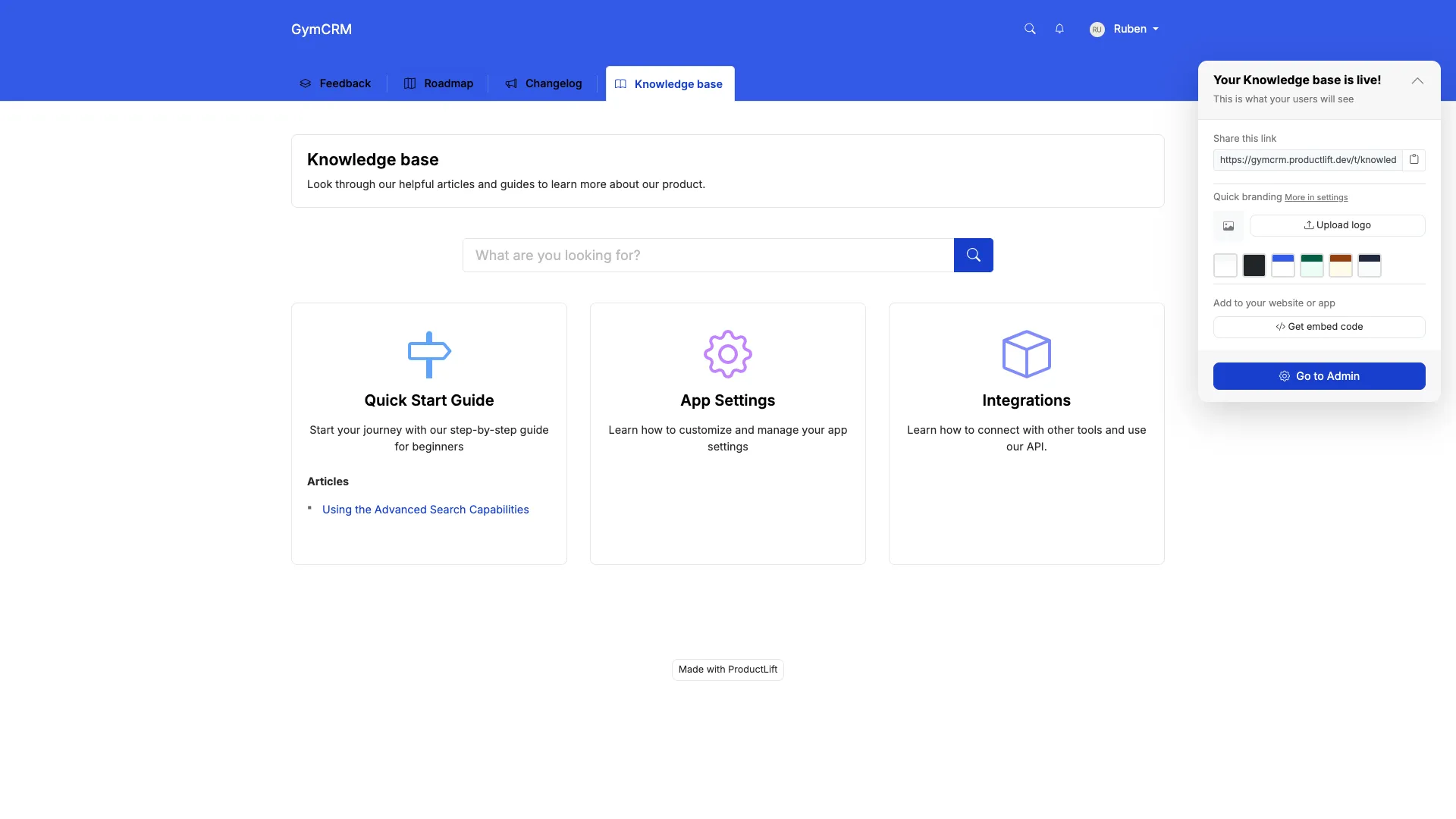
What ProductLift's KB Does Well
- Included in the platform: No separate KB subscription. Feedback, roadmap, changelog, and docs one affordable tool starting at $19/mo.
- AI-powered: Generate article drafts from shipped features. Auto-create docs from changelog entries.
- 28 languages supported: Customers can read articles in their preferred language.
- Unified search: Customers search across KB, feedback, and changelog in one interface.
- White-label ready: Custom domain, CSS, branding, on all plans.
- Categories & tags: Organize articles with nested categories and custom tags.
Where ProductLift Falls Short
- Not as feature-rich as dedicated KB tools: Document360 or Zendesk have more advanced features (workflows, advanced analytics)
- No approval workflows: Articles are either draft or published, no multi-stage review
- Simpler analytics: View counts and search queries, but not as detailed as specialized tools
Why SaaS Companies Choose ProductLift
The SaaS workflow advantage: Most SaaS teams need 4 tools: feedback (Canny/UserVoice), roadmap (Productboard/Aha), changelog (Beamer/Headway), and KB (Zendesk/Intercom). That's $200-400/mo combined.
ProductLift gives you all four starting at $19/mo. The workflow is designed for SaaS:
- Customer requests feature → Feedback board (with voting)
- You prioritize with RICE/ICE → Roadmap
- You ship feature → Changelog (auto-notify voters)
- AI generates KB article from changelog → Knowledge base
Everything stays connected. When you ship a feature, voters are notified AND you have a KB article ready.
What Users Say
"We were paying $79/mo for Intercom Articles, $79/mo for Canny, and $49/mo for Beamer. ProductLift replaced all three starting at $19/mo. The KB isn't as fancy as Intercom's, but it's 90% as good for 10% the cost." – Founder, SaaS startup
Pricing
- Starter $19/mo, Pro $49/mo, Business $129/mo – Unlimited articles, unlimited readers
- KB included with feedback/roadmap/changelog. No add-on cost
- 14-day free trial, no credit card required
Who should use ProductLift: Early-stage to growth SaaS teams (<$5M ARR) who want feedback, roadmap, changelog, AND documentation in one affordable platform. Perfect if you ship weekly and want everything connected.
Who should look elsewhere: Large enterprises needing advanced KB workflows, or support teams needing deep help desk integration without feedback/roadmap features.
Want to See It in Action?
2. Zendesk Guide – Best for SaaS Support Teams
⭐ G2 Rating: 4.3/5 | 💰 Starting Price: $55/agent/mo (Suite Team), Guide included
Best for: SaaS support teams already using Zendesk who need tightly integrated help center
What Zendesk Guide Does Well
- Native help desk integration: Articles link to tickets, auto-suggest during conversations, track deflection
- AI-powered content suggestions: Automatically suggest relevant articles to agents and customers
- Multilingual out of the box: Manage translations with side-by-side editor
- Community forums included: KB + community in one platform
- Content Cues: AI suggests which articles to update based on low ratings or ticket trends
- Strong analytics: Track ticket deflection, article performance, search effectiveness
Why SaaS Companies Choose Zendesk Guide
If you're a growing SaaS company (>$1M ARR) with a dedicated support team already using Zendesk Support, Guide is the obvious choice. The ticket deflection tracking is invaluable. You can prove your KB is reducing support volume.
SaaS-specific win: Content Cues uses AI to analyze ticket trends and tell you which KB articles to create or update. For SaaS teams shipping weekly, this keeps docs relevant.
Why SaaS Companies Avoid Zendesk Guide
- Expensive if you just need KB: Can't buy Guide standalone. You pay for full help desk ($55-115/agent/mo)
- No changelog or roadmap: You'll need separate tools (Beamer, Productboard, etc.), which adds cost and complexity
- Overkill for early-stage SaaS: If you're pre-$1M ARR with founder-led support, this is too much
Pricing Reality for SaaS Teams
- Suite Team: $55/agent/mo (includes Guide, Support, Messaging)
- Suite Growth: $89/agent/mo (adds advanced AI)
- Suite Professional: $115/agent/mo (multilingual, CSAT surveys)
A 5-person SaaS support team pays $275-575/month. You're paying for enterprise help desk, not just KB.
Who should use Zendesk Guide: SaaS companies with dedicated support teams (5+ agents) already using Zendesk Support.
Who should look elsewhere: Early-stage SaaS teams, or anyone not using Zendesk for ticketing.
3. Notion – Best Free Option for SaaS Startups
⭐ G2 Rating: 4.7/5 | 💰 Starting Price: Free (unlimited individuals), $10/user/mo (teams)
Best for: Early-stage SaaS startups needing internal docs + lightweight external KB on a budget
What Notion Does Well
- Incredibly flexible: Blocks, databases, embeds. Build exactly what you need
- Real-time collaboration: Google Docs-style co-editing with comments
- Generous free tier: Free for individuals, unlimited pages
- Beautiful design: Clean, modern interface that teams love
- Templates galore: 1,000+ community templates for wikis, SOPs, project docs
- Can publish pages publicly: Share select pages as external KB (help.yoursite.com)
Why SaaS Startups Choose Notion
Early-stage SaaS teams (pre-$100K ARR) love Notion because it's free and flexible. Use it for:
- Internal docs: Product specs, engineering runbooks, meeting notes
- Public KB: Publish select pages as help.yourcompany.com
- Product roadmap: Public roadmap using Notion databases
You're basically getting 3 tools in one (internal wiki + public KB + roadmap) for free.
Why SaaS Companies Outgrow Notion
As your SaaS grows, Notion's limitations become painful:
- No analytics: Can't track what customers search for or which articles help
- No changelog feature: You'll need Beamer/Headway separately ($50+/mo)
- Performance issues: Notion slows down with 500+ pages (common as SaaS grows)
- No feedback collection: Can't capture feature requests from KB readers
- Basic search: Keyword-only, no AI/semantic understanding
Pricing
- Free: For individuals, unlimited pages (great for solo founders)
- Plus: $10/user/mo (team collaboration, 30-day history)
- Business: $18/user/mo (advanced permissions, analytics)
Who should use Notion: SaaS startups (<$100K ARR) who need internal docs + lightweight public KB on $0 budget.
Who should look elsewhere: Growing SaaS teams needing analytics, changelog, feedback collection, or handling 200+ articles.
4. Confluence – Best for SaaS Engineering Teams (Internal)
⭐ G2 Rating: 4.1/5 | 💰 Starting Price: Free (10 users), $6.05/user/mo (Standard)
Best for: SaaS engineering teams using Jira who need technical documentation and runbooks
What Confluence Does Well
- Deep Jira integration: Link docs to issues, auto-update status, embed roadmaps
- Spaces for organization: Separate wikis per team/project with custom permissions
- Templates for tech teams: API specs, technical docs, runbooks, architecture diagrams
- Page hierarchy: Parent/child structure keeps large doc sets organized
- Macros & integrations: Embed charts, diagrams (Gliffy, Lucidchart), code blocks
- Version history: Track all changes, compare versions, revert edits
Why SaaS Engineering Teams Choose Confluence
If your SaaS product team lives in Jira (common for B2B SaaS), Confluence is the natural choice for internal docs:
- Engineering runbooks: Deployment guides, incident response, architecture docs
- API documentation: Link API docs to Jira tickets for new endpoints
- Product specs: Write specs in Confluence, link to Jira epics
SaaS-specific win: When you ship a feature, update the Confluence doc and it auto-links to the Jira ticket. Great for internal knowledge.
Why SaaS Companies Avoid Confluence for Customer KB
- Internal-only focus: Not designed for customer-facing help centers
- Clunky editor: Great for engineers, frustrating for non-technical support writers
- No analytics for customers: Can't track what customers search or which articles help
- Dated UI: Functional but not modern/beautiful like Notion or Zendesk
Pricing for SaaS Teams
- Free: Up to 10 users (great for tiny SaaS startups)
- Standard: $6.05/user/mo (most SaaS teams use this)
- Premium: $11.55/user/mo (analytics, 24/7 support)
A 20-person SaaS product team pays $121-231/mo.
Who should use Confluence: SaaS engineering teams deeply invested in Jira who need internal technical docs.
Who should look elsewhere: Customer-facing KB, non-technical teams, or anyone wanting modern UX.
5. Guru – Best AI Search Across SaaS Stack
⭐ G2 Rating: 4.7/5 | 💰 Starting Price: Free (3 users), $10/user/mo (Starter)
Best for: SaaS teams with knowledge scattered across Notion, Confluence, Slack, Google Drive who need AI to find it all
What Makes Guru Different for SaaS Teams
Guru isn't a traditional KB. It's a knowledge layer that sits on top of your entire SaaS stack:
- Search across everything: One search finds answers in Notion, Slack, Google Drive, Salesforce, Jira, etc.
- AI-powered: Understands context, suggests answers proactively
- Browser extension: Get answers without leaving your current tool
- Verification system: Mark content as "verified" with expiration dates, which ensures docs stay fresh
- Cards not articles: Bite-sized knowledge snippets instead of long docs
Why SaaS Teams Choose Guru
SaaS companies move fast. Knowledge ends up everywhere:
- Product specs in Notion
- Customer conversations in Slack
- Sales playbooks in Google Docs
- Engineering docs in Confluence
Instead of consolidating (which never works), Guru searches across all of them. Perfect for SaaS teams who don't want to change their workflow.
Why SaaS Companies Avoid Guru
- Internal-only: No customer-facing KB option
- Requires adoption: Only works if team actively creates and verifies Cards
- Not for long-form: Better for quick facts than comprehensive documentation
Pricing
- Free: 3 users, 50 Cards
- Starter: $10/user/mo
- Builder: $20/user/mo (most SaaS teams need this for AI features)
Who should use Guru: SaaS teams (especially sales/support) with knowledge scattered across 5+ tools who need AI-powered search.
Who should look elsewhere: Customer-facing KB, or teams wanting traditional long-form documentation.
6-10. Specialized KB Solutions for SaaS
Document360 – Best Dedicated KB for Growing SaaS
💰 Price: $199/project/mo (Standard) | ⭐ G2: 4.7/5
Why SaaS companies choose it: Powerful standalone KB without help desk lock-in. Great for SaaS teams ($500K-$5M ARR) who need advanced analytics, multilingual support, and version control but don't want to pay for Zendesk's full suite.
Key SaaS features: API documentation support, version control (critical for SaaS), Markdown support, private/public projects, advanced search analytics.
Why SaaS companies avoid it: $199/mo minimum (steep for early-stage), no changelog integration, no feedback collection, search is good but not AI-powered.
Helpjuice – Analytics-Focused
💰 Price: $120/mo (Starter, 4 users) | ⭐ G2: 4.6/5
Why SaaS companies choose it: If you're obsessed with measuring KB performance and proving ROI to stakeholders. Deep analytics show exactly which articles reduce support load.
Key SaaS features: Track no-result searches (these are your feature gaps), article ratings, ticket deflection metrics, custom branding.
Why SaaS companies avoid it: Dated UI (doesn't match modern SaaS aesthetics), no changelog or roadmap integration, pricing increases with team size.
Stonly – Interactive Guides
💰 Price: $99/mo (Starter) | ⭐ G2: 4.8/5
Why SaaS companies choose it: Instead of static articles, Stonly creates interactive decision trees. Perfect for complex SaaS onboarding ("If you're on Pro plan, click here; if Enterprise, click here").
Key SaaS features: Decision trees, checklists, step-by-step guides, in-app widgets, AI-powered suggestions.
Why SaaS companies avoid it: Not great for traditional documentation or API docs. Requires rethinking your content structure.
Trainual – Employee Onboarding
💰 Price: $250/mo (up to 50 users) | ⭐ G2: 4.7/5
Why SaaS companies choose it: Fast-growing SaaS startups (50-200 employees) need to onboard new hires quickly. Trainual is purpose-built for SOPs and training.
Key SaaS features: Onboarding tracks, quizzes, role-based content, progress tracking, integrates with HR systems.
Why SaaS companies avoid it: Internal-only (no customer KB), overkill if you just need simple wiki.
Slite – Clean Internal Wiki
💰 Price: Free (50 docs), $8/user/mo (Standard) | ⭐ G2: 4.7/5
Why SaaS companies choose it: Simpler, prettier alternative to Confluence for small SaaS teams (<50 people). Ask AI questions about your docs.
Key SaaS features: AI Q&A, clean editor, fast search, Slack integration, modern UI.
Why SaaS companies avoid it: Internal-only, limited at scale (best for <100 employees), no customer-facing option.
11-14. Developer Docs & Open Source for SaaS
ReadMe – Best for API Documentation
💰 Price: $99/mo (Startup) | ⭐ G2: 4.7/5
Why SaaS companies choose it: API-first SaaS products need beautiful, interactive developer docs. ReadMe is the gold standard.
Key SaaS features: Auto-generate docs from OpenAPI spec, live code examples, try-it console (test API calls in the docs), metrics on API usage, changelog integration.
Why SaaS companies avoid it: Specifically for API docs, not a general KB. $99/mo minimum, pricing increases with API calls tracked.
Perfect for: Developer-focused SaaS products (Stripe, Twilio, SendGrid style) where API docs are the primary KB.
GitBook – Docs as Code
💰 Price: Free (1 user), $6.70/user/mo (Plus) | ⭐ G2: 4.7/5
Why SaaS companies choose it: Developer-focused SaaS teams who want to manage docs like code. Git sync means docs live in your repo alongside code.
Key SaaS features: Git sync (docs as code), OpenAPI spec import, versioning (critical for SaaS), code blocks with syntax highlighting, public/private spaces.
Why SaaS companies avoid it: Better for technical docs than support KB, markdown-first (not WYSIWYG for non-technical writers).
BookStack – Best Open Source
💰 Price: Free (self-hosted) | ⭐ GitHub: 13K+ stars
Why SaaS companies choose it: Technical SaaS teams who want complete control, data sovereignty, and $0 licensing cost. Popular in privacy-focused SaaS.
Key SaaS features: Books/chapters/pages hierarchy, Markdown & WYSIWYG, LDAP/SAML SSO, API, full control over data.
Why SaaS companies avoid it: Requires DevOps time to maintain (server, backups, security), basic search (no AI), you're responsible for uptime.
Nuclino – Lightweight Team Wiki
💰 Price: Free (unlimited users, 50 items), $6/user/mo (Standard) | ⭐ G2: 4.7/5
Why SaaS companies choose it: Small SaaS teams (5-20 people) wanting a minimal, fast internal wiki without Notion's complexity.
Key SaaS features: Real-time collaboration, graph view of content connections, embeds, Markdown, clean design, affordable.
Why SaaS companies avoid it: No customer-facing option, basic permissions, no workflows or approvals, limited at scale.
Feature Comparison Table (SaaS Focus)
Here's how the top tools compare on SaaS-critical features:
| Feature | ProductLift | Zendesk | Notion | Document360 | ReadMe |
|---|---|---|---|---|---|
| Changelog Integration | ✅ Built-in | ❌ | ❌ | ❌ | ✅ |
| Feedback Collection | ✅ Built-in | ❌ | ❌ | ❌ | ❌ |
| Public Roadmap Link | ✅ Built-in | ❌ | ⚠️ Manual | ❌ | ❌ |
| API Documentation | ⚠️ Basic | ⚠️ Basic | ⚠️ Basic | ✅ Good | ✅ Excellent |
| AI Search | ⚠️ Basic | ✅ | ❌ | ✅ | ✅ |
| Version Control | ✅ | ✅ | ✅ | ✅ | ✅ |
| Multilingual | ✅ (22) | ✅ | ❌ | ✅ | ✅ |
| Analytics (No-Result Searches) | ✅ | ✅ | ❌ | ✅ | ✅ |
| Fast Editing (No Workflows) | ✅ | ✅ | ✅ | ⚠️ Workflows | ✅ |
| API Access | ✅ | ✅ | ✅ | ✅ | ✅ |
| White-Label | ✅ | ✅ | ⚠️ Limited | ✅ | ✅ |
Pricing Reality for SaaS Teams
Forget marketing prices. Here's what these tools cost at typical SaaS team sizes:
| Tool | Early Stage (3-5 people) | Growth (10-15 people) | Scale (30-50 people) | Best for SaaS Stage |
|---|---|---|---|---|
| ProductLift | Starter $19/mo | Pro $49/mo | Business $129/mo | Early to growth SaaS |
| Notion | Free-$50 | $150/mo | $500/mo | Pre-revenue to early |
| Zendesk Guide | $275/mo | $825/mo | $2,750/mo | Scale+ (>$1M ARR) |
| Document360 | $199/mo | $199/mo | $399/mo | Growth to scale SaaS |
| ReadMe (API docs) | $99/mo | $99/mo | $299+/mo | API-first SaaS |
| Confluence | Free-$30 | $91/mo | $303/mo | Internal docs only |
| GitBook | Free-$20 | $67/mo | $201/mo | Dev-focused SaaS |
| BookStack | Free* | Free* | Free* | Technical SaaS teams |
*BookStack is free software but requires server costs ($10-50/mo) and DevOps time to maintain.
SaaS Reality: Most growing SaaS teams need KB + changelog + feedback tools. Buying separately costs $200-500/mo. All-in-one (ProductLift) starts from $19/mo.
Still Comparing? Try It Yourself
Which KB Should You Choose? (SaaS Decision Guide)
🚀 You're a SaaS Startup (<$100K ARR)
Budget: $0-50/mo
Choose Notion (free) if you just need internal docs + lightweight public KB and can live without analytics or changelog.
Choose ProductLift (from $19/mo) if you want KB + feedback + roadmap + changelog in one tool. Perfect for shipping weekly and needing everything connected.
Choose BookStack (free) if you're technical, want complete control, and can self-host.
📈 You're Scaling SaaS ($100K-$1M ARR)
Budget: $100-300/mo
Choose ProductLift (from $49/mo) if you need KB + feedback + roadmap + changelog and want to avoid tool sprawl. Scales with you without pricing anxiety.
Choose Document360 ($199/mo) if you want a powerful standalone KB and already have separate feedback/changelog tools you're happy with.
Choose ReadMe ($99/mo) if you're API-first SaaS and developer docs are your primary KB need.
Choose GitBook ($67/mo for 10 users) if your engineering team wants docs-as-code with Git sync.
🏢 You're Enterprise SaaS (>$1M ARR)
Budget: $300-1,000+/mo
Choose Zendesk Guide ($825+ for 15 agents) if you have a dedicated support team already using Zendesk and need enterprise help desk integration.
Choose Document360 ($399/mo for multiple projects) if you need advanced workflows, approvals, and separate KBs for different products/audiences.
Choose ReadMe (Custom pricing) if you're API-heavy SaaS (like Stripe, Twilio) and developer docs are mission-critical.
🎯 Specific SaaS Scenarios
API-first product (developers are your users): ReadMe > GitBook > Document360
Ship features weekly, need changelog integration: ProductLift > ReadMe (API docs only)
Need feedback + roadmap + KB in one: ProductLift (only option)
Already using Zendesk for ticketing: Zendesk Guide (obvious choice)
Engineering team lives in Jira: Confluence (internal docs) + separate customer KB
International SaaS (multilingual required): ProductLift (22 langs) > Zendesk > Document360
Bootstrapped SaaS on tight budget: Notion (free) > ProductLift ($19) > GitBook ($20)
SaaS-Specific KB Questions
What KB features do SaaS companies need most?
Should my KB connect to my product roadmap?
How do SaaS companies keep KB updated with weekly releases?
Do I need separate tools for KB, changelog, and feedback?
What's the best KB for API-first SaaS products?
How important is search quality for SaaS knowledge bases?
Should SaaS startups use Notion for their knowledge base?
What if my SaaS product has multiple user types (end users vs admins)?
How do I prove my KB is reducing support tickets?
Can I migrate from one KB to another without losing SEO?
Related Comparison Guides
Explore more tool comparisons to find the right software for your team:
- Best Knowledge Base Software — General KB tools compared
- Best Feedback Tools for SaaS — Complete feedback platforms
- Best Changelog Tools — Announce product updates
- Best Customer Feedback Management Software — Centralize feedback
- Best Product Roadmap Software — Link your KB to your roadmap
- Best Release Notes Tools — Auto-generate KB articles from release notes
- Knowledge Base Examples — Real examples for inspiration
- Knowledge Base vs FAQ — Which format works for SaaS?