7 Best Website Feedback Widgets & Surveys (2026)
 Ruben Buijs
April 2026 15 min read
Ruben Buijs
April 2026 15 min read TL;DR
ProductLift (from $19/mo) is our top pick for structured website feedback with voting boards, roadmap, and changelog built in. Prices across all 7 tools range from free (Hotjar) to $259/mo (Mopinion). The biggest trend in 2026: teams are combining lightweight voting widgets with behavioral analytics rather than relying on a single all-in-one tool. Choose based on whether you need idea voting, visual bug reporting, or satisfaction surveys.
Comparison Table
| Tool | Best For | Starting Price | G2 Rating |
|---|---|---|---|
| ProductLift | Structured website feedback widget | $19/mo | 5.0/5 |
| Hotjar | Analytics + feedback combo | Free | 4.3/5 |
| Usersnap | Visual bug reporting | $69/mo | 4.5/5 |
| Mopinion | Enterprise feedback surveys | $259/mo | 4.1/5 |
| Survicate | Multi-channel surveys with NPS | $99/mo | 4.6/5 |
| Qualaroo | Nudge surveys with AI sentiment | $39/mo | 4.3/5 |
| Feedbackify | Simple, cheap website feedback | $19/mo | Limited reviews |
Tools Covered
- ProductLift — Best structured website feedback widget
- Hotjar — Best analytics + feedback combo
- Usersnap — Best visual bug reporting
- Mopinion — Enterprise website feedback surveys
- Survicate — Multi-channel surveys with NPS
- Qualaroo — Nudge surveys with AI sentiment
- Feedbackify — Simple and cheap website feedback
Why This Guide is Different
"Website feedback tool" means different things to different people. Some teams want heatmaps and session recordings. Others want screenshot annotation for bug reports. Many just want a voting widget where customers can submit and upvote feature ideas.
This guide covers all three categories.and helps you figure out which type you actually need:
- Structured feedback widgets (ProductLift, Feedbackify) – Embeddable voting boards where visitors submit and vote on ideas
- Visual feedback & bug reporting (Usersnap, Hotjar) – Screenshot annotations, session recordings, and visual bug capture
- Survey-based feedback (Survicate, Mopinion, Qualaroo) – On-site surveys, NPS, and multi-channel questionnaires
What you'll find here:
- Real pricing at scale – Not just "starting at $X" but what you'll actually pay
- Honest trade-offs – Every tool has strengths and weaknesses. We cover both
- User quotes from real reviews – Actual feedback from G2 and Reddit, not marketing fluff
- Category-specific recommendations – The right tool depends on what kind of feedback you need
Quick Picks by Use Case
Short on time? Here's the TL;DR:
🏆 Best Overall: ProductLift – Best when you want structured feature voting as website feedback. Embeddable widget, roadmap, changelog, and knowledge base starting at $19/mo.
📈 Best Analytics Combo: Hotjar – Heatmaps + surveys + session recordings. Best if you need behavioral analytics alongside feedback. Free tier available.
👨💻 Best for Developers: Usersnap – Visual bug reporting with screenshot annotations. Best for QA and development teams. $69+/mo.
💸 Best Budget Pick: Feedbackify – Simple, cheap website feedback widget at $19/mo. No frills, just basic feedback collection.
Must-Have Features in a Website Feedback Tool
Before diving into individual tools, here's what to evaluate when choosing a website feedback solution:
1. What Type of Feedback Do You Need?
This is the most important question. Website feedback tools fall into three distinct categories:
- Feature voting widgets: Let website visitors submit and vote on feature ideas. Best for SaaS companies building a product roadmap based on customer demand. (ProductLift, Feedbackify)
- Visual feedback tools: Screenshot annotations, screen recordings, and visual bug reporting. Best for QA teams and designers catching UI issues. (Usersnap, Hotjar)
- Survey tools: On-site popup surveys, NPS scores, exit-intent questionnaires. Best for measuring satisfaction and gathering qualitative insights. (Survicate, Mopinion, Qualaroo)
2. Embeddable Widget Quality
A website feedback tool is only as good as its widget. Look for:
- Non-intrusive design – Doesn't block content or annoy visitors
- Mobile responsive – Works on all screen sizes
- Customizable branding – Matches your site's look and feel
- Fast loading – Doesn't slow down your website
3. Feedback Organization
Collecting feedback is easy. Organizing it is hard. Look for:
- Automatic categorization – AI-powered sorting and duplicate detection
- Status tracking – Show visitors what you're working on
- Voting & prioritization – Let the crowd surface the best ideas
- Roadmap integration – Connect feedback to what you're building
4. Closing the Feedback Loop
The biggest mistake in website feedback: collecting ideas and never following up. The best tools notify users when their feedback leads to action. ProductLift's journey model does this automatically. Ideas travel from feedback to roadmap to changelog, and voters get notified at each step. Learn more in our guide to closing the feedback loop.
5. Privacy & Compliance
Website feedback tools often process personal data (email addresses, session data, screenshots). Ensure your tool is GDPR-compliant and doesn't require invasive tracking unless necessary.
1. ProductLift – Best Structured Website Feedback Widget
⭐ G2 Rating: 5.0/5 | 💰 Starting Price: $19/mo (unlimited end-users)
Best for: SaaS companies who want an embeddable feedback widget that connects voting boards to a roadmap, changelog, and knowledge base
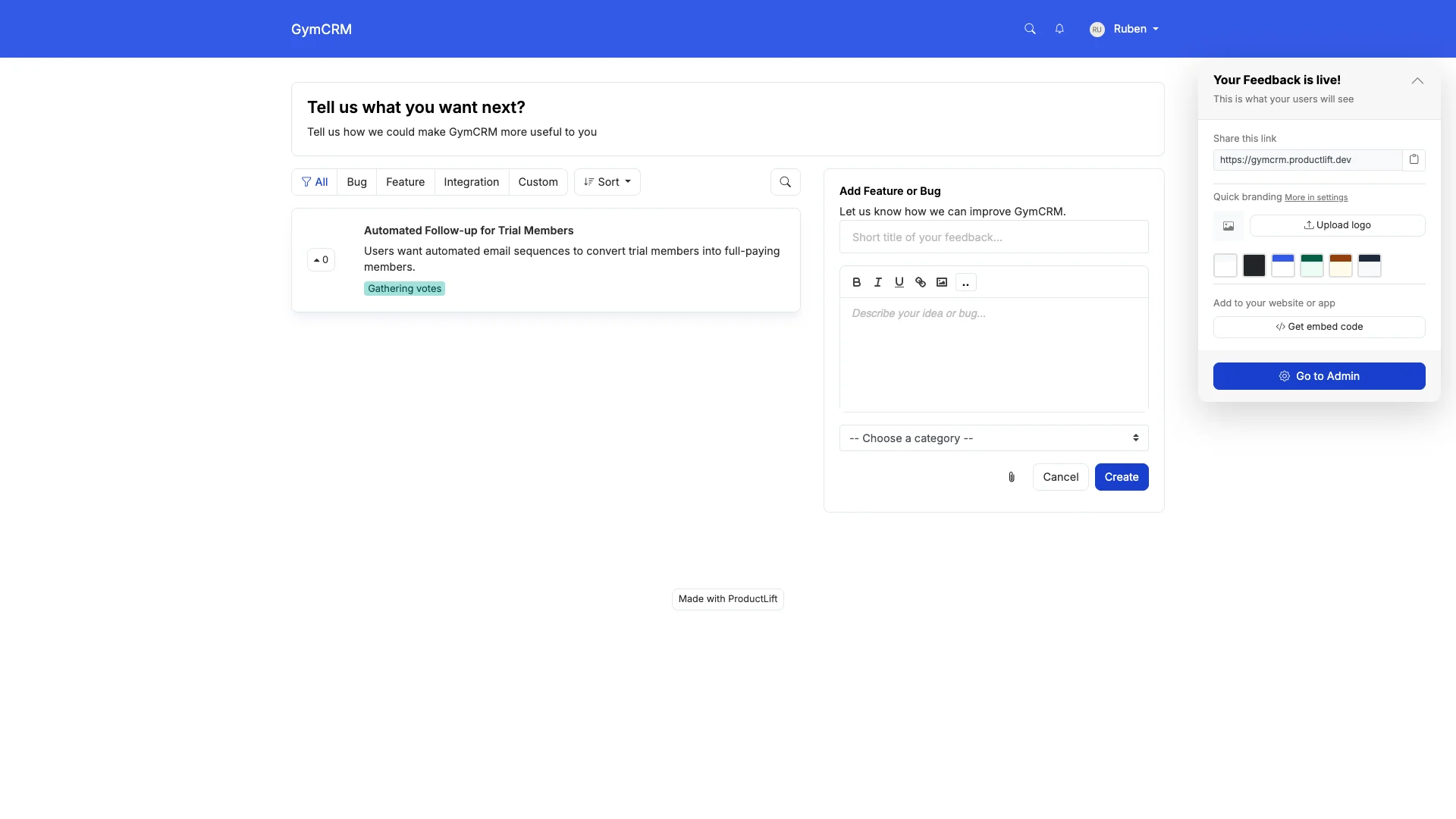
What ProductLift Does Well
- Embeddable Feedback Widget: Drop a widget on any page of your website. Visitors can submit ideas and vote without leaving your site.
- Journey Model: Feedback travels from Widget → Board → Roadmap → Changelog. Voters get notified automatically when you ship their idea.
- AI-Powered Prioritization: Auto-calculates RICE, ICE, MoSCoW scores. Connects to Stripe for MRR-based prioritization. Build what your highest-value visitors want.
- 4-in-1 Platform: Replaces separate tools for feedback collection, roadmap, changelog, and knowledge base.
- 28 Languages: Widget supports 28 languages for international websites.
- Full White-Label: Custom domain, CSS, branding. The widget looks like it's yours.
- Simple Tiered Pricing: Starter $19/mo, Pro $49/mo, Business $129/mo. Unlimited website visitors can vote. No pricing anxiety as traffic grows.
Where ProductLift Falls Short
- No visual feedback (screenshot annotations or screen recording)
- No heatmaps or session analytics
- No NPS surveys. Focused on structured idea voting, not satisfaction surveys
- No Zapier, GitHub, or Intercom integration
What Users Say
"We embedded the ProductLift widget on our website and saw a 3x increase in feature requests compared to our old contact form. Customers love being able to vote on each other's ideas." – Tom R., SaaS Founder
"The journey model is what sold us. Our users get notified when we ship their idea. That closes the feedback loop without any manual work on our end." – G2 Review
Pricing Breakdown
- Starter $19/mo, Pro $49/mo, Business $129/mo – Unlimited end-users, all plans include white-label and 28 languages
- No hidden costs: White-label, SSO, prioritization, knowledge base all included
- 14-day free trial (no credit card required)
Who should use ProductLift: SaaS companies who want structured feature voting on their website, connected to a roadmap and changelog. Ideal if you want customers to submit and prioritize ideas, not just report bugs or answer surveys.
Who should look elsewhere: Teams who need visual bug reporting, heatmaps, or NPS surveys. ProductLift is for idea management, not analytics or visual feedback.
Want to See It in Action?
2. Hotjar – Best Analytics + Feedback Combo
⭐ G2 Rating: 4.3/5 | 💰 Starting Price: Free (35 sessions/day), then $32-79+/mo
Best for: Teams who want to combine behavioral analytics (heatmaps, recordings) with on-site feedback widgets
What Hotjar Does Well
- Heatmaps: See exactly where visitors click, scroll, and hover on your website
- Session recordings: Watch real user sessions to identify UX issues
- Feedback widget: Simple emoji-based or text feedback widgets on any page
- Surveys: On-site popup surveys with multiple question types
- Free tier: Generous free plan for small sites (35 sessions/day)
The Catch
Hotjar is analytics-first, feedback-second. The feedback widget is basic. Visitors can leave a comment or rate a page. There's no voting, no idea organization, and no way for visitors to upvote each other's suggestions.
If you need structured feedback management (not just "how was this page?"), Hotjar's feedback features fall short.
What Users Say
"Hotjar is amazing for understanding user behavior. But the feedback tool is basically a comment box. We still needed a separate tool (ProductLift) for structured feature requests." – Reddit user, r/SaaS
Where Hotjar Falls Short for Feedback
- No voting: Visitors can't upvote each other's feedback
- No roadmap or changelog: Feedback goes into a black hole. No public status updates
- No idea organization: Feedback is a flat list, no categorization or prioritization
- No feedback loop: No way to notify users when you act on their feedback
- Privacy concerns: Session recordings can capture sensitive user data
Who should use Hotjar: Teams who primarily need behavioral analytics (heatmaps, recordings) and want basic on-page feedback as a bonus. Great complement to a dedicated feedback tool.
Who should look elsewhere: Anyone who needs structured feedback management, voting, or a public idea portal.
3. Usersnap – Best Visual Bug Reporting
⭐ G2 Rating: 4.5/5 | 💰 Starting Price: $69/mo (Startup), $129/mo (Company)
Best for: Development and QA teams who need visual bug reporting with screenshot annotations directly on the website
What Usersnap Does Well
- Screenshot annotations: Users can draw, highlight, and annotate directly on your website. Invaluable for bug reports
- Automatic metadata: Captures browser info, screen size, console errors, and URL automatically
- Dev tool integrations: Direct sync with Jira, Trello, Asana, GitHub, GitLab, Azure DevOps
- Feedback widget: Customizable on-site widget for both bug reports and feature requests
- Micro-surveys: Quick rating scales and NPS on any page
The Catch
Usersnap is built for bug reporting and QA workflows, not idea management. There's no public voting board, no roadmap, and no way for website visitors to see or prioritize each other's requests. It's a one-way feedback collection tool.
What Users Say
"Usersnap eliminated our 'can you send me a screenshot?' back-and-forth with QA. The annotations and auto-captured metadata save our dev team hours every week." – G2 Review
Where Usersnap Falls Short
- No public voting: Visitors can't see or upvote each other's feedback
- No roadmap or changelog: Focused on collection, not communication
- No prioritization frameworks: No RICE, ICE, or scoring. Manual sorting only
- Expensive for feedback only: $69/mo is steep if you only need a feedback widget
- No knowledge base: Pure feedback/bug-reporting tool
Who should use Usersnap: Dev and QA teams who need visual bug reporting with screenshot annotations and automatic metadata capture.
Who should look elsewhere: Teams who want customer-facing idea voting or need to build a public product roadmap from website feedback.
4. Mopinion – Enterprise Website Feedback Surveys
⭐ G2 Rating: 4.1/5 | 💰 Starting Price: $259/mo (Growth)
Best for: Enterprise teams who need advanced, multi-channel feedback surveys with deep analytics and reporting
What Mopinion Does Well
- Advanced survey builder: Multi-step, conditional logic, custom triggers (exit intent, scroll depth, time on page)
- Multi-channel: Website, email, in-app, and mobile feedback in one platform
- Deep analytics: Sentiment analysis, trend charts, text analytics across all feedback
- Visual feedback: Screenshot-based feedback option for website issues
- Enterprise features: Role-based access, API, webhooks, SSO
The Catch
Mopinion is enterprise-priced and enterprise-complex. Starting at $259/mo, it's overkill for most SaaS teams. Setup requires technical expertise, and the learning curve is steep.
What Users Say
"Mopinion is powerful but takes weeks to set up properly. Once configured, the analytics are excellent. But we needed a developer to implement the surveys correctly." – G2 Review
Where Mopinion Falls Short
- Expensive: $259/mo minimum puts it out of reach for most startups
- Complex setup: Requires technical expertise to configure survey triggers and logic
- No voting or idea management: Survey tool, not an idea management platform
- No roadmap or changelog: Feedback goes into analytics dashboards, not product planning
- Overkill for simple needs: If you just need a "what do you think?" widget, this is too much
Who should use Mopinion: Enterprise companies ($10M+ ARR) with dedicated UX research teams who need advanced survey logic and cross-channel analytics.
Who should look elsewhere: SaaS startups, small teams, or anyone who needs voting-based feedback rather than surveys.
5. Survicate – Multi-Channel Surveys with NPS
⭐ G2 Rating: 4.6/5 | 💰 Starting Price: $99/mo (Business)
Best for: Teams who need NPS tracking, multi-channel surveys, and customer satisfaction measurement on their website
What Survicate Does Well
- NPS tracking: Built-in Net Promoter Score surveys with trend tracking over time
- Multi-channel: Website, email, in-app, and mobile surveys from one platform
- Integration ecosystem: HubSpot, Salesforce, Intercom, Slack, and 15+ integrations
- Targeting rules: Show surveys based on URL, behavior, user attributes, or events
- AI analysis: Automatic categorization and sentiment analysis of responses
What Users Say
"Survicate's NPS tracking is solid, and the Intercom integration means we can trigger surveys at the right moment. But it's purely a survey tool. We needed a separate solution for feature request management." – G2 Review
Where Survicate Falls Short
- No voting or idea boards: Survey tool, not feedback management
- No roadmap or changelog: No way to show visitors what you're building
- No visual feedback: No screenshot annotations or screen recording
- Response limits on cheaper plans: Costs scale with survey volume
- Survey fatigue risk: Pop-up surveys can annoy visitors if overused
Who should use Survicate: Teams who need NPS tracking and multi-channel satisfaction surveys, especially if already using HubSpot or Intercom.
Who should look elsewhere: Teams who need structured idea voting, visual bug reporting, or a public product roadmap.
6. Qualaroo – Nudge Surveys with AI Sentiment
⭐ G2 Rating: 4.3/5 | 💰 Starting Price: $39/mo (Essentials)
Best for: Teams who want unobtrusive "nudge" surveys on their website with AI-powered sentiment analysis
What Qualaroo Does Well
- Nudge™ surveys: Small, unobtrusive surveys that appear in the corner. Less annoying than popup modals
- AI sentiment analysis: IBM Watson-powered analysis of open-text responses
- Branching logic: Ask follow-up questions based on previous answers
- Exit intent surveys: Catch feedback from visitors about to leave
- Affordable: $39/mo entry point is reasonable for a survey tool
What Users Say
"Qualaroo's nudges get way better response rates than our old popup surveys. The AI sentiment analysis is a nice bonus. Saves time manually reading hundreds of responses." – G2 Review
Where Qualaroo Falls Short
- No voting or idea management: Pure survey tool. No public feedback boards
- No roadmap or changelog: No product planning features
- No visual feedback: No screenshot annotations
- Limited integrations: Fewer third-party connections compared to Survicate
- No multi-language widget: English-focused interface
Who should use Qualaroo: Teams who want non-intrusive on-site surveys with AI sentiment analysis at a reasonable price point.
Who should look elsewhere: Teams needing idea voting, visual bug reporting, or a full feedback management platform.
7. Feedbackify – Simple and Cheap Website Feedback
⭐ Rating: Limited reviews | 💰 Starting Price: $19/mo
Best for: Small websites that need the simplest possible feedback widget at the lowest cost
What Feedbackify Does Well
- Dead simple: Add a feedback tab to your website in minutes
- Cheap: $19/mo flat. One of the most affordable options
- Customizable widget: Basic styling to match your brand
- No login required: Visitors can leave feedback without creating an account
- Category-based: Organize feedback by custom categories (bug, idea, praise, etc.)
What Users Say
"Feedbackify does one thing and does it okay. It's a feedback tab on your website. Don't expect more than that." – User Review
Where Feedbackify Falls Short
- No voting: Visitors can't upvote each other's feedback
- No roadmap or changelog: Just a collection box
- No AI or automation: Everything is manual
- No integrations: No Jira, no Slack, no API
- Dated interface: UI hasn't been significantly updated in years
- No prioritization: Manual sorting only
- Limited analytics: Basic reporting at best
Who should use Feedbackify: Very small websites that just need a basic "feedback tab" and can't justify spending more than $19/mo.
Who should look elsewhere: Anyone who needs voting, integrations, analytics, or a real feedback workflow. For the same $19/mo (ProductLift Starter), you get dramatically more value.
Feature Comparison Table
Here's how all 7 website feedback tools compare on the features that matter:
| Feature | ProductLift | Hotjar | Usersnap | Mopinion | Survicate | Qualaroo | Feedbackify |
|---|---|---|---|---|---|---|---|
| Public Voting | ✅ | ❌ | ❌ | ❌ | ❌ | ❌ | ❌ |
| Visual Feedback | ❌ | ⚠️ Basic | ✅ | ✅ | ❌ | ❌ | ❌ |
| Heatmaps | ❌ | ✅ | ❌ | ❌ | ❌ | ❌ | ❌ |
| Surveys | ❌ | ✅ | ⚠️ Micro | ✅ | ✅ | ✅ | ❌ |
| Roadmap | ✅ | ❌ | ❌ | ❌ | ❌ | ❌ | ❌ |
| Changelog | ✅ | ❌ | ❌ | ❌ | ❌ | ❌ | ❌ |
| NPS | ❌ | ✅ | ⚠️ Basic | ✅ | ✅ | ✅ | ❌ |
| Embeddable Widget | ✅ | ✅ | ✅ | ✅ | ✅ | ✅ | ✅ |
| AI Features | ✅ | ❌ | ❌ | ✅ | ✅ | ✅ | ❌ |
| Multi-Language | ✅ (22) | ⚠️ Limited | ⚠️ Limited | ✅ | ✅ | ❌ | ❌ |
Pricing Comparison: What You'll Actually Pay
Forget "starting at" prices. Here's what these website feedback tools actually cost at different scales:
| Tool | Starter | Mid-Tier | Scale | Pricing Model |
|---|---|---|---|---|
| ProductLift | $19/mo | $49/mo | $129/mo | Starter $19, Pro $49, Business $129 |
| Hotjar | Free-$32/mo | $79/mo | $171+/mo | Sessions/day based |
| Usersnap | $69/mo | $129/mo | $249+/mo | Tiered plans |
| Mopinion | $259/mo | $259/mo | $499+/mo | Pageviews based |
| Survicate | $99/mo | $99/mo | $199+/mo | Responses based |
| Qualaroo | $39/mo | $79/mo | $149+/mo | Pageviews based |
| Feedbackify | $19/mo | $19/mo | $19/mo | Flat rate |
Key Takeaway: Enterprise survey tools (Mopinion, Survicate) start expensive and scale with usage. Visual feedback tools (Usersnap) charge tiered rates. ProductLift and Feedbackify offer the most predictable pricing, but ProductLift delivers dramatically more features starting at $19/mo.
Still Comparing? Try It Yourself
Decision Framework: Which Website Feedback Tool Should You Choose?
The right tool depends on what kind of website feedback you need. Here's our honest recommendation:
🎯 You want customers to submit and vote on feature ideas
Choose ProductLift. It's the only tool in this comparison with public voting boards, a roadmap, changelog, and knowledge base. All connected through a journey model. From $19/mo with unlimited end-users.
📈 You need to understand user behavior on your website
Choose Hotjar. Heatmaps and session recordings show you exactly how visitors interact with your site. The feedback widget is a nice bonus but shouldn't be your primary feedback tool. Free tier is generous for small sites.
🐛 You need visual bug reporting for your dev team
Choose Usersnap. Screenshot annotations, automatic metadata capture, and direct Jira/GitHub sync make it the best choice for QA workflows. Worth the $69+/mo if visual bug reporting is your main need.
📊 You need NPS tracking and customer satisfaction surveys
Choose Survicate if you need multi-channel surveys and strong CRM integrations (HubSpot, Salesforce).
Choose Qualaroo if you want non-intrusive nudge surveys with AI sentiment analysis at a lower price point.
🏢 You're an enterprise with complex survey needs
Choose Mopinion if you need advanced survey logic, multi-channel feedback collection, and deep analytics. Be prepared for $259+/mo and a complex setup.
💸 You just need the cheapest option
Choose Feedbackify ($19/mo) if you literally just need a feedback tab. But consider ProductLift (from $19/mo) for dramatically more functionality at the same starting price.
🌍 You serve international visitors
Choose ProductLift (28 languages) for voting-based feedback. Choose Mopinion or Survicate for multi-language surveys. Most other tools are English-only or have limited language support.
🔄 You need multiple types of feedback
Consider combining tools: ProductLift for structured idea voting + Hotjar for behavioral analytics + Survicate for NPS surveys. Many teams use 2-3 complementary tools rather than trying to find one that does everything.
Frequently Asked Questions About Website Feedback Tools
What's the difference between a website feedback tool and a survey tool?
Do I need heatmaps alongside my feedback tool?
Will a feedback widget slow down my website?
Can website visitors submit feedback without creating an account?
How do I embed a feedback widget on my website?
What's the best free website feedback tool?
Should I use NPS surveys or voting boards for website feedback?
How do I handle spam in website feedback widgets?
Can I use a website feedback tool for bug reporting?
Which website feedback tools support multiple languages?
Related Comparison Guides
Explore more tool comparisons to find the right software for your team:
- 15 Best Feedback Tools for SaaS. The broadest comparison of SaaS feedback platforms
- Best Customer Feedback Platforms for Teams. Centralize requests from support, sales, and in-app channels
- Best Feature Request Tools. Collect structured feature requests
- Best Feature Voting Tools. Let users upvote ideas on your product
- Best Idea Management Software. Collect and prioritize product ideas
- Complete Guide to Customer Feedback. Everything about collecting and acting on feedback
- Compare Feedback Tools Head-to-Head — Feature tables for Canny, UserVoice, Productboard & more