 Ruben Buijs
Download the free impact effort matrix template and replace the example initiatives.
Download the impact effort matrix template (.xlsx) →
Want to plot requests without downloading a file? Use the interactive impact effort matrix. It updates the 2x2 as you edit the Impact and Effort values.
- What is inside the Impact effort matrix template
- How to use the impact effort matrix template
- Use the template in Google Sheets
- Impact effort matrix formula
- A worked product example
- When a spreadsheet stops being enough
- Impact Effort versus other prioritization methods
- Choose your next step
What is inside the Impact effort matrix template
The workbook has two linked sheets:
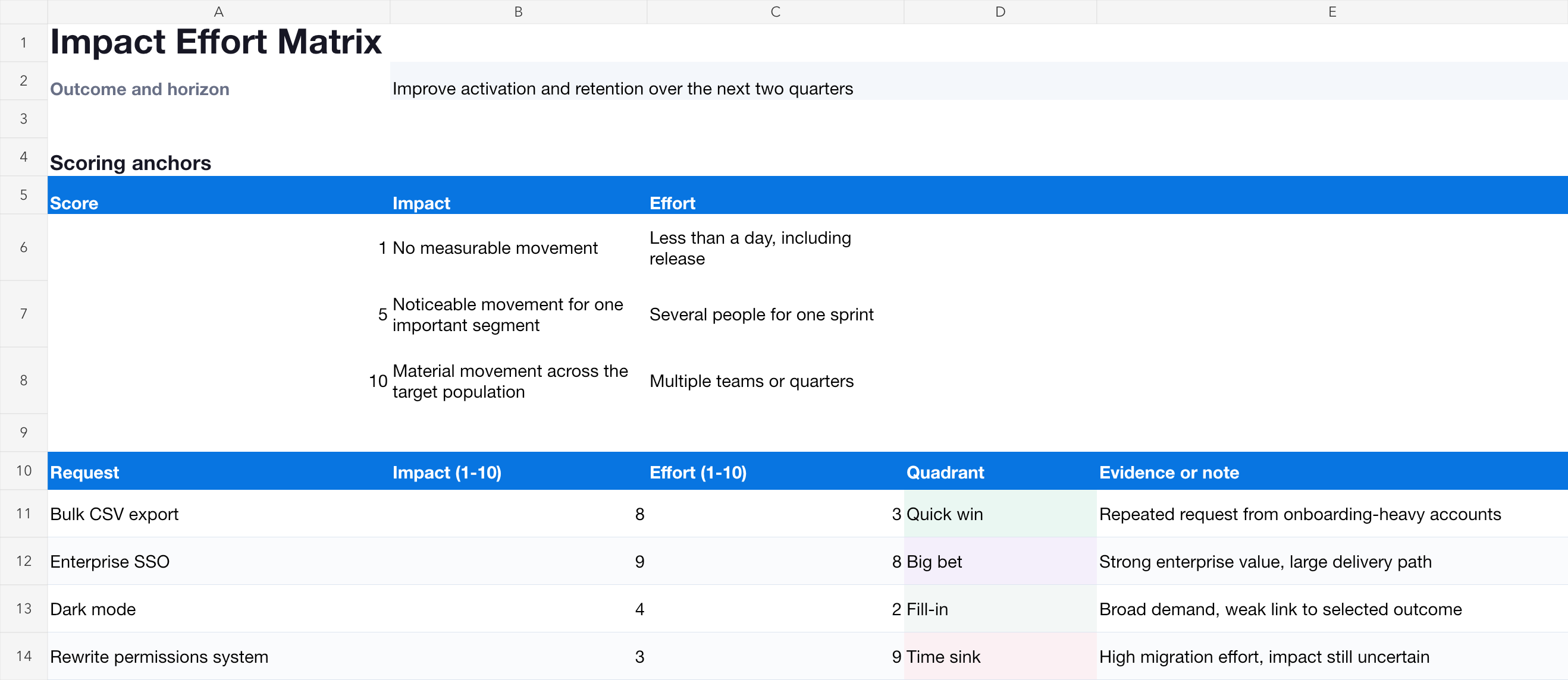
- Requests contains the editable backlog, Impact and Effort scores, evidence notes and the calculated quadrant.
- Matrix plots the same initiatives on a 2x2 chart, with Impact on the vertical axis and Effort on the horizontal axis.
The example backlog makes the logic visible before you replace it:
| Request | Impact | Effort | Quadrant |
|---|---|---|---|
| Bulk CSV export | 8 | 3 | Quick win |
| Enterprise SSO | 9 | 8 | Big bet |
| Dark mode | 4 | 2 | Fill-in |
| Rewrite permissions system | 3 | 9 | Time sink |
The template uses a 1 to 10 scale and splits the matrix at 5.5. A score is only useful when everyone applies the same anchors, so the workbook leaves room to write what low, medium and high mean for this session.
How to use the impact effort matrix template
1. Choose one outcome
Write the outcome and time horizon above the table. “Impact on activation during the next two quarters” is a useful frame. “Impact on the product” is not, because one person may score revenue while another scores customer satisfaction.
2. Define Impact anchors
Agree what 1, 5 and 10 mean before scoring:
| Impact | Example anchor |
|---|---|
| 1 | No measurable movement on the selected outcome |
| 5 | Noticeable movement for one important customer segment |
| 10 | Material movement across the target population |
Replace these anchors with measures your team can defend. Votes, customer segments, product usage and revenue may all inform Impact, but popularity alone is not impact.
3. Define Effort anchors
Effort should include the complete delivery path, not just coding time:
| Effort | Example anchor |
|---|---|
| 1 | Less than a day, including review and release |
| 5 | Several people for one sprint, with moderate dependencies |
| 10 | Multiple teams or quarters, migration and operational risk |
Include discovery, design, implementation, testing, rollout, documentation and support. Quick wins often look quick because part of the work is missing from the estimate.
4. Score independently
Ask participants to score before revealing everyone else’s values. That reduces anchoring. If two estimates differ sharply, do not average them immediately. Ask which assumption, dependency or evidence caused the disagreement.
5. Read the four quadrants
- Quick wins: high impact and low effort. Verify the effort, then consider doing these soon.
- Big bets: high impact and high effort. Validate the impact and split the work before committing.
- Fill-ins: low impact and low effort. Use intentionally when capacity or onboarding makes them appropriate.
- Time sinks: low impact and high effort. Stop, reshape or reject unless another constraint makes them necessary.
6. Record the decision
The chart starts the conversation. It does not model strategy, dependencies, legal obligations or confidence. Keep a short rationale beside any decision that differs from the visual order.
Use the template in Google Sheets
- Download the
.xlsxworkbook. - Open Google Sheets and select File → Import → Upload.
- Upload the workbook and choose Create new spreadsheet.
- Check the example rows and chart before replacing the requests.
- Share the sheet with the people joining the prioritization session.
Google Sheets may render label positions differently from Excel, but the request table, formulas and chart data remain editable.
Impact effort matrix formula
An impact effort matrix does not need one combined score. Position is the result: the Impact value controls the vertical coordinate, and Effort controls the horizontal coordinate.
The template calculates the quadrant with this logic:
IF(Impact >= 5.5,
   IF(Effort < 5.5, "Quick win", "Big bet"),
   IF(Effort < 5.5, "Fill-in", "Time sink"))
Changing the midpoint is valid when your scale or portfolio requires it. Write the threshold down, use it consistently and avoid moving it just to make a favored initiative look better.
A worked product example
A SaaS team wants to improve activation and retention over two quarters. Bulk CSV export has strong customer evidence, helps an important segment and takes less than one sprint, so it lands as a quick win. Enterprise SSO could unlock larger accounts, but the full identity, security and support path makes it a big bet.
Dark mode is easy but weakly connected to the selected outcome, so it becomes a fill-in. Rewriting the permissions system has uncertain customer impact and a large migration path, so it appears as a time sink. That does not mean the rewrite is forbidden. It means the team needs another reason, such as security risk or a strategic dependency, to prioritize it.
Try the same example in the browser-based impact effort matrix and move the values while watching the points cross quadrant boundaries.
When a spreadsheet stops being enough
The template is useful for a workshop or a small backlog. It becomes difficult to maintain when:
- new votes and customer comments arrive after the session;
- the team needs to see which segments or accounts requested an item;
- MRR, plan or company context affects the Impact discussion;
- several people need a lasting internal decision trail;
- the chosen work must move into a roadmap and release;
- requesters should receive status updates.
ProductLift keeps Impact and Effort on the live feature request. Customer votes, segments and revenue stay beside the position. The team can discuss an override with internal comments and move the decision into delivery without copying it into a new system.
See the complete Impact Effort workflow or explore the broader ProductLift prioritization module.
Impact Effort versus other prioritization methods
Impact Effort is deliberately simple. Use a different framework when another factor changes the decision:
- Use RICE or ICE when you need a ranked list and Confidence matters.
- Use MoSCoW when the team must negotiate release scope and explicit must-haves.
- Use the prioritization framework guide when you are still choosing a method.
- Use the framework comparison to compare the inputs and trade-offs side by side.
Choose your next step
Last updated on Oct 10, 2026